Migrate MySQL based TSS to TSS OVA


Migrate MySQL based TSS to TSS OVA |
|
| Solution Installation > TSS Installation > Install TSS on a standard server > Upgrade TSS/Console |
Overview
This section describes how to migrate MySQL based TSS/Console from a Standard server to a TSS OVA while upgrading.
Here is an overview of installation procedure:
Remove MySQL replication (if any)This step explains how to remove replication on primary an secondary server.
Remove replication on primary server On primary server : •Open MySQL Workbench •Access SQL Development panel •Execute following query: - STOP SLAVE;
Remove replication on secondary server On primary server : •Open MySQL Workbench •Access SQL Development panel •Execute following query: - STOP SLAVE;
Upgrade Primary TSS to R8.Y.ZThis step must be executed on primary server.
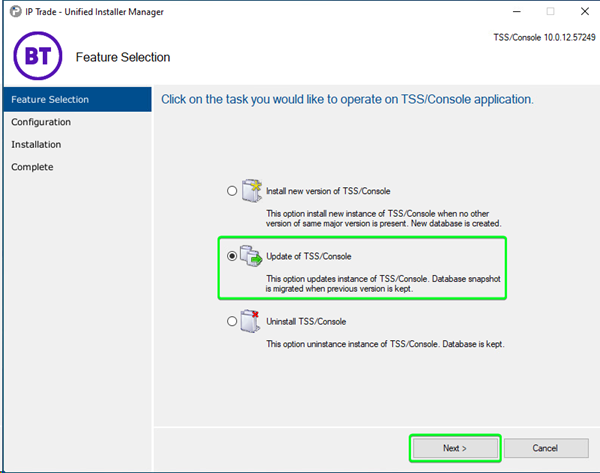
Proceed as follows: Extract the archive TSS-Console-10.1.Y.Z.cab. Start the application UIM.exe. Select option Update of TSS/Console and press Next button.
Next step ask you to choose some options: •Version: Version to upgrade. Server will be determined depending of selected version. •Server: Server where database is stored. Server will be determined depending of selected version. •Authentication: Type of authentication to connect to SQL Server (not used with mySQL). oWindows Authentication oSQL Server Authentication •Login: Login to connect to DBMS. •Password: Password to connect to DBMS. •Database: Database will be determined depending of selected version.. Press Next button.
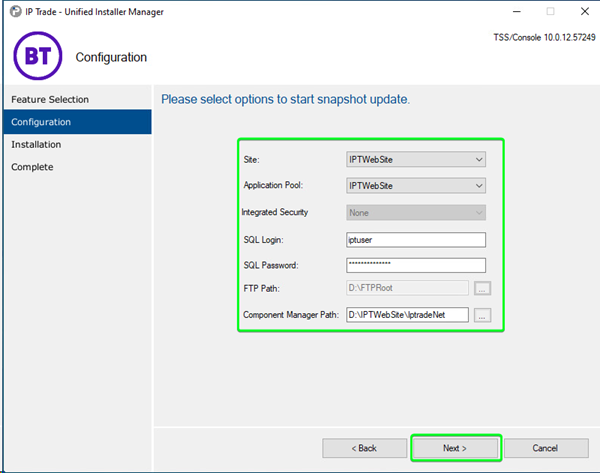
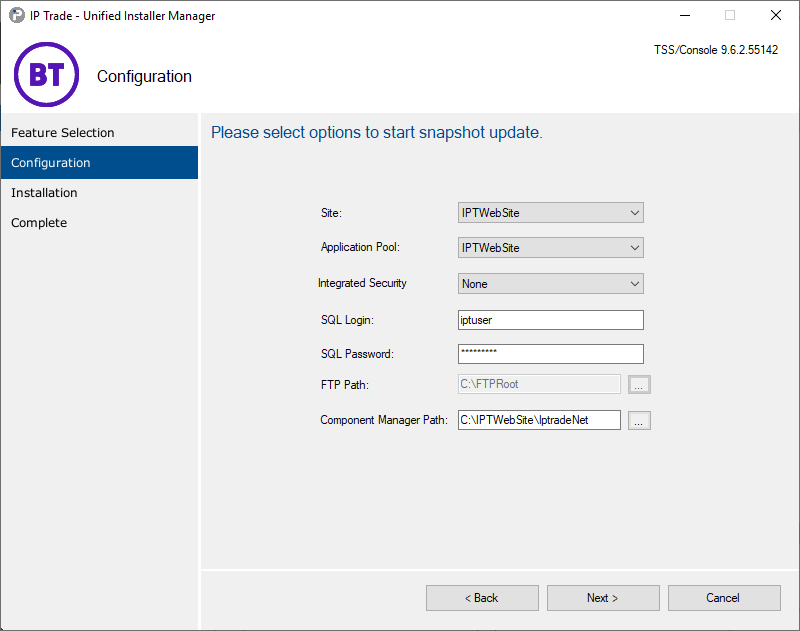
Next step ask you to choose some options: •Site: HTTP site that will be used. Choose your recently created Site. •Application Pool: application pool will be used to install application on. •SQL Login: login application will use to connect to SQL Server or mySQL. •SQL Password: password application will use to connect to SQL Server or mySQL. •FTP Path: the new FTP folder created for R8 Press Install button.
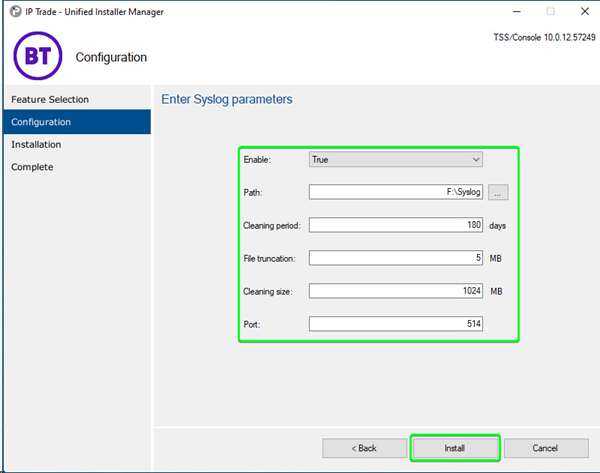
Next step ask you to choose some options about Syslog configuration: •Enable: Enable syslog log (Enable the automatic start of the Windows Service) •Path: Path of syslog log •Cleaning period: Delete syslog files that are older than this value (in day) •File truncation: Maximum file size (in mo) of each syslog log •Cleaning size: Maximum total file size (in mo) of all syslog log •Port: Port of syslog log
Next step is status step.
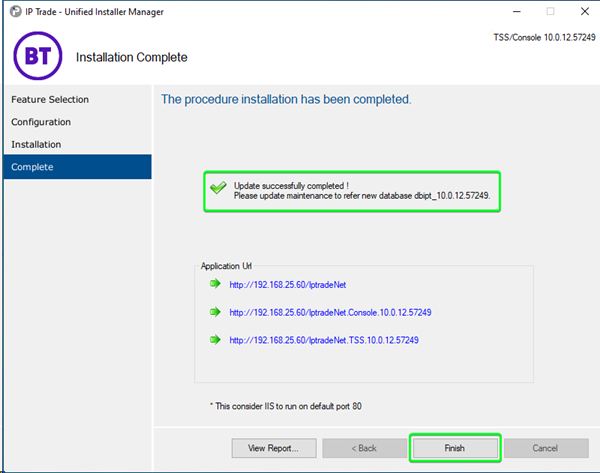
At the end of the process the following screen is displayed:
Backup MySQL Database from Primary TSSThis step is described in Back up Database
Shut down Primary TSSPower down the Primary TSS to avoid IP address conflict once the TSS OVA is deployed
Deploy New TSS OVA with same IP address as Primary TSSThis step is described in: 1. Deploying the TSS Virtual Appliance using VSphere client 2. Virtual appliance - First launch
Install TSS R8.Y.Z on TSS OVAThis step is described in Install new TSS version
restore MySQL DB backup on TSS OVA•upload the Database Backup file on the TSS OVA FTP •Open the TSS OVA Command line interface •type: getprompt •type: cd "\Program Files\MySQL\MySQL Server 8.0\bin" •type: mysql --user root --password="8]THv@u9w6" databasename < F:\FTPRoot\backupfile.sql
restore replication (if any)•Power Down the Secondary TSS Server •Deploy a second TSS OVA with same IP address as Secondary TSS •Set the replication link
|