Replication link


Replication link |
|
| Solution Installation > TSS Installation > Using the TSS Virtual Appliance > TSS |
OverviewMySQL replication can be used to replicate data from primary server (identity 1) and secondary server (identity 2). One primary server can have only one secondary server (and vice versa).
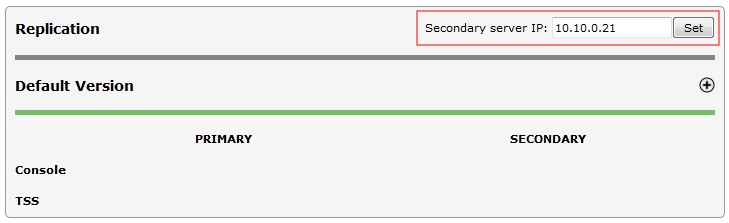
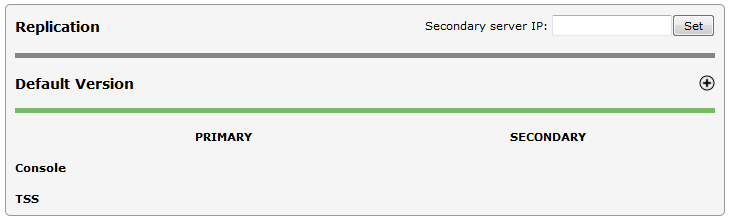
All operations shall be made from primary server - no operation can be made on Component Manager hosted on secondary server. Set Replication LinkTo set replication link : •Open the Component Manager in a web browser •Select the TSS Versions tab •Enter the secondary server's IP address in the appropriate text field (Secondary server IP) •Press the "Set" button
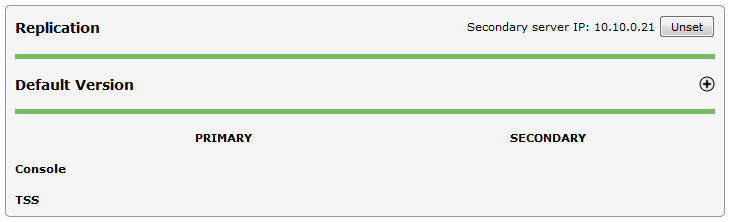
Once the link is established, the secondary IP address appears. On the secondary server's Component Manager, primary server's IP address is displayed.
Unset Replication LinkTo destroy the replication link (unset the replication address), no replicated TSS/Console instance must be present.
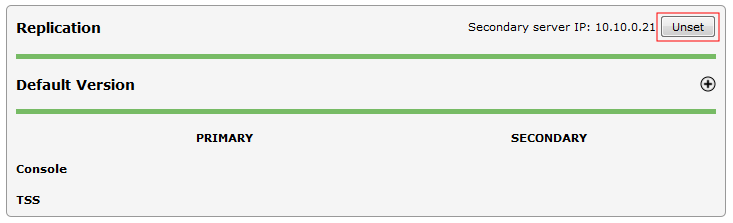
To unset the replication link: •Open the Component Manager in a web browser •Press the "Unset" button
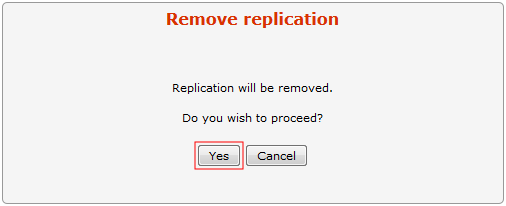
•Press the "Yes" button to confirm
|
|
|
|
|
|
|
It is necessary to remove replication on all instances of TSS/Console to be allowed to unset replication link. |
|
|
|
|
|
|
|
|
|
|
|
Boot settings are synchronized between the two servers (and thus made available for devices) every 60 minutes. When a change is performed on one of the two TSS servers, either wait for the automatic synchronization to occur or press the Rebuild boot settings link in the devices list. |
|
|
|
|
|