
|

|
|

|
|

|
Do not create snapshot of the TPO Virtual machine, this might dramatically impact the TPO performance
|
|

|
|
|

|
The TPO Virtual Appliance allows the administrator to:
•Configure its network settings. •Configure the TPO software.
To do so, a Command Line Interface has been designed. This CLI is the only interface available on the TPO Virtual Appliance.
Deploy TPO Virtual Appliance 3.0 or lower
At the first start of the Virtual Appliance, the Command Line Interface prompts the user with a wizard, allowing him to define the minimal configuration of the TPO.
As the parameters asked by the wizard are required in attempt to initiate the TPO, this wizard cannot be avoided by the user and must be completed.

Please note that parameters won't be taken in consideration until the completion of the wizard. If an incorrect value is entered for a parameter, simply use the CTRL+C combination to restart the CLI and so, the wizard.
The first parameter asked by this wizard is the TPO Identifier. If this value is left blank (by pressing Enter without entering a value), the Network Interface MAC address will be used as identifier.

After, you will have the possibilities to enter or change (if it's not the first start of the Virtual Appliance) a password. This password will allow to lock the current session and enable the remote connection. There is no policies for a new password. The password can only be set in a TPO Virtual Appliance 3.0 or higher.

Then, the static IP address is asked. If an invalid IP address is entered, the user will be prompted with an error. Please note that the wizard does not prevent the user from entering an already used IP address.

The next parameter required is the IP mask. This parameter is not checked for syntax error and must be entered under the following format: xxx.xxx.xxx.xxx. (example: 255.255.255.0 for a /24 mask).

The IP default gateway must then be entered. This value is checked for syntax error but is not verified as a valid gateway. Any error in this gateway may lead to a connection problem.

The next parameter is the DNS server IPv4 address. This address is optional for the TPO to run but is mandatory if you plan to use HTTPs or FTPs features. A valid DNS server address must be entered. A wrong or unreachable DNS server address will cause the wizard setup to fail.

If a blank DNS server address is provided, a confirmation step is required to ensure the user is aware that HTTPs and FTPs features won't be functional.

The next parameter required is the FTP server IP address or Fully Qualified Domain Name (FQDN). Those values are is generally the same as the TSS server address or FQDN. Please note that for a FQDN to be functional, the DNS server address must have been previously set. Only a valid FQDN will allow the use of HTTPs and FTPs features as this FQDN will be used within the SSL certificate required by those features.

If required by the FTP server, a FTP Username can be defined.

If a FTP Username has been specified, a FTP Password can be provided. If no FTP Username has been previously specified, this step is skipped.

Once the username/password parameters are defined, the wizard will check if a Root CA Certificate is available on the server.
If so, the wizard prompts the user with the certificate details and asks him whether or not this certificate should be added to the Trusted Root CA certificate store.
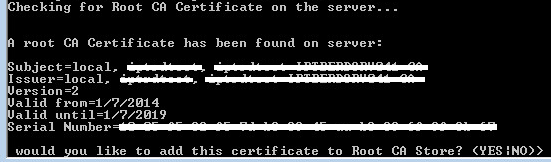
Any other input than "YES" will prevent the certificate from being added to the certificate store.
After this last step, the wizard saves the values and restarts the TPO services to apply this new configuration. Once done, user is prompted with the general Command Line Interface.

The set of parameters specified in the wizard represents the minimal configuration for the TPO.
Now, the user is able to configure other parameters with the Command Line Interface.
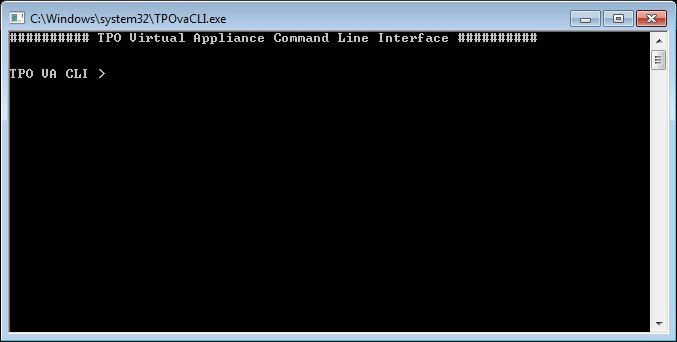
Deploy TPO Virtual Appliance 3.1 or higher
At the first start of the Virtual Appliance, the Command Line Interface prompts the user with a wizard, allowing him to define the minimal configuration of the TPO.
As the parameters asked by the wizard are required in attempt to initiate the TPO, this wizard cannot be avoided by the user and must be completed.

Please note that parameters won't be taken in consideration until the completion of the wizard. If an incorrect value is entered for a parameter, simply use the CTRL+C combination to restart the CLI and so, the wizard.
In TPO Virtual Appliance 3.1, the first parameter asked by this wizard is the the static IP address. If an invalid IP address is entered, the user will be prompted with an error. Please note that the wizard does not prevent the user from entering an already used IP address.
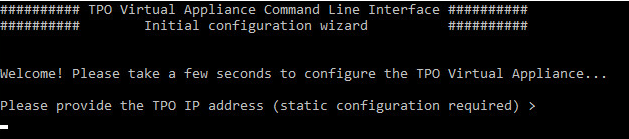
In TPO Virtual Appliance 3.2 or higher, an IP Adrdress has been already defined through the DHCP as well as a default password ("1234"). Therefore, it is possible to configure the TPO locally or remotely.
The CLI requires an IPv4 or IPv6 address. This address is the address of the TPO. You can either let DHCP decide for your network configuration or configured it statically.


If an IP address is defined statically, the next parameter required is the IP mask. This parameter is not checked for syntax error and must be entered under the following format: xxx.xxx.xxx.xxx. (example: 255.255.255.0 for a /24 mask).

Then you must enter the IP default gateway. This value is checked for syntax error but is not verified as a valid gateway. Any error in this gateway may lead to a connection problem.

After, you will have the possibilities to enter or change (if it's not the first start of the Virtual Appliance) a password. This password will allow to lock the current session and enable the remote connection. There is no policies for a new password.

In TPO Virtual Appliance 3.2 or higher, a default password has already been defined to allow to do all the configuration remotely. The default password is "1234". It is possible to define a new password for the TPO Virtual Appliance.

If you have correctly set an IP address and a password, a message will appear warning that the minimal configuration has been applied. This means that after that message, it is possible to continue the configuration in a remote connection or in local. If no password has been set, the configuration will continue normally.

The next parameters will be the TPO Identifier. If this value is left blank (by pressing Enter without entering a value), the Network Interface MAC address will be used as identifier.

The next parameter is the DNS server IPv4 address. This address is optional for the TPO to run but is mandatory if you plan to use HTTPs or FTPs features. A valid DNS server address must be entered. A wrong or unreachable DNS server address will cause the wizard setup to fail.

If a blank DNS server address is provided, a confirmation step is required to ensure the user is aware that HTTPs and FTPs features won't be functional.

In TPO Virtual Appliance 3.2 or higher, there is the possibility to define a NTP server. This setting is optional. The TPO synchronize its time with this server.

The next parameter required is the FTP server IP address or Fully Qualified Domain Name (FQDN). Those values are is generally the same as the TSS server address or FQDN. Please note that for a FQDN to be functional, the DNS server address must have been previously set. Only a valid FQDN will allow the use of HTTPs and FTPs features as this FQDN will be used within the SSL certificate required by those features.

If required by the FTP server, a FTP Username can be defined.

If a FTP Username has been specified, a FTP Password can be provided. If no FTP Username has been previously specified, this step is skipped.
Once the username/password parameters are defined, the wizard will check if a Root CA Certificate is available on the FTP server.
Before accepting the CA Certificate, the TSS Certificate must be validated to download the CA Certificate through a secure connection
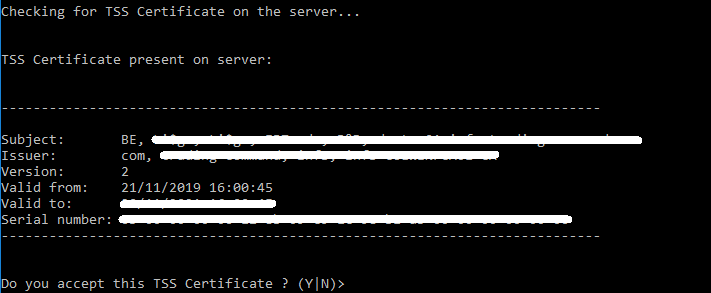
If so, the wizard prompts the user with the certificate details and asks him whether or not this certificate should be added to the Trusted Root CA certificate store.
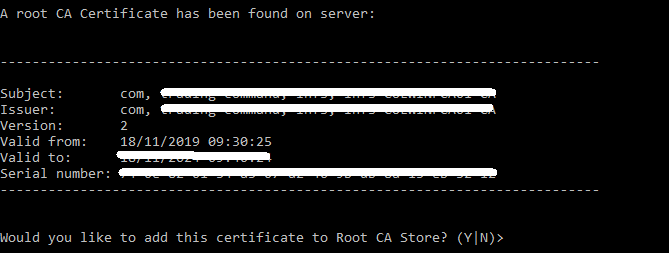
After this last step, the wizard saves the values and restarts the system to apply the settings.

|
|
|
|
|
|
Do not create snapshot of the TPO Virtual machine, this might dramatically impact the TPO performance
|
|
|
|
|
|
Following, the list of available commands that can be used to configure the TPO Virtual Appliance.
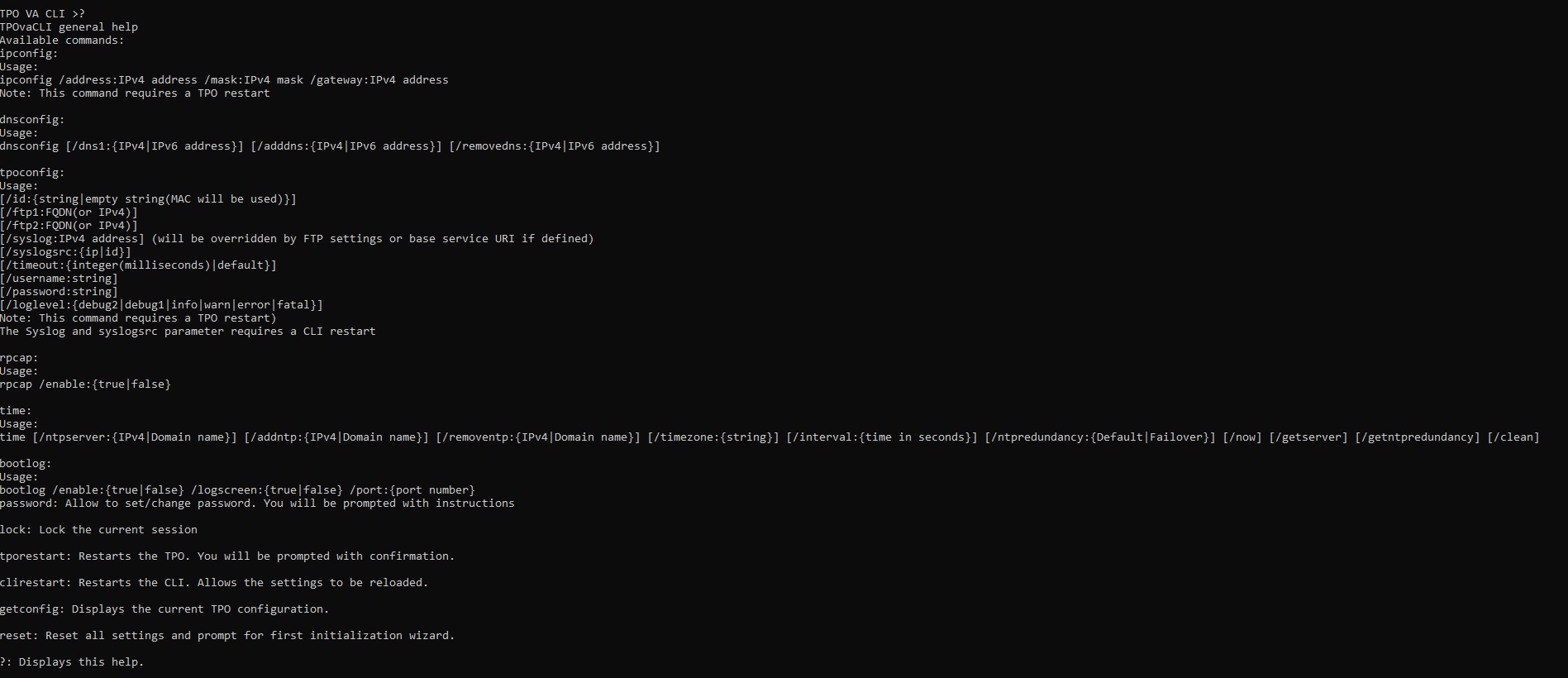
?:
This command prompts the user with a general help on the commands and their parameters.
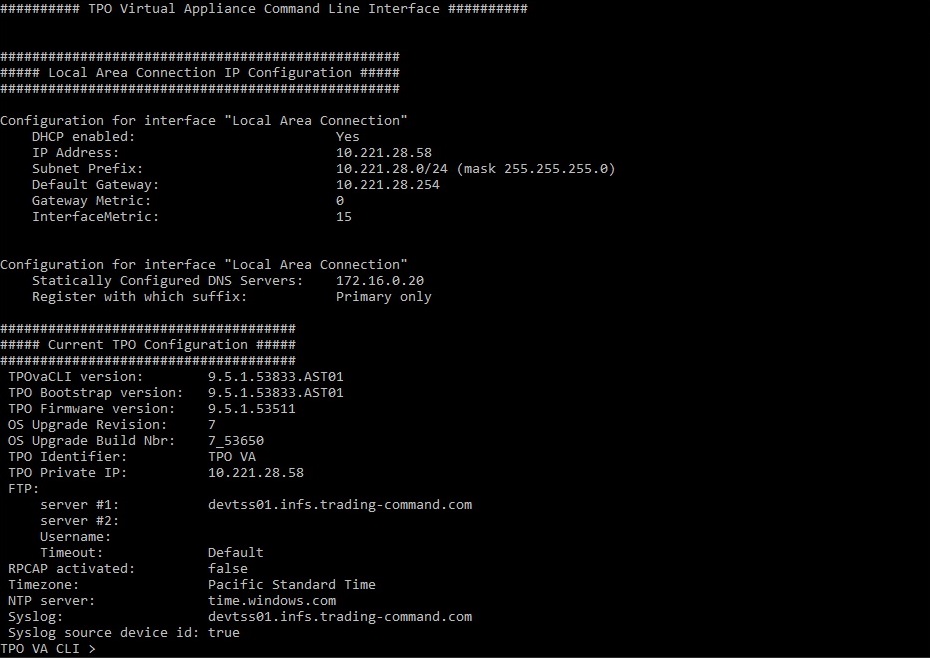
getconfig:
This command will display the current configuration to the user. By “current configuration”, we mean: Ip configuration, TPO configuration and remote capture configuration.
ipconfig:
This command allows the administrator to modify the network configuration of the TPO Virtual Appliance. When entered without any parameter, the command displays the following help.

The ipconfig command allows the administrator to specify:
•The IP address with the /address: parameter. If the specified address is not a well-formatted ipv4 address, the user will be prompted with an error message. Please note that this parameter is required, even if no change has to be applied to the IP address. •The network mask with the /mask: parameter. •The default gateway with the /gateway: parameter. •The DHCP configuration with /dhcp parameter.
Warning: modifications will be applied without confirmation. Any error in this configuration could lead to TPO failure.
This command is not available in remote connection.
dnsconfig:
This command allows the administrator to modify the DNS configuration of the TPO Virtual Appliance. When entered without any parameter, the command displays the following help.

The dnconfig command allows the administrator to specify:
•The first primary dns server with the /dns1: parameter. If the specified address is not a well-formatted ipv4 address, the user will be prompted with an error message. •The first secondary dns server with the /dns2: parameter. If the specified address is not a well-formatted ipv4 address, the user will be prompted with an error message. •The DHCP configuration with /dhcp parameter.
tpoconfig:
This command allows the administrator to modify the TPO configuration. When entered without any parameter, the command displays the following help.
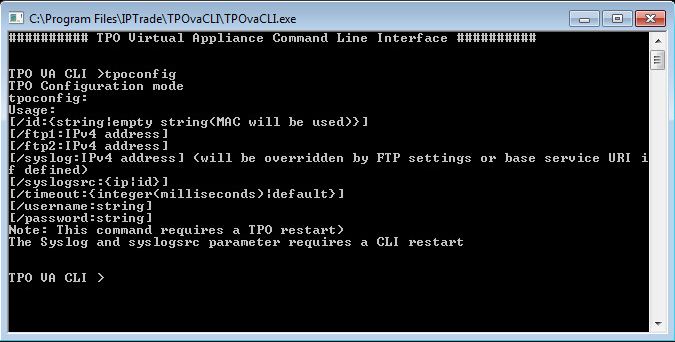
The tpoconfig command allows the administrator to specify:
•The TPO id with the /id: parameter. If the parameter is used while TPO id is left blank, the MAC address will be used as the TPO id. •The TPO primary ftp server with the /ftp1: parameter. If the specified address is not a well-formatted ipv4 address, the user will be prompted with an error message. •The TPO secondary ftp server with the /ftp2: parameter. If the specified address is not a well-formatted ipv4 address, the user will be prompted with an error message. This parameter can be cleared by specifying an empty value. •The TPO syslog server with the /syslog: parameter. If the specified address is not a well-formatted ipv4 address, the user will be prompted with an error message. This parameter can be cleared by specifying an empty value. •Whether the IP or the identifier of the device shall be used to identify the target syslog file with the /syslogsrc parameter. If ip is specified, the ip address of the device will be used to identify the target syslog file. If id is specified, the device identifier will be used to identify the target syslog file. •The FTP server timeout with the /timeout: parameter. The value must be an integer value or the word "default". Using this specific word will result in a reset of the FTP timeout to its default value. •The FTP passive/Active parameter with the /passive: parameter. The available values for this parameter are true or false. •The FTP username with the /username: parameter. •The FTP password with the /password: parameter.
Warning: modifications will not be applied until a TPO restart is required by the administrator with the command tporestart.
Notice: syslog and syslogrc parameters require a CLI restart to take effect.
tporestart:
This command allows the administrator to restart the TPO bootstrap service. This procedure is required to apply TPO settings modifications. The administrator will be asked for confirmation before proceeding to TPO restart.
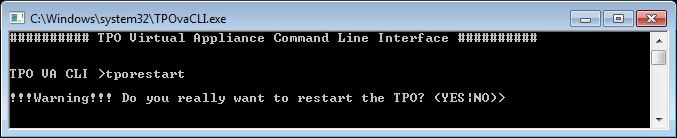
Please note that any other input that "YES" will cancel the restart procedure.
reset:
This command allows the administrator to reset the TPO Virtual Appliance to its initial configuration. This procedure will reset all settings of the TPO. If a Root CA Certificate has been installed during the previous configuration, it will be removed from the Trusted Root CA certificate store. Once the settings have been cleared, the CLI prompts the user with the initial configuration wizard.
The administrator will be asked for confirmation before proceeding to TPO reset.
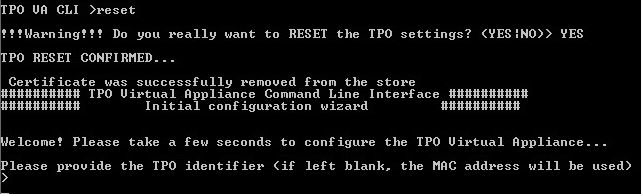
Please note that any other input that "YES" will cancel the reset procedure.
This command is not available in remote connection.
rpcap:
This command allows the administrator to enable or disable the remote capture service. When entered without any parameter, the command displays the following help.
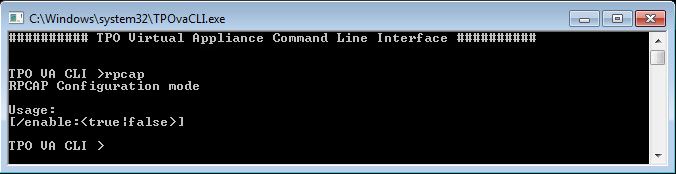
Please note that the remote capture service status can be obtained with the getconfig command.
password:
This command allows the administrator to set or change the current's user password. This command will also enable/disable the remote connection if a password is set or not. If a password is already, your old password will be asked.

This command is only available in a TPO Virtual Appliance 3.0 or higher.
time:
This command allows the administrator to manage the time of the TPO. When entered without any parameter, the command displays the following help.

The time command allows the administrator to :
/ntpserver
•Sets one or more NTP servers to synchronize with. •When specifying multiple servers, separate them with a space. •Running this command multiple times will override the previously configured servers with the new list provided. •The first server in the list will always be the primary server, while any additional servers will act as fallback servers if the primary is unavailable. /timezone
•Sets the system's timezone. •The configured timezone will be displayed in the CLI configuration. •A list of available timezone values is provided at the end of this document. /interval
•Sets the synchronization interval (in seconds) for the NTP service to query the configured NTP servers. /now
•Displays the system's current time. /clean
•Removes all configured NTP servers. •Reverts the system to its default, non-configured state. /checkstatus
•Returns the time synchronization status of the system. •Includes details of the currently selected active NTP source. /checkpeers
•Returns a list of all configured NTP peers (servers) and their status. •Includes synchronization details. /checkconfiguration
•Lists all configured NTP servers. •Displays the /interval (specialpollinterval) value currently set for the system. /resync
•Forces an immediate synchronization of the system clock with the configured NTP server(s). •This command is useful when the system time is out of sync and an immediate correction is needed.
This command is only available in a TPO Virtual Appliance 3.2 or higher.
bootlog:
This command allows the administrator to display messages from the TSS Bootstrap about updates/modifications that are currently made.

The bootlog command allows the administrator to :
•Allow you to enable/disable the display of messages from the TPO Bootstrap with /enable parameter. •Allow you to modify the way the messages are displayed in the CLI with /logscreen parameter If you enable the logscreen, the message will be displayed at the top of the CLI.
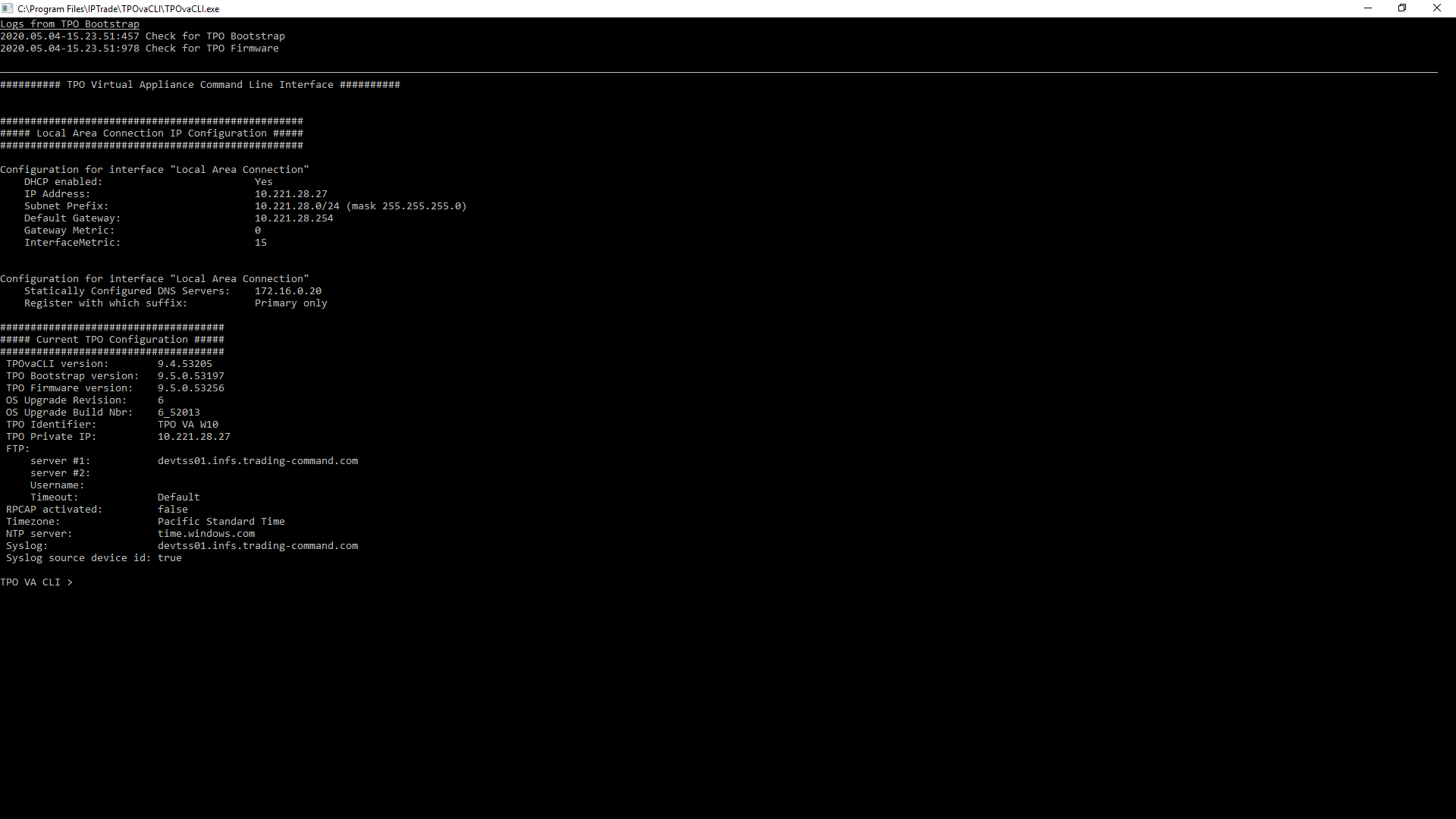
Otherwise, it'll be displayed inside the CLI.
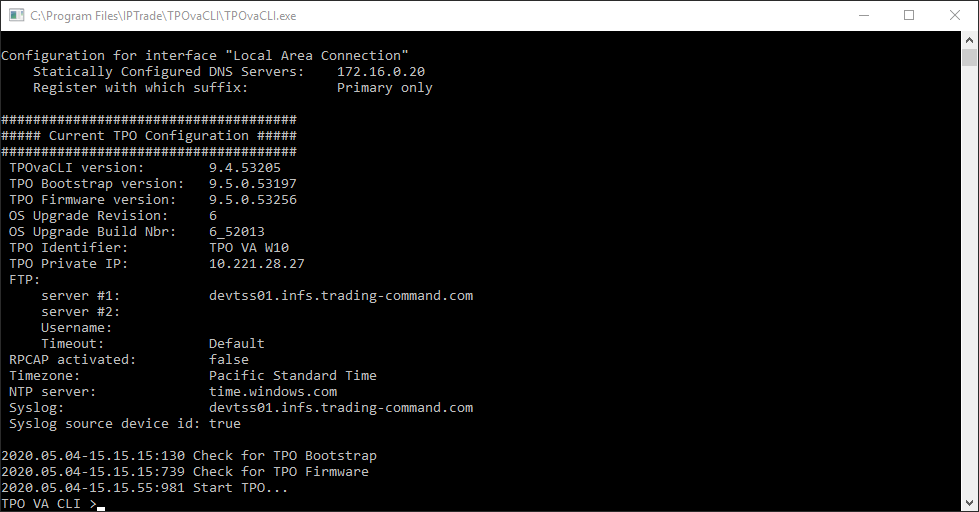
•Allow you to modify the communication port between the TPO Bootstrap and the CLI with /port parameter. This command is only available in a TPO Virtual Appliance 3.2 or higher.
lock:
This command allows the administrator to lock the current session

This command is only available in a TPO Virtual Appliance 3.0 or higher and is not available in remote connection.
|


