Configure HTTPS binding

Top  Previous  Next
IT&Operations > Security > TSS Virtual Appliance

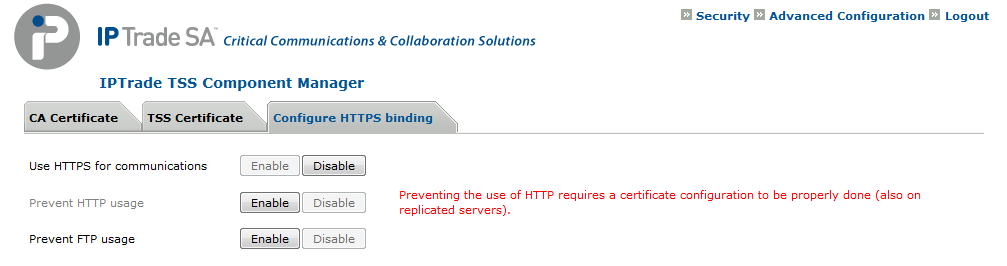
This sections describe how to switch to HTTPS for communications, prevent the use of HTTP (thus forcing the use of HTTPS only), and prevent the use of FTP (thus forcing the use of FTPS only).


Configure HTTPS bindings TSS VA


To see which network port are used by devices, see Network port usage section.


To configure HTTPS, please follow these steps (in this order):

Use HTTPS for communications

This option automatically configures IPTrade devices to use the HTTPS protocol, automatically changing their TSS URIs.


TableCornerTopLeftA

IPT_Empty

IPT_Empty

TableCornerTopRightA

IPT_Empty

ImportantNote_Icon

When on a standalone TSS, please perform this steps before:

•Open the Component Manager (i.e.: http://SERVER_IP/IptradeNet) with your preferred web browser

•Log in

•Go to Security \ Advanced Configuration

•Set the Custom Base Url (ie: https://yourtssname) and press Update button


This custom base URI allows defining the URI used to access the TSS server. When such an URI is used (the field is not left blank), the URIs used by the IPTrade devices are constructed based on its value instead of being simply based on the TSS server's IP address.

IPT_Empty

TableCornerBottomLeftA

IPT_Empty

IPT_Empty

TableCornerBottomRightA


•Open the Component Manager (i.e.: http://SERVER_IP/IptradeNet) with your preferred web browser

•Log in

•Go to Security \ Configure HTTPS binding

•Enable Use HTTPS for communications

•Reboot all the devices so that they get their new configuration and switch to HTTPS


TableCornerTopLeftB

IPT_Empty

IPT_Empty

TableCornerTopRightB

IPT_Empty

Important_icon

On Virtual Appliance setups, this option is only available when there is no replicated version and the CA certificate and the TSS certificate are well configured.

IPT_Empty

TableCornerBottomLeftB

IPT_Empty

IPT_Empty

TableCornerBottomRightB


Prevent HTTP usage

This option increases the security by disabling the HTTP protocol (thus closing port 80) on the TSS server.


TableCornerTopLeftA

IPT_Empty

IPT_Empty

TableCornerTopRightA

IPT_Empty

ImportantNote_Icon

This option is available only on Virtual Appliance setups and if the CA certificate is installed and if all installed versions are superiors to 8.2.

IPT_Empty

TableCornerBottomLeftA

IPT_Empty

IPT_Empty

TableCornerBottomRightA


•Open the Component Manager (i.e.: http://SERVER_IP/IptradeNet) with your preferred web browser

•Log in

•Go to Security \ Configure HTTPS binding

•Enable Prevent HTTP usage


Prevent FTP usage

This option increases the security by disabling the FTP protocol on the TSS server.


TableCornerTopLeftA

IPT_Empty

IPT_Empty

TableCornerTopRightA

IPT_Empty

ImportantNote_Icon

This option is available only on Virtual Appliance setups and if CA certificate installed and if all installed version are superiors to 8.2. Keep in mind that very first CA certificate installation on Turret and TPO VA cannot be done through FTPs. Activating this property requires to properly handle deployment phases. Turret and TPO VA must have been provided with a first valid CA certificate before being deployed in an environment where FTP usage is prevented.

IPT_Empty

TableCornerBottomLeftA

IPT_Empty

IPT_Empty

TableCornerBottomRightA


•Open the Component Manager (ie: http://SERVER_IP/IptradeNet) with your preferred web browser

•Log in

•Go to Security \ Configure HTTPS binding

•Enable Prevent FTP usage