Vega SIP Over TLS Configuration


Vega SIP Over TLS Configuration |
|
| Trading and C&C > Turret Proxy To Open communication (TPO) > DDI Sharing > DDI Lines & Private Wires > Configure > TPO Configuration > Vega 400G & Vega400G V2 > Vega 400G R12 |
Configure SIP over TLS
Some configuration needs to be done on the TPO and on the Vega gateway to enable SIP over TLS.
Important Note: - The TPO and Vega gateway signed trusted certificate must be signed by same certificate authority (CA) server. Please refer BT Trade help section for steps to apply CA server certificate on TPO
Important: -Licenses are needed to enable SIP over TLS and SRTP in the Vega gateway.
TPO configuration Settings Here are the settings that need to be set on the TPO to enable SIPS communication with Vega.
When SIPS is used to connect to a Vega gateway, the voice is also automatically encrypted by the TPO (SRTP) without additional configuration.
• Enable SIPS
• PLAD group
A PLAD group needs to be configured to be used as a target in slot properties configuration.
To configure the Vega gateway in the Secure SIP mode, the ":tls" suffix is added at the end of the definition of PLAD group targets.
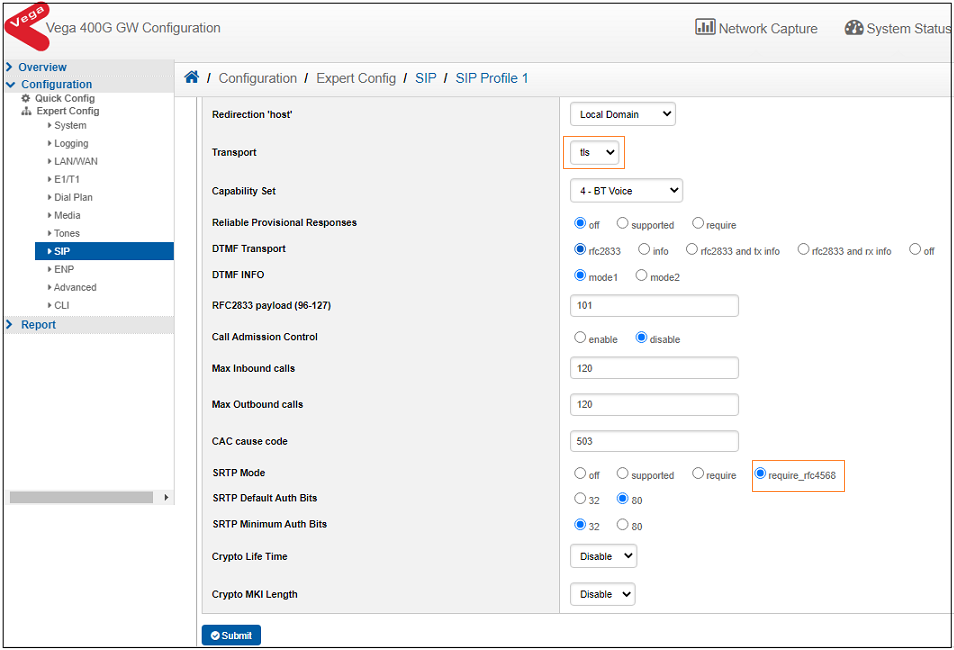
Example : application.tpo.plad.groupnames = VEGA400G application.tpo.plad.groupvalue.VEGA400G = 10.221.108.202:5061:tls, 10.10.50.66:5061:tls Settings To configure the TLS on the Vega gateway, navigate to SIP Profile tab configuration set in "Configuration à Expert Config à SIP -> SIP Profile 1" to enable SIPS and SRTP.
The SRTP mode must be set to "require_rfc4568".
|