TPO Configuration


TPO Configuration |
|
| Trading and C&C > Turret Proxy To Open communication (TPO) > DDI Sharing > DDI Lines & Private Wires > Configure |
Private wire slot properties
Configuring Private Wire access on DDI slot requires to properly configure a DDI line. Afterward, specific properties has to be defined on the DDI line slots. Those properties are different depending on the private wire type:
PLAD GroupsProceed as follows 1)Connect to the TSS 2)Go to the TPO Cluster > Settings > Advanced Mode 3)Add the following entries in advanced mode and save the modifications
Adding properties to DDI slot
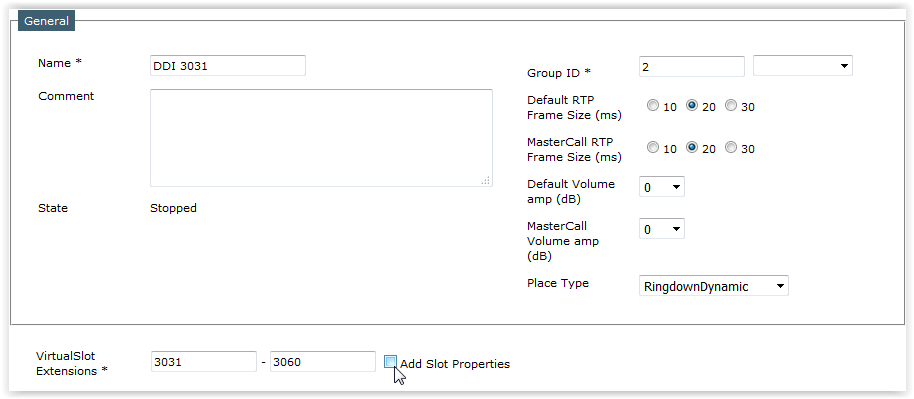
In order to add properties to your DDI slots, open the DDI line edition form on the TSS console •Open TPO Cluster list: TSS Console > Device Management > TPO Clusters •Select your cluster in the list •Open TPO Place panel in order to access places list •Click on the DDI line you want to configure Private Wire access in
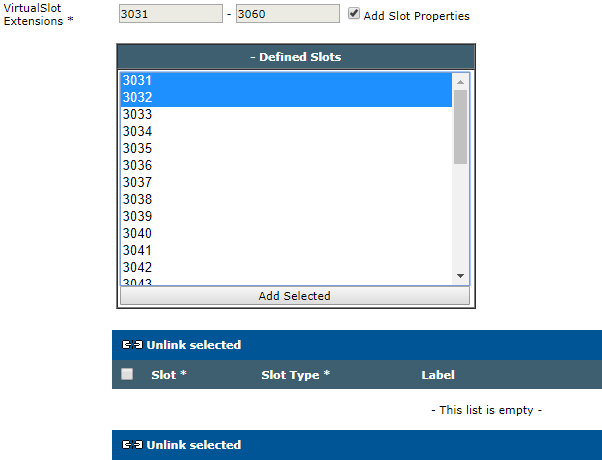
Ticking “Add Slot properties” check box next to "VirtualSlot Extensions" shows DDI slots list
Select slots you want to define priorities for and click "Add Selected" button
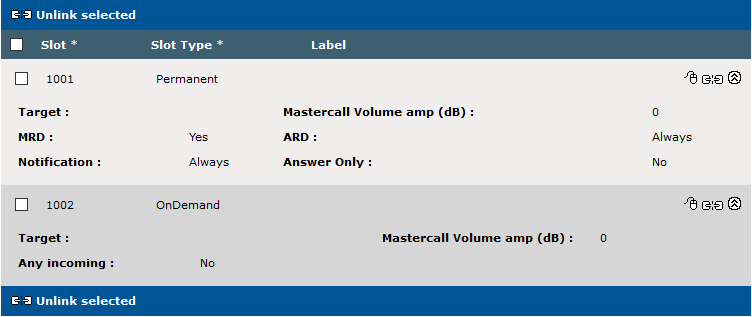
Selected slots appear in the slot properties list populated with the default slot properties
Manual Ring Down
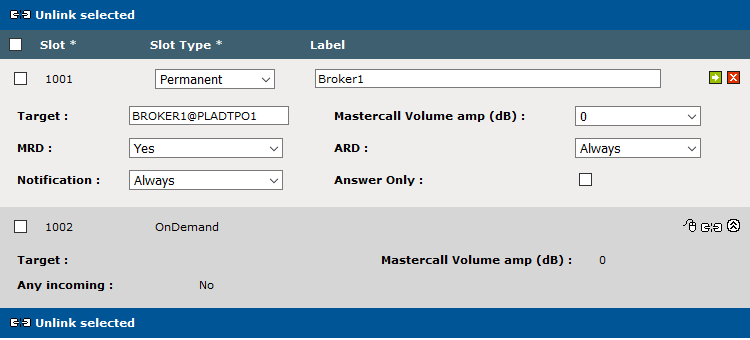
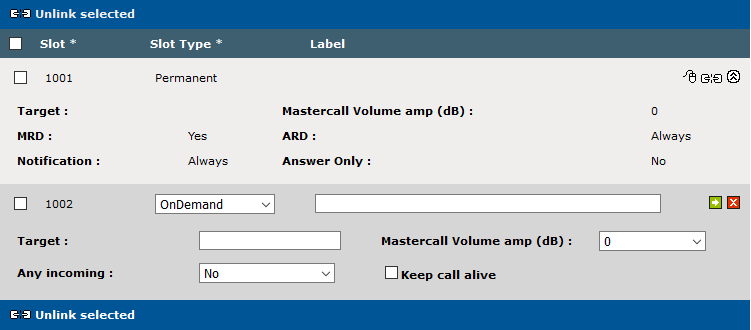
Manual Ring Down private wires are managed using "Permanent" slot type. Select "Permanent" in slot type drop down list.
Mandatory property
Such slots require a PW Line target to connect to when the place is started up.
This information is mandatory and requires the PLAD groups have properly been configured in TPO settings Fill the Target field with a valid PW line URI: “PLADLineName@PLADGroupName”: •e.g. BROKER1@PLADTPO1
Note: Clicking green square "Update" button is not enough, you must click general "Update" button at the bottom of the page to validate changes.
Additional properties
The only available "message" in MRD line protocol is pulse. System is able to send pulse on the line and detect incoming pulse sent by the remote party. The additional slot properties allow to finely tune the system behavior regarding pulse management: •When to generate outbound pulse •What to do when a pulse is received
Outbound pulse generation configuration: •MRD is the basic Manual Ring Down feature. oYes: allows turret user to manually send pulse on the line by pressing the DDI slot shortcut. Note that the turret user profile configuration must explicitly allow such operation on DDI slot shortcuts. oNo: Even if the turret user profile configuration allows it, system doesn't send pulse when user press DDI slot shortcut. •ARD allows to simulate kind of "Automatic Ring Down" behavior on Manual Ring Down lines oAlways: system generates a pulse each time a trader connects to the slot oFirst User: system generates a pulse when a trader connects to the slot while no other traders are connected to the same slot. oNever: system doesn't generate pulse depending on turret user connections oHook Switch FPC: system generates a pulse when a trader connects to the slot while no other traders are connected to the same slot. Clear all connected traders if the last Far Party participant clear the call. oHook Switch Latch: system generates a pulse when a trader connects to the slot while no other traders are connected to the same slot. Keeps traders connected even if the last Far Party participant clear the call. oTOS: system doesn't generate pulse depending on turret user connections. Set the MRD property to No.
Inbound pulse management configuration: •Notification indicates when to notify inbound pulse to turret users oAlways: notifications are always sent to users oNo Call: notifications are sent to users only if no user is connected to the place oNever: notifications are never sent to users
•The label is an optional property, the value contained by the label will be showed on the turret as the sip displayname.
Note: Mastercall Volume amp. (dB) description is part of a dedicated topic
Multi-target slot
It's possible to set multiple targets on permanent slots by using a semicolon (;) to separate the different targets. •e.g : BROKER1@PLADTPO1;BROKER2@PLADTPO1;BROKER3@PLADTPO2;...
Note that setting multiple targets on a slot is only supported for Permanent slots that are not in "Answer only" mode. Setting multiple targets for OnDemand slots or permanent slots in "Answer Only" is not supported and can cause unexpected behaviors. The same "user" must be present only once in the target list, you can't do the following : BROKER1@PLADTPO1;BROKER2@PLADTPO1;BROKER1@PLADTPO2;...
Multi-target slot with "ITS local leg"
It's also possible to define a target of a multi-target slot as a "local ITS leg" by adding the "(ITS)" prefix before the extension : •e.g : BROKER1@PLADTPO1;(ITS)BROKER2@PLADTPO1
With this configuration, the TPO will consider this target as a local turret regarding MRD events.
When the key "application.tpo.permanent.multitargetslots.forward.mrd = true" is enabled to allow the TPO to transfer MRD signaling between the different targets, the TPO will forward MRD events with following rules : A.Incoming MRD event on the "real remote party leg" will alert turrets plugged on TPO and be forwarded to the "ITS leg" B.Incoming MRD event on the "ITS leg" will be forwarded only to "real remote party leg" and not alert TPO turrets C.Turrets plugged on TPO triggering an outgoing MRD event to "real remote party leg" will not be forwarded to the "ITS leg"
If the ARD field is set to Hook Switch FPC or Hook Switch Latch, the TPO will consider the ITS leg as a local turret, and will take this target into account to know when to send a pulse, and when to clear traders connected on the slot. Automatic Ring Down
Automatic Ring Down private wires are managed using "on Demand" slot type. Select "on Demand" in slot type drop down list.
Mandatory property
Such slots require a standard target to connect to when a first turret user connects the slot. This information is mandatory and allows system to place outbound call as well as to identify inbound calls. Fill the Target field with a valid phone number that allows calling remote party as well as identifying him when he calls the line.
Note: Clicking green square "Update" button is not enough, you must click general "Update" button at the bottom of the page to validate changes.
Additional properties
With usual automatic ring down slots, system compares incoming calls remote party identity with the different "RingDown" slot configured targets. When an incoming call remote party matches a "RingDown" slot target and the corresponding slot is free, system assigns the slot to the incoming call. Turret users can see an incoming call is ringing on the slot and can pickup the call by pressing the slot. That's the usual way system behaves with automatic ring down private wire.
Some times, certain customers want the automatic ring down to work quite differently. They want system to place outbound calls using the slot target, as usual automatic ring down behaves. But, when an incoming call reaches the DDI line, they want system to assign the first free slot of the line, regardless the configured slot targets. Setting Any incoming property true on all the slots of the line makes the system to fit that specific need.
•Any incoming indicates whether an incoming call remote party must match the slot target value for being handled by the slot or not. oNo: incoming call remote party must match slot target for being handled by the slot, this is the commonly used setup. oYes: any incoming call can be handled on that slot regardless its target value.
•The label is an optional property, the value contained by the label will be showed on the turret as the sip displayname.
Note: Mastercall Volume amp. (dB) description is part of a dedicated topic
Defining default slot properties
In order to ease DDI Slot setup, TSS allows defining default values used to populate slot properties when adding properties to a slot. Most of the time, slot properties depends on system usage. Operator must configure multiple slots but all properties are identical except the target. Setting the most valuable default values avoid spending time on systematically changing slot type, MRD, etc... for each slot when adding the slot properties.
Most useful one is probably the Slot Type:
There's also default value for manual ring down specific attributes:
Any incoming property is going to be No most of the time but can be changes as well:
|
||||||||||||||||||||||||||||||||||||||||||||||||||||||||||||||||||||