Install new TSS/Console

Top  Previous  Next
Solution Installation > TSS Installation > Install TSS on a standard server

Introduction

The server is now ready to start the installation of the Turret Support Server (TSS) program.
 

The TSS software is composed of two different applications:

•The first TSS component is IptradeNet.TSS. This is a web application that communicates with the turrets and access to the database. It is running on IIS, using ASP.NET 4.5.2 and the SQL server database.

•The second TSS component is the IptradeNet.Console. This is a web-based application that enables the management of the TSS. It also accesses the same database.
 

This section explains how to install, update and remove the TSS and Console web applications.
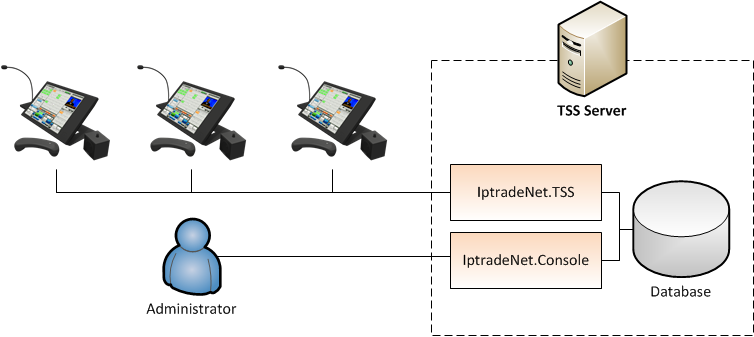
 

shema_general


Remarks

It is possible to install several versions of the web application on the same server.

Table Of Content

See how to make new install  :

•without replication

•with replication


TableCornerTopLeftB

IPT_Empty

IPT_Empty

TableCornerTopRightB

IPT_Empty

Important_icon

Since UIM is using some SQL Server 2012 features, it is necessary to install two Microsoft SQL Server 2012 features from this feature pack before proceeding:


Go to: http://www.microsoft.com/fr-be/download/details.aspx?id=29065


Download and install:

oMicrosoft® SQL Server® 2012 Shared Management Objects

                Package X64 : http://go.microsoft.com/fwlink/?LinkID=239659&clcid=0x40c


oMicrosoft® System CLR Types for Microsoft® SQL Server® 2012 (only required when installing SQL Server® 2012)

                Package X64 : http://go.microsoft.com/fwlink/?LinkID=239644&clcid=0x40c


IPT_Empty

TableCornerBottomLeftB

IPT_Empty

IPT_Empty

TableCornerBottomRightB
