Logging On


Logging On |
|
| Trading and C&C > Netrix > Logging On and Off > Usage |
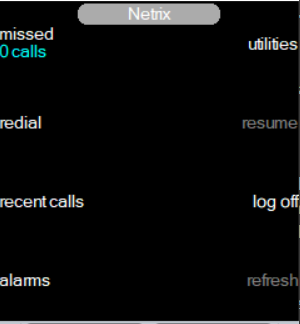
Logging-on allows you to use all the facilities of the Netrix as defined by your user profile. You are prompted to enter your user ID followed by a password. Both are numeric. Once logged on, Netrix automatically sets up any speaker channel configurations (if saved). If you are logging on to your regular Netrix the user ID field is populated. message Press a key to login press any key on the Netrix …the user id menu is displayed. enter user id press …to jump to the password field enter password press ok message Authenticating Retrieving user data Logon completed …the Netrix menu is displayed
All of the functions available in this menu are covered in more detail later in this guide. Incorrect User ID or passwordIf you enter an incorrect username and/or password the following error message is displayed:message user unauthorised: You need to try again. If it still does not work see your Platform Administration for confirmation of your username/password. Logged on elsewhereIf you are logged on at another turret, the following happens:message User is already logged on elsewhere. Do you wish to continue?
press abort …returns to logged off screen or press ok message Please wait while user is free seated. …logon process continues …the Netrix menu is displayed You are automatically logged off from the original turret and logged on to this one.
|