Usage


Usage |
|
| Trading and C&C > Netrix > Call Lists |
Call lists display records of call activity on DDI lines which have been selected for monitoring. When an event occurs on a DDI, a record is added to the appropriate call list. For example, if you miss a call a record of that event is added to the missed calls list. Call lists displays records for the following call activity types: •any missed incoming calls at this Netrix records of these events are added to missed calls, for DDIs that are monitored. •any outgoing calls made from this Netrix records of these events are added to dialled calls, for any DDI line. •any calls answered by colleagues' records of these events are added to by other users, for DDIs that are monitored. •any calls answered here records of these events are added to answered here, for any DDI line.
Using Call Lists you can: •view more detailed information on when an event occurred e.g. for a missed call you can find out how long the call rang for before the far end ended the call. •return a call using the record. •use the details of a record to create a contact and save it to a Phone List in the Directory. •delete records displayed in a call list. •audit who has answered your calls. Incoming callsThe labels displayed for a record are dependent on whether calling line identity (CLI) was provided on the line: •if CLI was provided and a match is found with any contact record stored in any phone list, the contact name is displayed. •if CLI was provided but no match is found with any contact record stored in any phone list, the CLI is displayed. Outgoing CallsThe labels displayed for each record are as follows: •if the telephone number matches a contact stored in any phone list, the contacts' name is displayed. •if the dialled digits do not match a contact stored in any phone list, the dialled telephone number is displayed.
You must select those DDI lines to be monitored otherwise no records are added to the missed and answered elsewhere calls. All outgoing calls will appear in the dialled list even for DDI lines that are not being monitored. A record of call events is maintained even if you free-seat to another Netrix. Missed CallsMissed Calls, logs events for any unanswered calls received on monitored DDI lines programmed at this Netrix. If you miss a call your Netrix displays how many calls have been missed next to the missed label (displayed in the main menu). A missed call is an incoming call not answered by anybody.
The records are sorted in time order, with the most recent missed call first. If you have more than one missed call from the same number, then that number will only appear once. Under details, the time of the missed call will be the last time that number called. Recent CallsRecent Calls, logs events for all outgoing calls made from this Netrix. DDI lines do not need to be monitored to enable these types of call events to be logged. A record is added to Recent Calls as soon as the call starts to ring. The records are displayed with the most recently dialled number first. By Other UsersBy Other Users, logs events for all incoming calls on DDI lines being monitored at this Netrix which were answered by a colleague. This list does not include transferred calls. The record is added to By Other Users when the incoming call is answered elsewhere. The records are displayed in time order, with the most recent call first. Answered HereAnswered Here, logs events for calls answered at this Netrix on any DDI line, irrespective of whether the line is monitored or not. The record is added to Answered Here when the incoming call is answered. The records are sorted in time order, with the most recently answered call first. Opening missed callsIn the main menu: press missed …the missed calls list is displayed
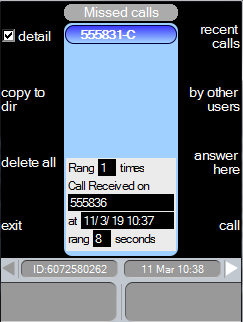
To get to all other call list options: Recent calls, By other users, Answered here, is via the missed call menu: press missed press by other users …the by other users calls list is displayed press answer here …the answered here calls list is displayed press recent calls …the dialled calls list is displayed Returning a call using a recordYou can return a call for any record in any call list with a single keypress. Your default DDI extension will be used to make the call. The call is made using the current handset. With the call list displayed: press …to highlight the record press call …the number is dialled Showing a record's detailsProvides more detailed information on any record in any of the call lists. This is a toggle-action key, press again to remove details. With the appropriate call list being viewed: press …to highlight the call record press detail
Rang: For missed calls, shows how many times this caller had called.
Call Received on: This displays the DDI number on which the call was missed or answered.
At: The date and time the call commenced. This applies to the last missed call from this caller.
Call Dialled on This displays the DDI number on which the outgoing call was dialled.
Rang: How long the call rang for. This applies to the last missed call from this caller. Displayed in seconds. Calls ringing for longer than 99 seconds show 99. Range: 1-99. Copying a record to create a contact and save to a Phone ListThe details of any record can be used to create a contact and saved to any Personal Phone List. You have the opportunity to amend the contact name and telephone number during the save process.
With the call list displayed: press …to highlight the required record press copy to dir ..the directory is displayed listing all available phone lists press …to highlight the phone list to copy details to press ok …the edit details menu is displayed enter the First name press …to jump to next or previous field Enter Label – this is a mandatory field, as this label is displayed in the phone list as well as the speed dial key. When finished press ok …to confirm or press abort …to cancel Deleting all recordsAllows you to delete all records in any call list. With the call list displayed: press delete all prompt Delete all calls? press OK …all records are deleted |





 or
or 
 …details are displayed at the bottom of the call list