Making an Outgoing Call


Making an Outgoing Call |
|
| Trading and C&C > Netrix > Basic Call functions > Usage |
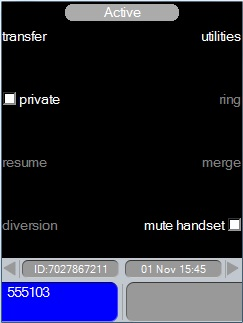
There are several methods you can use to make outgoing calls at the Netrix. Using a DDI keypress DDI key indicator red-on supervisory HS 1 or HS 2 enter telephone number …using the dial pad line label …the call on handset menu is displayed Autoline selectenter telephone number …using the dial pad Indicator on your default DDI red-on supervisory HS 1 or HS 2 line label …the call on handset menu is displayed Using a speed dial keyPressing a speed dial key automatically dials the telephone number assigned to the key. The handset status field within the application display shows the telephone number dialled. press speed dial key …the telephone number is dialled …the call on handset menu is displayed Using a contact in a DirectoryYou only need to search the contact and press the call key to initiate the outgoing call. Phone Lists available for your use are accessed via the dir key. When the dir key is press the Directory displays all the Phone Lists you can use. You open the Phone List to search the contact to dial. The action to initiate a call varies depending on whether or not a line is currently connected to your handset. Line not connected to your handset:call – seizes your default DDI line, connects it to your selected handset, and dials the telephone number assigned to the highlighted contact. The Directory remains open whilst the call is in progress. The Directory remains open whilst the call is in progress. Line is connected to your handset:call – maintains the line currently connected to your handset and dials the telephone number assigned to the highlighted contact on this connected line. The Directory remains open whilst the call is in progress. press dir key …on the Netrix press …to highlight the phone list to open press ok press …to highlight the contact press call …the call on handset menu is displayed Call on Handset MenuAs soon as you have a line connected to your handset the call on handset menu is displayed: •transferring calls internally or externally. •diverting calls received on DDI keys to other telephone numbers. •making the current call private or removing privacy •temporarily muting audible alarms whilst on a call. •inviting a colleague to join in on the call currently connected to your handset. •muting the handset so that your voice is not transmitted. Each function available via the call on handset menu is dealt with individually later in this guide. |

 or
or