Usage


Usage |
|
| Trading and C&C > Netrix > Divert |
Only applies to DDI lines. Allows you to divert calls received on a DDI line to another internal or external telephone number. Any incoming calls are forwarded to the divert number without ringing the diverted DDI line.
Netrix provides two different methods of sourcing numbers to divert to: •selecting a contact from a phone list. •manually entering the telephone number to divert to. This could be another DDI number, an internal extension or an external telephone number (such as a mobile phone). You can find out what number a DDI line is diverted to when you select that DDI and press divert. The option to divert is only displayed when you have selected a DDI key, and you have not dialled a number.
Diverting a DDIPress the line key of the DDI to divert: …call on handset menu displayed press divert …the diversion menu is displayed
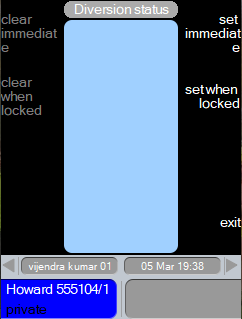
Immediate divert: press set immediate …to divert immediately
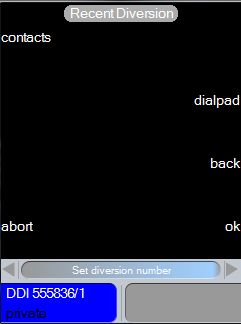
Via Dialpad: press dialpad …to enter the digits manually press ok … to dial the digits.
Via contact: press contact The diversion directory is displayed. press …to highlight the phone list to open press ok
Diversion status view is displayed with the number that has been diverted to. press clear …on Netrix to clear the handset and return to the main menu or press exit …to return to the main menu
supervisory …divert immediate
If you have selected a Phone List, and the contact required is not included in it, you need to press dir to display all Phone Lists. Viewing a contact’s detailsYou can view more detailed information on any contact name displayed in a phone list by pressing the details key. For each contact their name and assigned telephone number are displayed. These fields are not editable. Contact details can only be amended via the Directory. This is a toggle action key, press again to remove details.
With a phone list open: press …to highlight the contacts name press details …information on the highlighted contact is displayed at the base of the menu Divert on lockOptionally, you can have your turret synchronised to your PC, so when the PC is locked, your turret will also be locked. You can set one or more DDIs to be diverted to an internal extension or an external number when the turret is locked.
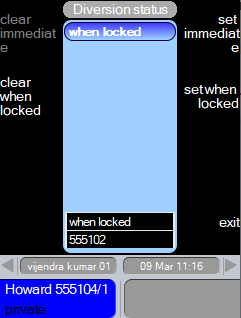
press set when locked …to divert when turret is locked
Via Dialpad: press dialpad …to enter the digits manually press ok … to dial the digits.
Diversion status view is displayed with the number that has been diverted to.
press clear …on Netrix to clear the handset and return to the main menu or press exit …to return to main menu Note: the line key will not show any supervisory, as diversion is not currently set, it will only be set when this user is locked. Canceling a DDI on divertPress the DDI line currently diverted: …call on handset menu displayed press divert …the diversion menu is displayed press clear immediate or press clear on lock …the set diversion is removed.
press clear or press exit … to clear handset and return to main menu Whitelist FeatureNetrix does support whitelist feature in diverting/forwarding the call. In order to successfully divert a call to an extension, the extension to divert to must be a valid extension as per the rules indicated by whitelist configuration. The divert/forward whitelist feature can be enabled/disabled via TSS configuration by admin. The wildcards are also supported for extensions provided in the whitelist. •If the divert/forward whitelist feature is enabled and diverting extension either from contacts or manually entered is not in whitelist, following message is displayed the screen. Diversion not in whitelist AbortYou can cancel the setting of a divert operation during any part of the diversion process using the abort function. In all cases, pressing abort will clear the handset and return you to main menu.
One exception being the dialpad menu, where abort returns you to the main diversion menu.
|





 or
or 
 …details displayed