The information of the line is usually obtained from the carrier.
•E1 or T1, Framing, Line Encoding 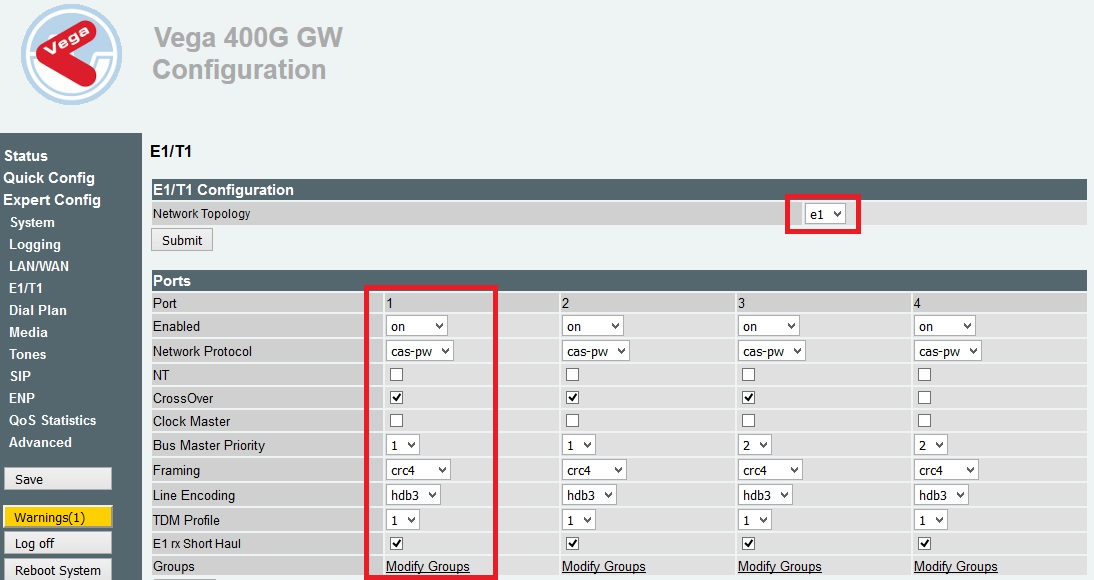
Port
|
E1/T1 Port Number on the Vega 400G
|
Enabled
|
Port On/Off
|
Network Protocol
|
cas-pw is the protocol to use E1/T1 CAS
|
NT
|
Network Termination. Determines whether the Gateway is the Network Termination. If the checkbox is not ticked the Gateway will act as TE (Terminating Equipment)
|
CrossOver
|
Enables a software crossover which negates the need for a physical crossover cable
|
Clock Master
|
If this setting is checked, the Vega will act as the clock source. If the box is unticked, the Vega will take clock from the other side of the E1/T1.
|
Bus Master Priority
|
Defines the order of E1's that the Vega will take it's clocking from. 0= Never take clocking from this Interface.
1 -4 = Priority of clocking Interfaces, 1 being the highest priority and 4 being the lowest.
|
Framing
|
E1: crc4 defines that CRC4 is supported on the carrier E1, pcm30 defines that CRC4 is not supported on the carrier E1.
T1: ESF or SF
ESF is the more modern and more commonly used framing. This is typically used with B8ZS line encoding.
|
Line Encoding
|
E1: HDB3 or AMI, must match with what the carrier is using
T1: B8ZS or AMI must match with what the carrier is using
|
TDM Profile
|
Please leave at default
|
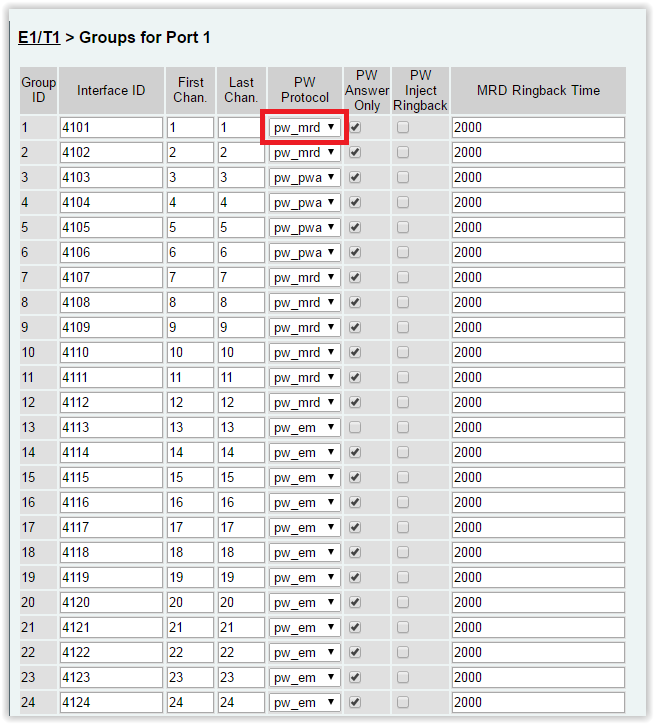
•Manual Ring Down
Ajust PW protocol regarding the carrier information
|


