Step 3.2.2 – Run TPO services

Top  Previous  Next
Solution Installation > TPO Installation > Step 3 – Install TPO runtime > Step 3.2 – Install TPO on an existing server

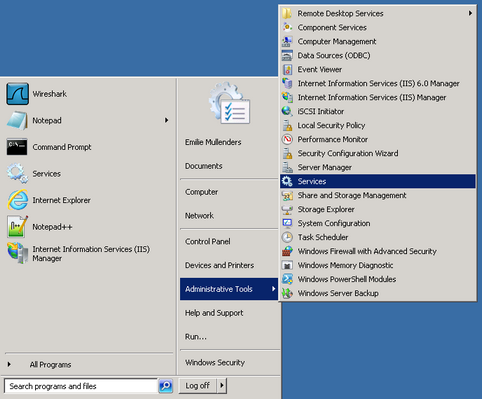
On server, go to Administrative Tools/Services

TPOInstallStep2.1

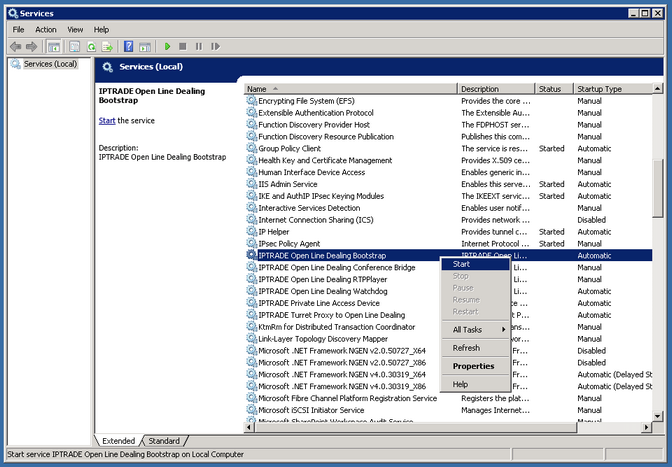
Start the following IPTrade service: Open Line Dealing Bootstrap. The four following services will start automatically:

•IPTRADE Open Line Dealing Bootstrap

•IPTRADE Open Line Dealing Conference Bridge

•IPTRADE Open Line Dealing Watchdog

•IPTRADE Turret Proxy to Open Line Dealing

TPOInstallStep2.2

Have a look to the TPO list on TSS console: a green dot is present near the TPO icon. TPO has been successfully installed and connection with TSS is established.

Table Of Content


•Prerequisites

•Step 1 – Create a TPO Device on the TSS

•Step 2 – Create an empty TPO cluster

•Step 3 - Install TPO runtime

oStep 3.1 – Using the TPO Virtual Appliance

oStep 3.2 – Install TPO package on server

•TPO upgrades

•Stop & Start