Troubleshooting


Troubleshooting |
|
| Solution Installation > TSS Installation > Using the TSS Virtual Appliance > Optional Configuration > Optional setup using component manager |
Virtual Appliance error investigation Once the Virtual Appliance is deployed (refer to Deploying the TSS Virtual Appliance), all operations can be achieved via the Component Manager. If an error occurs during an upgrade process such as: •Bootstrap upgrade •Firmware installation •Firmware upgrade •Firmware replication •Firmware un-replication •Operating System upgrade
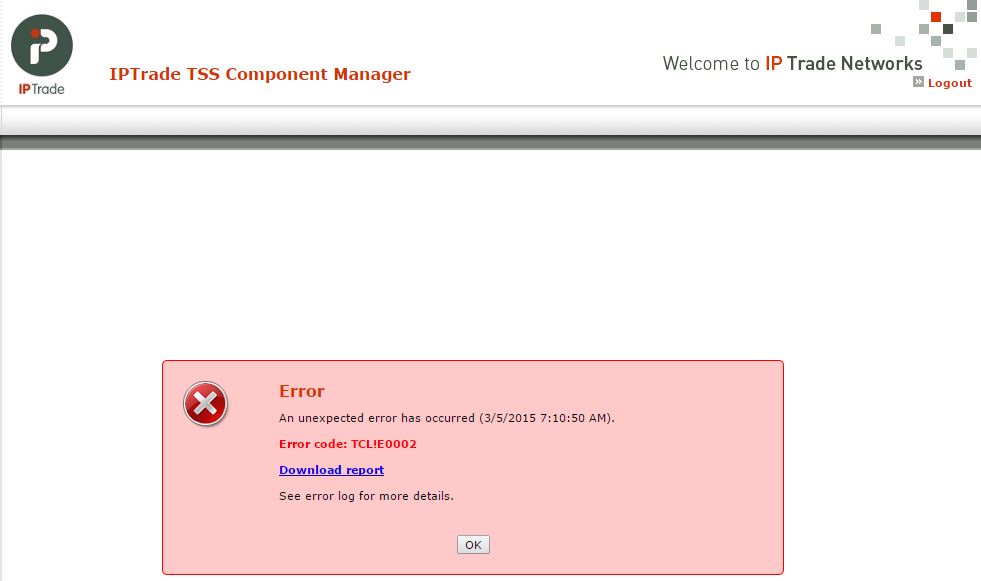
the component manager is designed to prompt you with an error message. The following screen-shot is an example of such an error:
This error screen gives you: •the time and date of the error, •the error code (if available), •a link to the error report. The error code is a reference to the Yellow Pages. Searching this error code in the Yellow Pages provides you with more details about the circumstances and the probable reasons of the error. Clicking on the link initiates the download of the error report archive. Depending on the error type/cause, this archive may contains: •TSS VA CLI log file: this file contains all the CLI traces. It can be used to investigate the error reason. •MySQL Installer log file: this file contains all the MySQL Installer traces. If the MySQL installation/uninstallation failed, this file can be used for investigations. •UIM log file: Depending on the requested operation, you may find an UIM log file formatted as following: <YYYY-MM-DD_HH-MM-SS->UIM<Operation>.txt. This file contains the traces of the Unified Installer Manager. •TraceConfig file: contains all the tracing configuration files. •Upgrade configuration file. This file gives you information about which upgrade process was running when the error occurred. •Temp folder: this folder contains the files unpacked from the upgrade archive. This folder can be used to investigate the crash (for example if a file is missing or corrupted). |