The profile of each user who wants to make/receive calls through the shared DDI line must be updated as follows. Alternatively you may define a line in a shared profile and modify properties through line inheritance
Define shared DDI line
The user account definition must be updated to include the shared DDI line registrar information. Please proceed as follows
1.Go to TSS Administration console, and click on Account Management
2.Click on Users (or Shared Profile) and select user (or Shared Profile) to use
3.Click on the Lines panel and add a new line DDI Shared Line 4.Set DDI Sharing Line value as Type 5.Set Yes value as Subscribe to Notification 6.Set extension as DDI Line Local Extension 7.Set TPO Location as TPO DNS Name 8.Set DDI Line as SIP Display Name
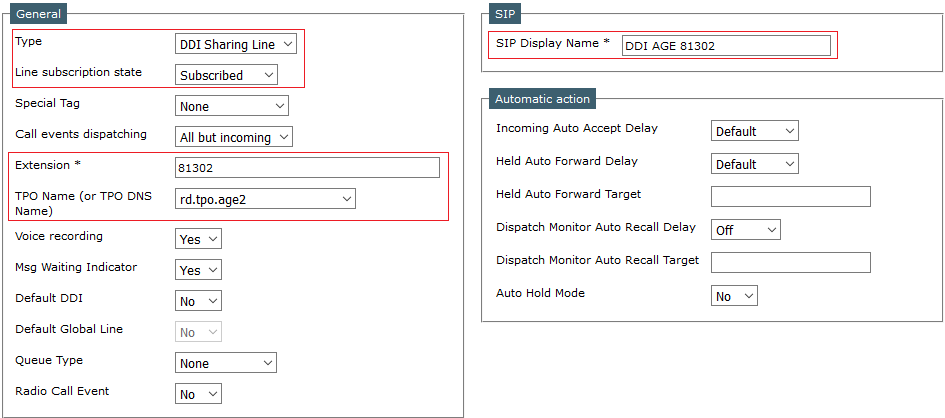
9.Select whether "Default DDI" and "Default Global Line" must be set to "Yes" or "No". See this topic
10.Press Update to commit changes ; new options will apply at the next logon for the user ;
11.This procedure can be repeated for any user who need to access the shared DDI line 81302 ; however IPTrade recommend to use DDI line inheritance to avoid administration mistake.
Define DDI slots
Every DDI line slot must have its corresponding DDI slot key associated. However, it is not mandatory to create each key in each user profile. User or IT administrator should create the DDI slot keys that will be effectively used by the trader. These keys can be positioned in one of its home pages or keys applet. The system will automatically generate any missing DDI slot key during line registration, but these will have no ringtone. Those automatically generated keys are grouped in a page called "Missing DDI Slots".
Keys can be programmed from the TSS administration console or directly from the turret. Although not mandatory, it is advisable to have these keys closely grouped in the same area of the screen;
Please proceed as follows to manually create any DDI slot key on the turret itself:
1)Log on the turret and switch it to the maintenance mode ; 2)Select the key to be programmed and open the key properties panel ; 3)Fill in key properties as shown below and press the button Save ; 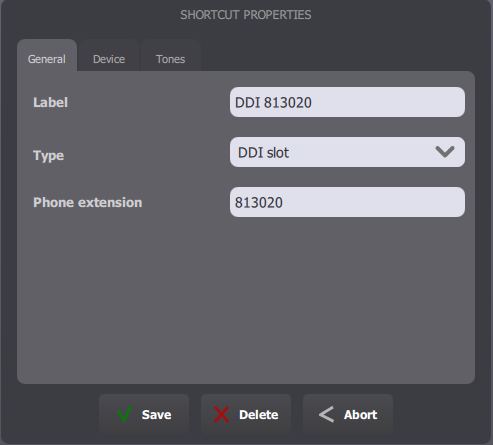
4)Proceed in the same way for slots 813020, 813021, 813022,... ; 5)This procedure must be repeated for all users who need to access the shared DDI line 81302.
Note: While the system automatically creates any missing DDI slot key when the user subscribes to a line, it does not automatically removes it when the user unsubscribes or manually creates a private slot key in his profile. Also note that removing a DDI slot key in the user profile while the user is authenticated is highly discouraged, because it would leave a slot without any key associated.
|


