Additional options


Additional options |
|
| Trading and C&C > Turret Proxy To Open communication (TPO) > DDI Sharing > DDI Lines Sharing > Configure > Workflow |
Line reservation on handset seizureOptions are available in order to automatically select a shared DDI line when initiating an out-bound call sequence from a handset or by pressing a shortcut/contact key. See options User settings | Default device line association and User settings | Device line association (only available in advanced settings view). 1)Open your preferred Internet navigator, connect to the TSS administration console URL and log onto the system with administrator privileges ; 2)From the main menu, select Account Management | Profiles ; 3)From the profiles list, select the profile, navigate to Settings tab panel 4)In the Devices tab, edit the default device line association and fill it with the shared DDI line extension
1)Press Add and Go Back to save the changes ;
Note •Same behavior is obtain by setting to Yes the Default Global Line field in the Line edition form.
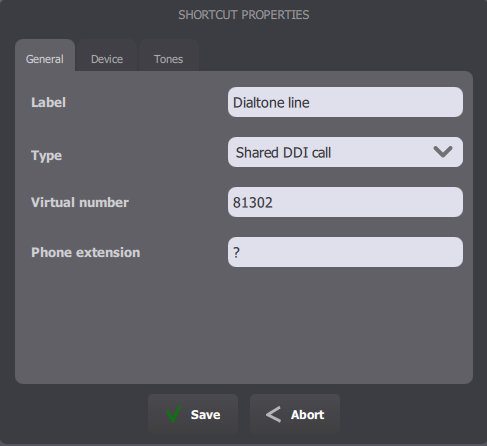
•It is recommended having the Default DDI attribute set to Yes on the shared DDI line specified in this option (or the DDI Sharing | Advanced call handling on all DDI lines set to true); •Different extensions can be assigned to each handset using the option User settings | Device line association (profile.setting.telephony.*device*.line in which *device* is replaced with HS1 or HS2); note that shared DDI line or primary/secondary extensions can be specified. Dial tone keyHaving handsets bound to a shared DDI line as shown above means that the primary/secondary extension can not be used anymore by traders to place calls to external parties. This capability can be restored by programming a specific shortcut key with the following attributes
The key type must be Shared DDI call. The virtual number value must be the primary extension registered in the trader’s profile. The target must be set to ?.
DDI line display policyThe information that should appear on a DDI slot key is globally configurable via the profile.setting.old.displaypolicy setting.
An administrator can also configure a display policy on a per line basis via the TSS administration console. The same values are available for configuration than those described for profile.setting.old.displaypolicy. In addition, an administrator can also attach display policy on a DDI line based on its subscription mode (Subscribed vs Monitored)
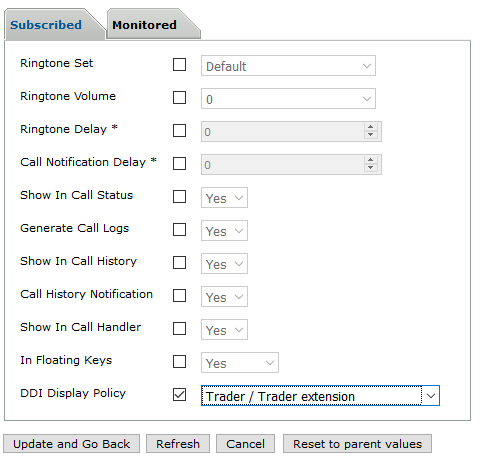 Console line configuration
If the "Legacy" value has been attached to a DDI line, DDI slot keys will follow the policy prescribed by the profile.setting.old.displaypolicy setting.
|
||||||||||