Exclusive mode


Exclusive mode |
|
| Trading and C&C > Turret Proxy To Open communication (TPO) > DDI Sharing > DDI Lines Sharing > Usage > Telephony functions > PBX dependent features > Video Call > Usage |
Exclusive mode impacts video state in different ways depending on exclusive configuration.
•When user presses exclusive button to turn call in exclusive conference: oother users can not join the call ocurrent video state is preserved
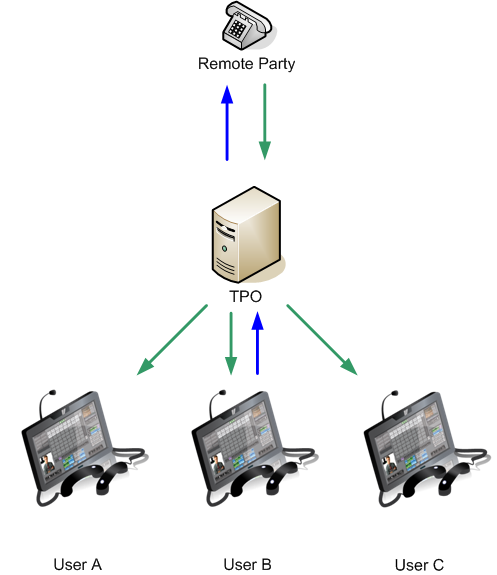
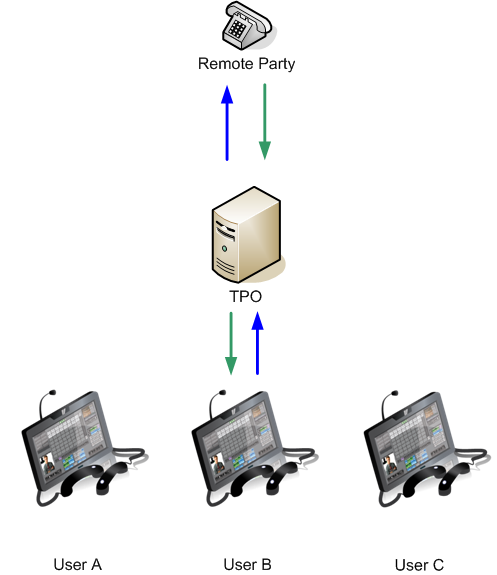
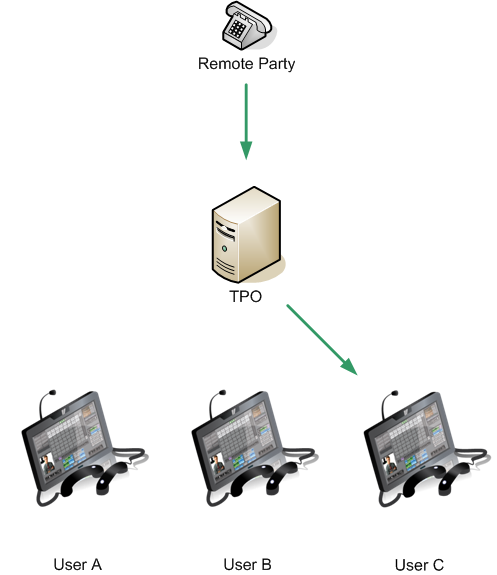
•When user presses exclusive button to turn call strictly exclusive: oother users can not join the call oother users stop receiving remote party video ouser who handles the exclusive call continues to receive remote party video oif video out stream was sent by the user who handles the call exclusivity, video continues to be sent to the remote party. oif video out stream was sent by another user, video stop to be sent to the remote party.
Video is sent by the user who handles the exclusivity:
Video is sent by another user:
|