Enabling HTTP(S) and FTP(ES)


Enabling HTTP(S) and FTP(ES) |
|
| Solution Installation > Netrix Installation > Configure TSS / TPO |
Booting NetrixWhen Netrix boots it tries to connect to the TSS Server defined by DHCP Option 171 (or the override set via the Network Tab)
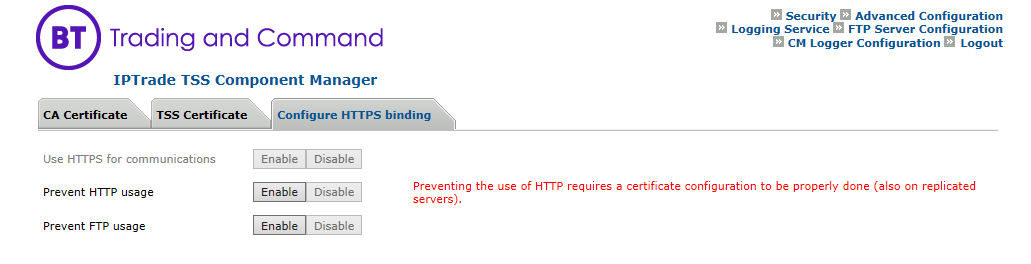
Booting using HTTPIf the DHCP Option (or TSS address override on the Network Tab) is an IP address, Netrix will attempt to boot from the TSS using the HTTP protocol. In the TSS Component Manger make sure Prevent HTTP usage is set to disabled;
Booting using HTTPSIf the TSS address override on the Network Tab is a FQDN, Netrix will attempt to connect to the server using the HTTPS protocol. The TSS will require •a CA Certificate to be installed •HTTPS to be enabled on the TSS Component Manager. If the turret •is configured to use HTTPS but is unable to establish the connection it will not downgrade to using insecure HTTP. •is unable to validate the server, it will ask the user whether they trust the server. If the answer is yes, the turret will update its persisted bundle of certificates and continue to connect to the server. If the answer is no, the turret will reboot. Booting with HTTP AuthenticationIf the TSS has been configured to require turrets to use Basic HTTP Authentication when they boot up, then authentication details should be entered on the TSS Tab. Connecting to the TSSOnce Netrix has booted up it will connect to the TSS defined by the boot settings application.bscg.baseServiceURI and application.bscg.alternateServiceURI
Connecting using HTTPIf the URIs specify an HTTP scheme, Netrix will try and connect using HTTP protocol. In the TSS Component Manger make sure Prevent HTTP usage is set to disabled.
Connecting using HTTPSIf the URIs specify an HTTPS scheme, Netrix will try and connect using HTTPS. The TSS will require •a CA Certificate to be installed •HTTPS to be enabled on the TSS Component Manager. If the turret •is configured to use HTTPS but is unable to establish the connection it will not downgrade to using insecure HTTP. •is unable to validate the server, it will ask the user whether they trust the server. If the answer is yes, the turret will update its persisted bundle of certificates and continue to connect to the server. If the answer is no, the turret will reboot. |