Enabling T3MH


Enabling T3MH |
|
| Solution Installation > Netrix Installation > Configure TSS / TPO |
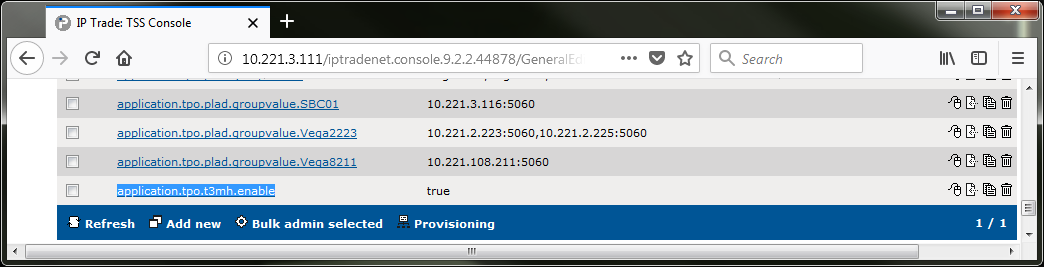
Netrix must receive T3MH messages from the TPOs else the lines will not liven up and/or show the correct supervisory labels; 1.Log in to the TSS console. 2.On the main menu select Device Management > Clusters > YourCluster > Settings > Advanced. 3.In the Advanced Settings add the new setting application.tpo.t3mh.enable and set it to true.
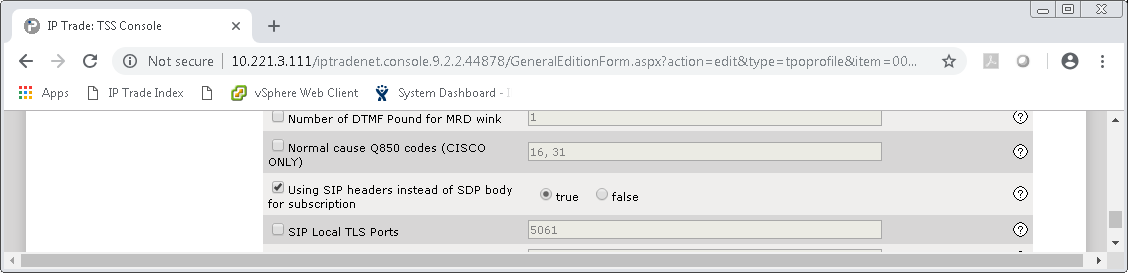
4.In the Expert settings for SIP select using SIP headers instead of SDP and set true. Confirm in Advanced Settings you see add new setting application.sip.subscription.on.header = true.
5.Stop and start the cluster to get it to take effect. |