Optional setup using TSS Command Line Interface

Top  Previous  Next
Solution Installation > TSS Installation > Using the TSS Virtual Appliance > Optional Configuration

At this point, the TSS Virtual Appliance is configured with an IP address, a network mask, a default gateway and a redundancy ID. If not, please refer to the Virtual Appliance deployment section.


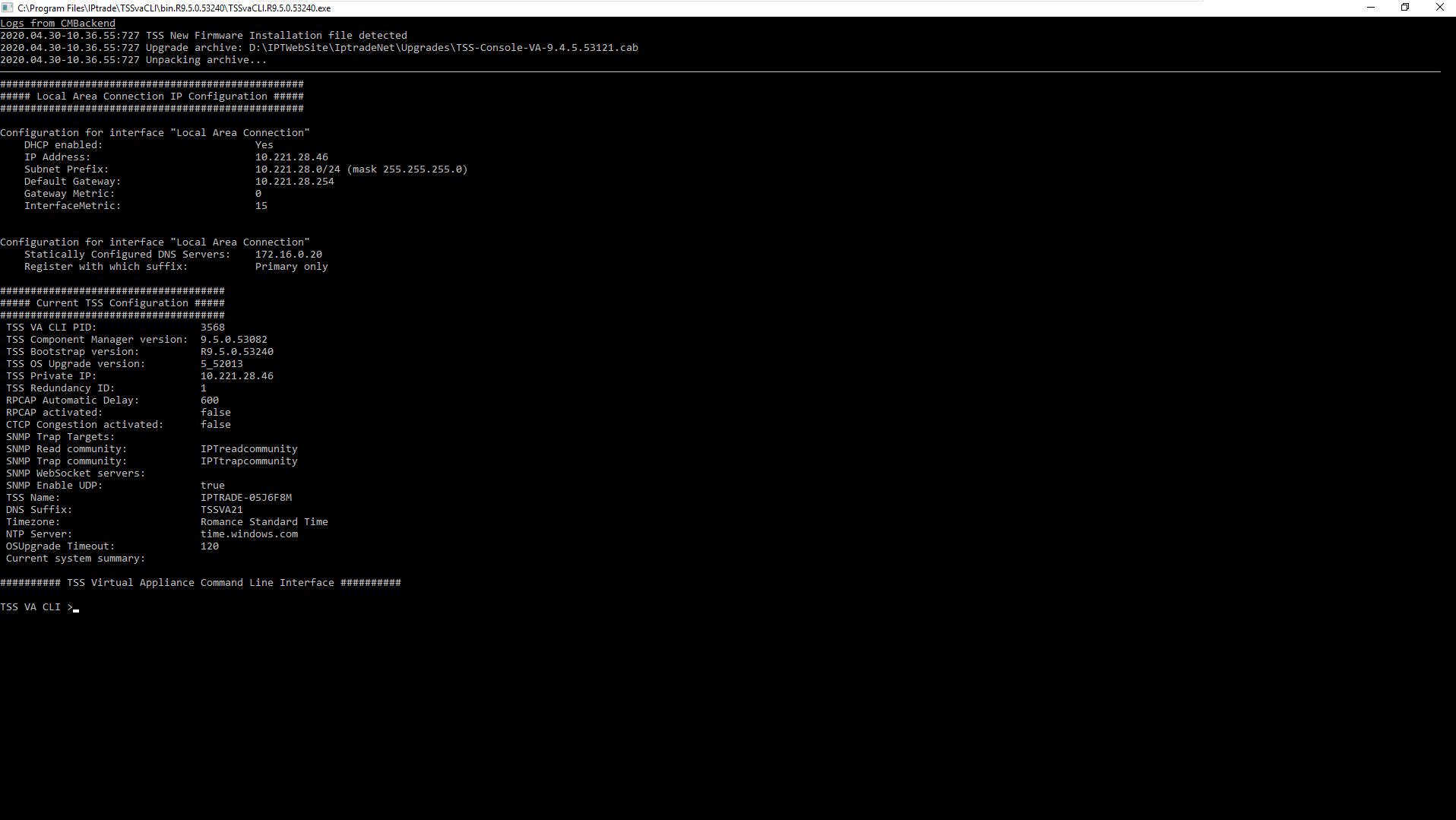
The Command Line Interface should prompt the following information.


TSSVAConfig1


Please note that the TSS has already all the required information to run properly. This section describes how the Command Line Interface (abbreviated CLI) can be used to customize the Virtual Appliance.


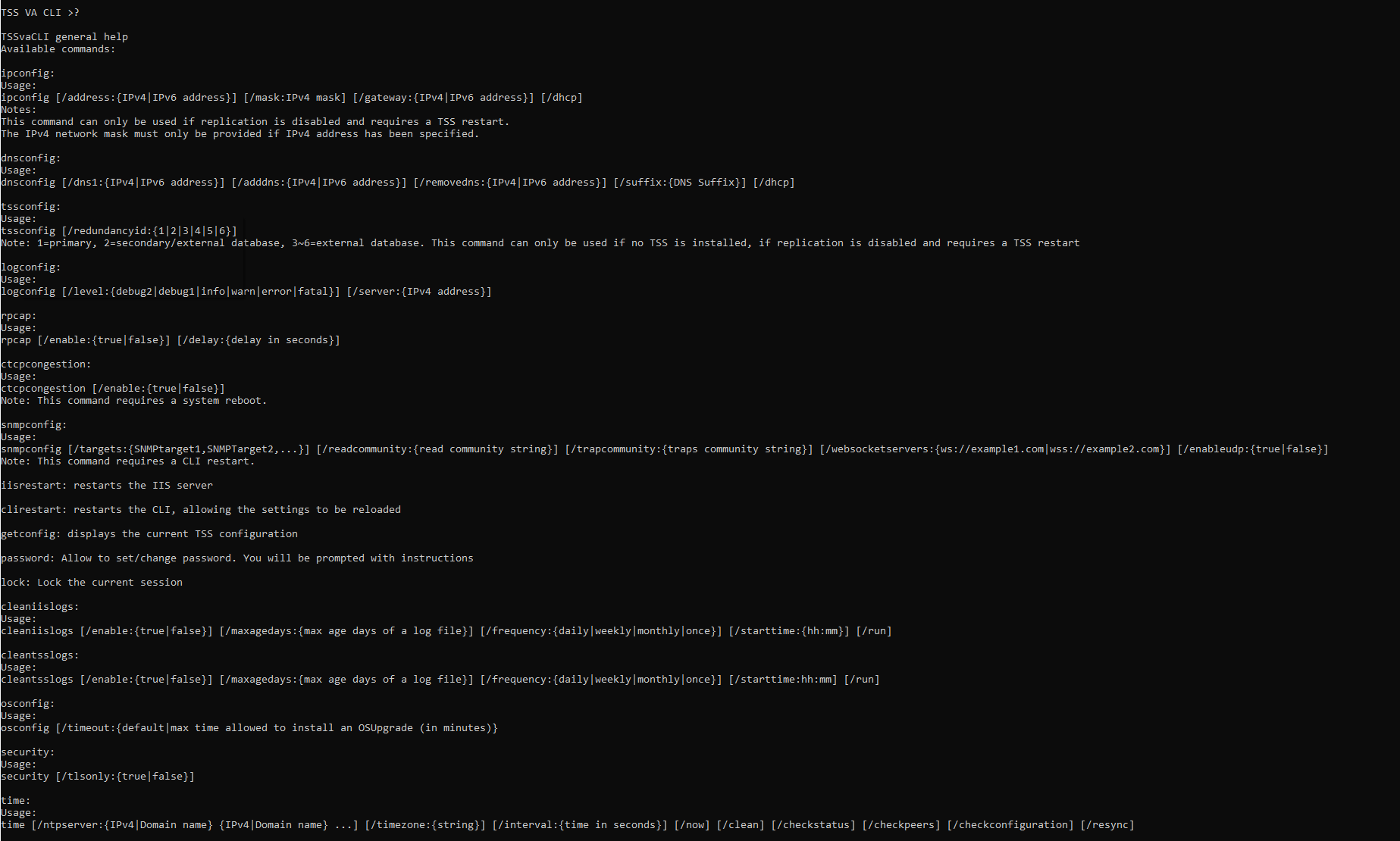
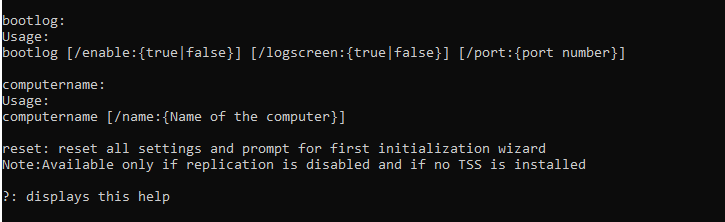
First, notice that a help section is available by entering the "?" command. The CLI then prompts you the following information.


TSSVAConfig2bis

tssvaconfig3bis

ipconfig

This command allows you to change the IP configuration of the TSS. Please note that this command can only be used if replication is disabled.


The switches of this command are:

•/address: allows you to specify the IPv4 or IPv6 address

•/mask: allows you to specify the IPv4 mask. Please note that this parameter is only taken in consideration if an IPv4 address has been provided with the /address switch.

•/gateway: allows you to specify the default gateway. This parameter can take an IPv4 or IPv6 address.

•/dhcp: allows you to enable DHCP and set your IP address automatically.


Once IP address has been changed it is necessary to update value of boot setting 'application.bscg.baseServiceURI'. Go to Console / Device Management /Zones / Edit zone 'System' / Open tab TPO/Turrets Boot Settings / Open tab Advanced mode / Update value of setting 'application.bscg.baseServiceURI' with new server IP address.

dnsconfig:

This command can be used to define the TSS Virtual Appliance DNS configuration.

The following switches can be used with this command:

•/dns1: allows you to specify the primary DNS IPv4 or IPv6 address.

•/adddns: allows you to add a new DNS IPv4 or IPv6 address.

•/removedns: allow you to remove an existing DNS IPv4 or IPv6 address.

•/suffix: allows you to specify the DNS suffix. This information is required if you plan to enable HTTPs and FTPs features on the TSS. Indeed, the DNS suffix is used to build the Fully Qualified Domain Name (FQDN) required by the HTTPs and FTPs features. Please note that this option can only be used when replication is disabled.

•/dhcp: allow you to set the DNS addresses automatically through the DHCP.

tssconfig:

This command can be used to configure the TSS.

The following switch can be used with this command:

•/redundancyid: allows you to specify the  TSS redundancy identity. Accepted values are 1 (for primary) to 6 (2 for secondary/external database, 3 to 6 for external database only).

Please note that this command can only be used if no TSS firmware is installed on the TSS Virtual Appliance and if the replication is disabled. If a redundancy ID  modification is required, all TSS Firmwares installed on the device must be removed and replication disabled in order to use this command.

logconfig:

This command allows you to modify the logging configuration of the TSS Virtual Appliance.

The following switches can be used to do so:

•/level: allows you to define the default logging level. Accepted values are debug2, debug1, info, warn, error, fatal. Any syslog message with a level higher or equivalent to the defined level will be traced to the syslog server and in the local trace file. Please note that the default value is info.

•/server: allows you to define the target syslog server of the TSS Virtual Appliance.

rpcap:

This command allows you to enable or disable the rpcap service and to configure the auto deactivation delay. Such service can be used to remotely capture network traffic on the TSS Virtual Appliance.

The following switch can be used with this command:

•/enable: allows you to enable or disable the rpcap feature. Accepted values are enable and disable.

•/delay: allows you to specify after how many seconds the rpcap service will be automatically disabled when activated via the Component Manager interface. This value in seconds cannot be set to 0 or a negative value. Default value is 600 seconds.

ctcpcongestion:

This command allows you to enable or disable the CTCP congestion provider on the network connection.

The following switch can be used with this command.

•/enable: allows you to enable or disable the CTCP congestion provider. Accepted values are enable and disable.

snmpconfig:

This command allows you to configure the SNMP engine running on the TSS. The following switches can be used with this command.

•/targets: allows you to specify the SNMP traps target(s). This value can be empty, a single target IP address or multiple targets IP addresses separated by a comma.

•/websocketservers: allows you to specify the SNMP WebSocket target(s). This value can be empty, a single target URI or multiple URIs separated by a pipe character ("|"). Example : ws://echo.websocket.org|wss://echo2.websocket.org

•/readcommunity: allows you to define the read community. This value can be a string (no space) or empty.

•/trapcommunity: allows you to define the traps community. This value can be a string (no space) or empty.

iisrestart:

This command restarts the IIS Server. It shall only be used when required by an IP Trade support member in order to solve a potential problem. A confirmation message is displayed when this command is used.

clirestart:

This command restarts the current Command Line Interface. It can be used to refresh the CLI settings which is not necessary in a "normal" scenario. Once again, this command shall only be used when required by an IPTrade support member.

getconfig:

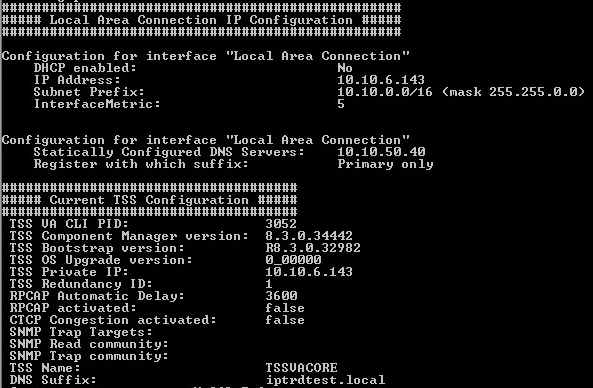
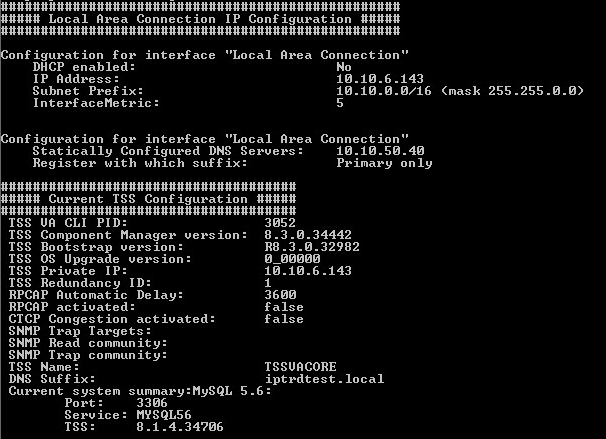
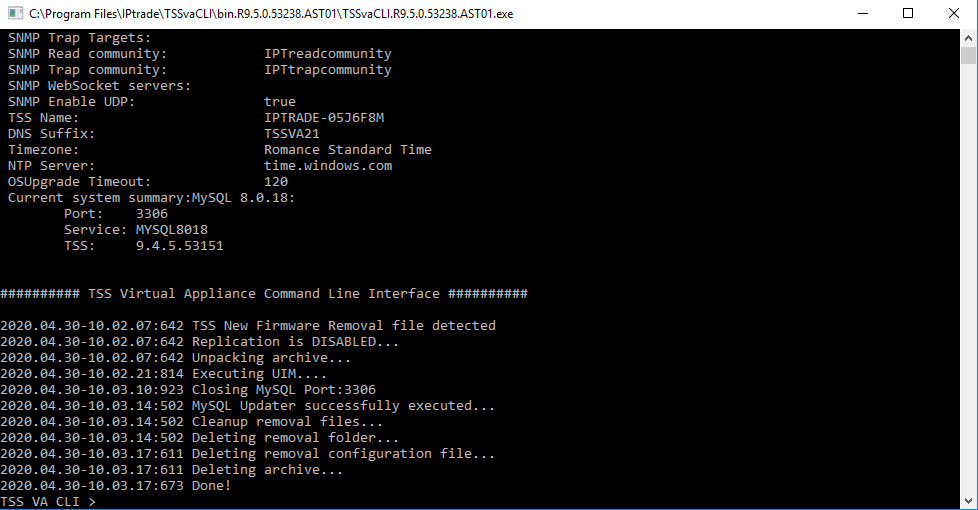
This command allows you to prompt the current TSS Virtual Appliance configuration. This system summary gives you details about IP Configuration and TSS Firmware(s) installed on this Virtual Appliance.


The following example shows you the result of such a command on a TSS Virtual Appliance with a TSS Firmware installed. Please note that TSS Firmwares with replication enabled are displayed with an "*".


TSSVAConfig3


reset:

This command can only be used if no TSS firmware is installed on the TSS Virtual Appliance and if replication is disabled. If a reset is required, all the TSS Firmwares installed on the device must be removed and replication disabled in order to use this command. Using this command brings you back to the Initial Configuration Wizard mentioned in the Virtual Appliance deployment section.


This command is not availbale in remote connection.

password:

This command allows the administrator to set or change the current's user password. This command will also enable/disable the remote connection if a password is set or not. If a password is already, your old password will be asked.


TSSVAConfig4

lock:

This command allows the administrator to lock the current session


TSSVAConfig5 

security:

This command allows to manage the security of the TSS. Once this command is executed, a system reboot is required

The following switches can be used with this command:

•/tlsonly {true|false} : Enable or disable specific ciphers protocols used for accessing the TSS. When set to "true", SSLv2, SSLv3, TLSv1.0 are disabled.


TSSVAConfig9


time:

This command allows to configure and manage system time synchronization using NTP (Network Time Protocol). It provides options to set servers, define synchronization parameters, and check the synchronization status of the system clock.

The following switches can be used with this command:

/ntpserver

•Sets one or more NTP servers to synchronize with.

•When specifying multiple servers, separate them with a space.

•Running this command multiple times will override the previously configured servers with the new list provided.

•The first server in the list will always be the primary server, while any additional servers will act as fallback servers if the primary is unavailable.

/timezone

•Sets the system's timezone.

•The configured timezone will be displayed in the CLI configuration.

•A list of available timezone values is provided at the end of this document.

/interval

•Sets the synchronization interval (in seconds) for the NTP service to query the configured NTP servers.

/now

•Displays the system's current time.

/clean

•Removes all configured NTP servers.

•Reverts the system to its default, non-configured state.

/checkstatus

•Returns the time synchronization status of the system.

•Includes details of the currently selected active NTP source.

/checkpeers

•Returns a list of all configured NTP peers (servers) and their status.

•Includes synchronization details.

/checkconfiguration

•Lists all configured NTP servers.

•Displays the /interval (specialpollinterval) value currently set for the system.

/resync

•Forces an immediate synchronization of the system clock with the configured NTP server(s).

•This command is useful when the system time is out of sync and an immediate correction is needed.


TSSVAConfig10


bootlog:

This command allows to display messages from the TSS Bootstrap about updates/modifications that are currently made

The following switches can be used with this command:

•/enable {true | false}: Allows you to enable/disable the display of messages from the TSS Bootstrap.

•/logscreen {true | false}: Allow you to modify the way the messages are displayed in the CLI.

If you enable the logscreen, the message will be displayed at the top of the CLI.

TSSVAConfig11

Otherwise, it'll be displayed inside the CLI.

TSSVAConfig12


•/port {port}: Allows you to modify the communication port between the TSS Bootstrap and the CLI.


TSSVAConfig13


computername:

This command allows you to change the name of the computer.

The following switch can be used with this command:

•/name {name}: Allows you to change the name of the computer for the value mentioned.


TSSVAConfig14


Region

Value

(UTC-12:00)

International Date Line West

Dateline Standard Time

(UTC-11:00)

Co-ordinated Universal Time-11

UTC-11

(UTC-10:00)

Aleutian Islands

Aleutian Standard Time

(UTC-10:00)

Hawaii

Hawaiian Standard Time

(UTC-09:30)

Marquesas Islands

Marquesas Standard Time

(UTC-09:00)

Alaska

Alaskan Standard Time

(UTC-09:00)

Co-ordinated Universal Time-09

UTC-09

(UTC-08:00)

Baja California

Pacific Standard Time (Mexico)

(UTC-08:00)

Co-ordinated Universal Time-08

UTC-08

(UTC-08:00)

Pacific Time (US & Canada)

Pacific Standard Time

(UTC-07:00)

Arizona

US Mountain Standard Time

(UTC-07:00)

Chihuahua, La Paz, Mazatlan

Mountain Standard Time (Mexico)

(UTC-07:00)

Mountain Time (US & Canada)

Mountain Standard Time

(UTC-06:00)

Central America

Central America Standard Time

(UTC-06:00)

Central Time (US & Canada)

Central Standard Time

(UTC-06:00)

Easter Island

Easter Island Standard Time

(UTC-06:00)

Guadalajara, Mexico City, Monterrey

Central Standard Time (Mexico)

(UTC-06:00)

Saskatchewan

Canada Central Standard Time

(UTC-05:00)

Bogota, Lima, Quito, Rio Branco

SA Pacific Standard Time

(UTC-05:00)

Chetumal

Eastern Standard Time (Mexico)

(UTC-05:00)

Eastern Time (US & Canada)

Eastern Standard Time

(UTC-05:00)

Haiti

Haiti Standard Time

(UTC-05:00)

Havana

Cuba Standard Time

(UTC-05:00)

Indiana (East)

US Eastern Standard Time

(UTC-05:00)

Turks and Caicos

Turks And Caicos Standard Time

(UTC-04:00)

Asuncion

Paraguay Standard Time

(UTC-04:00)

Atlantic Time (Canada)

Atlantic Standard Time

(UTC-04:00)

Caracas

Venezuela Standard Time

(UTC-04:00)

Cuiaba

Central Brazilian Standard Time

(UTC-04:00)

Georgetown, La Paz, Manaus, San Juan

SA Western Standard Time

(UTC-04:00)

Santiago

Pacific SA Standard Time

(UTC-03:30)

Newfoundland

Newfoundland Standard Time

(UTC-03:00)

Araguaina

Tocantins Standard Time

(UTC-03:00)

Brasilia

E. South America Standard Time

(UTC-03:00)

Cayenne, Fortaleza

SA Eastern Standard Time

(UTC-03:00)

City of Buenos Aires

Argentina Standard Time

(UTC-03:00)

Greenland

Greenland Standard Time

(UTC-03:00)

Montevideo

Montevideo Standard Time

(UTC-03:00)

Punta Arenas

Magallanes Standard Time

(UTC-03:00)

Saint Pierre and Miquelon

Saint Pierre Standard Time

(UTC-03:00)

Salvador

Bahia Standard Time

(UTC-02:00)

Co-ordinated Universal Time-02

UTC-02

(UTC-01:00)

Azores

Azores Standard Time

(UTC-01:00)

Cabo Verde Is.

Cape Verde Standard Time

(UTC)

Co-ordinated Universal Time

UTC

(UTC+00:00)

Dublin, Edinburgh, Lisbon, London

GMT Standard Time

(UTC+00:00)

Monrovia, Reykjavik

Greenwich Standard Time

(UTC+00:00)

Sao Tome

Sao Tome Standard Time

(UTC+01:00)

Casablanca

Morocco Standard Time

(UTC+01:00)

Amsterdam, Berlin, Bern, Rome, Stockholm, Vienna

W. Europe Standard Time

(UTC+01:00)

Belgrade, Bratislava, Budapest, Ljubljana, Prague

Central Europe Standard Time

(UTC+01:00)

Brussels, Copenhagen, Madrid, Paris

Romance Standard Time

(UTC+01:00)

Sarajevo, Skopje, Warsaw, Zagreb

Central European Standard Time

(UTC+01:00)

West Central Africa

W. Central Africa Standard Time

(UTC+02:00)

Amman

Jordan Standard Time

(UTC+02:00)

Athens, Bucharest

GTB Standard Time

(UTC+02:00)

Beirut

Middle East Standard Time

(UTC+02:00)

Cairo

Egypt Standard Time

(UTC+02:00)

Chisinau

E. Europe Standard Time

(UTC+02:00)

Damascus

Syria Standard Time

(UTC+02:00)

Gaza, Hebron

West Bank Standard Time

(UTC+02:00)

Harare, Pretoria

South Africa Standard Time

(UTC+02:00)

Helsinki, Kyiv, Riga, Sofia, Tallinn, Vilnius

FLE Standard Time

(UTC+02:00)

Jerusalem

Israel Standard Time

(UTC+02:00)

Kaliningrad

Kaliningrad Standard Time

(UTC+02:00)

Khartoum

Sudan Standard Time

(UTC+02:00)

Tripoli

Libya Standard Time

(UTC+02:00)

Windhoek

Namibia Standard Time

(UTC+03:00)

Baghdad

Arabic Standard Time

(UTC+03:00)

Istanbul

Turkey Standard Time

(UTC+03:00)

Kuwait, Riyadh

Arab Standard Time

(UTC+03:00)

Minsk

Belarus Standard Time

(UTC+03:00)

Moscow, St Petersburg

Russian Standard Time

(UTC+03:00)

Nairobi

E. Africa Standard Time

(UTC+03:30)

Tehran

Iran Standard Time

(UTC+04:00)

Abu Dhabi, Muscat

Arabian Standard Time

(UTC+04:00)

Astrakhan, Ulyanovsk

Astrakhan Standard Time

(UTC+04:00)

Baku

Azerbaijan Standard Time

(UTC+04:00)

Izhevsk, Samara

Russia Time Zone 3

(UTC+04:00)

Port Louis

Mauritius Standard Time

(UTC+04:00)

Saratov

Saratov Standard Time

(UTC+04:00)

Tbilisi

Georgian Standard Time

(UTC+04:00)

Volgograd

Volgograd Standard Time

(UTC+04:00)

Yerevan

Caucasus Standard Time

(UTC+04:30)

Kabul

Afghanistan Standard Time

(UTC+05:00)

Ashgabat, Tashkent

West Asia Standard Time

(UTC+05:00)

Ekaterinburg

Ekaterinburg Standard Time

(UTC+05:00)

Islamabad, Karachi

Pakistan Standard Time

(UTC+05:00)

Qyzylorda

Qyzylorda Standard Time

(UTC+05:30)

Chennai, Kolkata, Mumbai, New Delhi

India Standard Time

(UTC+05:30)

Sri Jayawardenepura

Sri Lanka Standard Time

(UTC+05:45)

Kathmandu

Nepal Standard Time

(UTC+06:00)

Astana

Central Asia Standard Time

(UTC+06:00)

Dhaka

Bangladesh Standard Time

(UTC+06:00)

Omsk

Omsk Standard Time

(UTC+06:30)

Yangon (Rangoon)

Myanmar Standard Time

(UTC+07:00)

Bangkok, Hanoi, Jakarta

SE Asia Standard Time

(UTC+07:00)

Barnaul, Gorno-Altaysk

Altai Standard Time

(UTC+07:00)

Hovd

W. Mongolia Standard Time

(UTC+07:00)

Krasnoyarsk

North Asia Standard Time

(UTC+07:00)

Novosibirsk

N. Central Asia Standard Time

(UTC+07:00)

Tomsk

Tomsk Standard Time

(UTC+08:00)

Beijing, Chongqing, Hong Kong SAR, Urumqi

China Standard Time

(UTC+08:00)

Irkutsk

North Asia East Standard Time

(UTC+08:00)

Kuala Lumpur, Singapore

Singapore Standard Time

(UTC+08:00)

Perth

W. Australia Standard Time

(UTC+08:00)

Taipei

Taipei Standard Time

(UTC+08:00)

Ulaanbaatar

Ulaanbaatar Standard Time

(UTC+08:45)

Eucla

Aus Central W. Standard Time

(UTC+09:00)

Chita

Transbaikal Standard Time

(UTC+09:00)

Osaka, Sapporo, Tokyo

Tokyo Standard Time

(UTC+09:00)

Pyongyang

North Korea Standard Time

(UTC+09:00)

Seoul

Korea Standard Time

(UTC+09:00)

Yakutsk

Yakutsk Standard Time

(UTC+09:30)

Adelaide

Cen. Australia Standard Time

(UTC+09:30)

Darwin

AUS Central Standard Time

(UTC+10:00)

Brisbane

E. Australia Standard Time

(UTC+10:00)

Canberra, Melbourne, Sydney

AUS Eastern Standard Time

(UTC+10:00)

Guam, Port Moresby

West Pacific Standard Time

(UTC+10:00)

Hobart

Tasmania Standard Time

(UTC+10:00)

Vladivostok

Vladivostok Standard Time

(UTC+10:30)

Lord Howe Island

Lord Howe Standard Time

(UTC+11:00)

Bougainville Island

Bougainville Standard Time

(UTC+11:00)

Chokurdakh

Russia Time Zone 10

(UTC+11:00)

Magadan

Magadan Standard Time

(UTC+11:00)

Norfolk Island

Norfolk Standard Time

(UTC+11:00)

Sakhalin

Sakhalin Standard Time

(UTC+11:00)

Solomon Is., New Caledonia

Central Pacific Standard Time

(UTC+12:00)

Anadyr, Petropavlovsk-Kamchatsky

Russia Time Zone 11

(UTC+12:00)

Auckland, Wellington

New Zealand Standard Time

(UTC+12:00)

Co-ordinated Universal Time+12

UTC+12

(UTC+12:00)

Fiji

Fiji Standard Time

(UTC+12:45)

Chatham Islands

Chatham Islands Standard Time

(UTC+13:00)

Co-ordinated Universal Time+13

UTC+13

(UTC+13:00)

Nuku'alofa

Tonga Standard Time

(UTC+13:00)

Samoa

Samoa Standard Time

(UTC+14:00)

Kiritimati Island

Line Islands Standard Time