TPO Cluster


TPO Cluster |
|
| Solution Integration > PBXs > Cisco > Secure Communication > Configure |
Installation recommendations•It is preferable the Alpha node is an Active node. In that case, the client certificate could be in used after its creation. •It is preferable to have only an active node in a TPO cluster due to the "several active nodes" limitation.
The following steps describe how to configure TPO for secure communication usage:
1.Go to TSS console administration, TPO Cluster 2.Enable Secure mode on the cluster
3.Enable Bulk registration
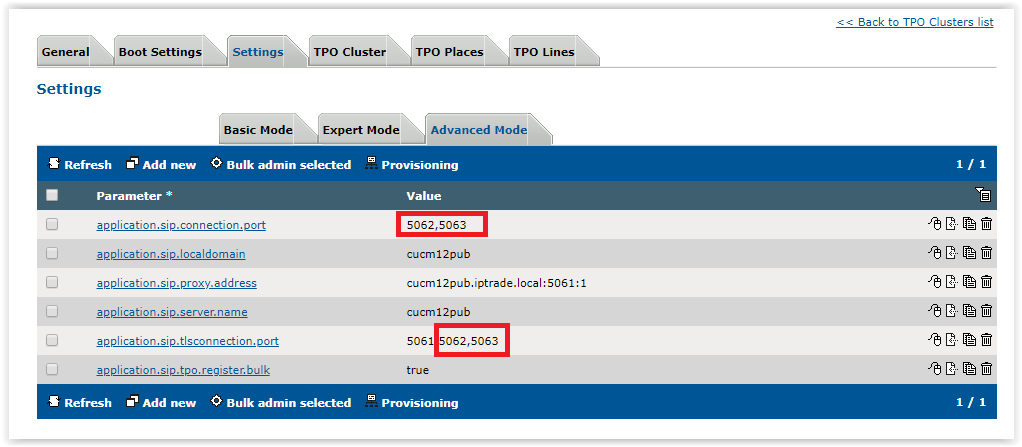
4.Configure SIP settings Important: ▪the SIP Proxy must be configured to use default SIPS port 5061 (in the PBX Cluster configuration, see "Node addresses/Subscribers list" field). Example: cucm12pub.iptrade.local:5061 ▪The setting "application.capf.proxy.address" must be configured to the same value. Example: application.capf.proxy.address = cucm12pub.iptrade.local:5061 ▪SIP Local TLS Ports must contains the default SIPS port 5061 Example: application.sip.tlsconnection.port = 5061,5062,5063
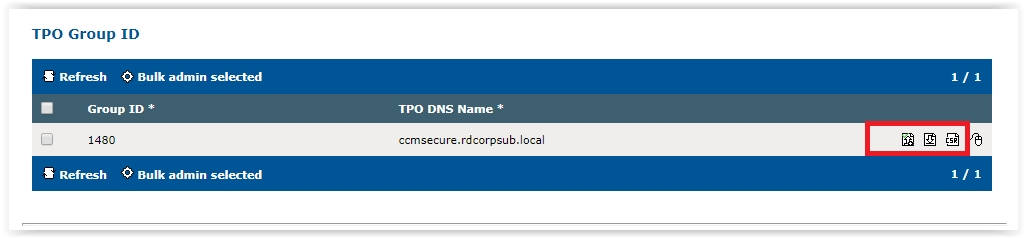
5.TPO Server Certificate Create TPO Server Certificate. It allows the turrets to make a secure communication with TPO. Important: TPO node must in Active or Passive state to display the certificate management icons:
7.Fetch < %DEVICE_5000%> lines Important: Once lines are fetched, TSS automatically adds SIP Local IP ports and TLS ports. Depending of the secure/non secure configuration, the TPO will use one setting or the other. Example: 2 devices fetched using local port 5062 and 5063
8.Reboot the Cluster |
||||||||||||||||||||||||||||||||