How to track Turret's call


How to track Turret's call |
|
| Standard > Troubleshooting Data: References > TPO > TPO Debug Information > FAQ > Tracking calls > Example: Tracking DDI call |
Go to the TPO debug information file:
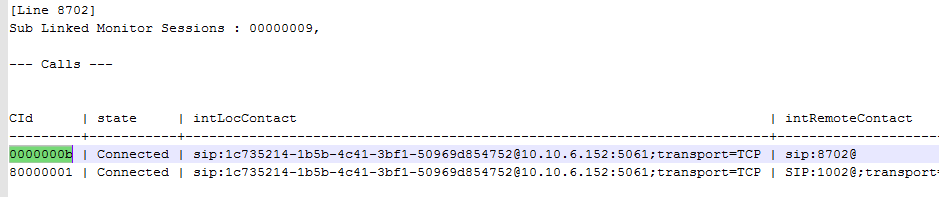
1.Open SystemInformation.txt 2.Go to the section "Calls information" and find the turret's call (CId 0000000b)
3.With the call Id (CId), you can have SIP information. Open CCL.txt and find in the CId 0000000b.
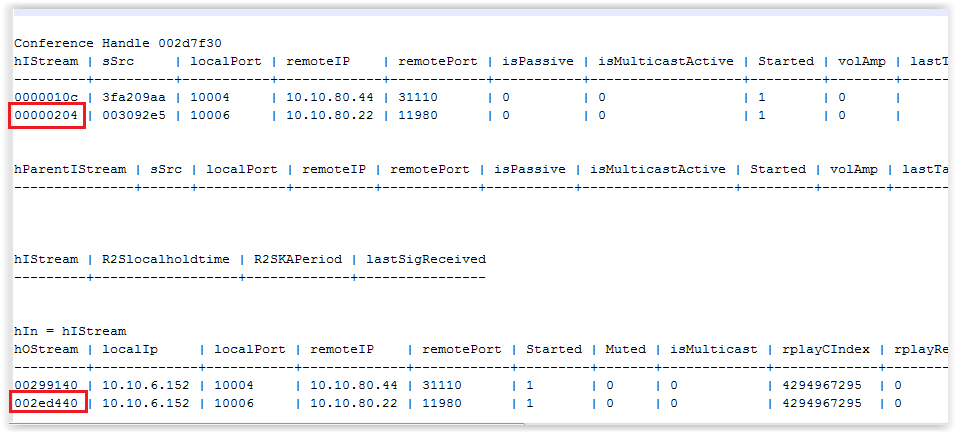
4.With the input handle (inputH) and the output handle (outputH), get RTP information. These information is TPO point of view. It means the inputH corresponds to the output stream of the turret and the outputH correspond to the input stream of the turret.
Open OLDCBdump.txt and find 00000204 and 002ed440
Input stream•TPO receives RTP stream of the turret on listening port 10006 Output stream•TPO sends RTP stream to the turret listening port 11980
NOTE: When there is bad voice quality, TPO provides packets statics (for example the Number of lost RTP packet).
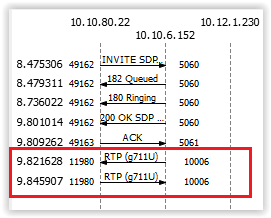
5.Open the network trace It confirms the used ports on the turret:
|