How to track Master call


How to track Master call |
|
| Standard > Troubleshooting Data: References > TPO > TPO Debug Information > FAQ > Tracking calls > Example: Tracking DDI call |
Go to the TPO debug information file:
1.Open SystemInformation.txt 2.Go to the section "Master Calls information" and find the Master call (CId 80000001)
3.With the call Id (CId), you can have SIP information. Open CCL.txt and find in the CId 80000001.
4.With the input handle (inputH) and the output handle (outputH), get RTP information. These information is TPO point of view. It means the inputH corresponds to the output stream of the IP phone and the outputH correspond to the input stream of the IP phone.
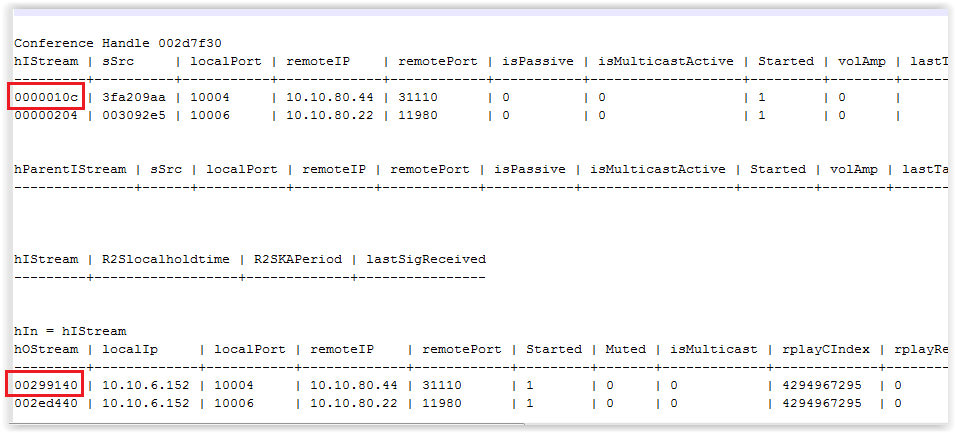
Open OLDCBdump.txt and find 0000010c and 00299140
Input stream•TPO receives RTP stream of the turret on listening port 10004 Output stream•TPO sends RTP stream to the turret listening port 31110
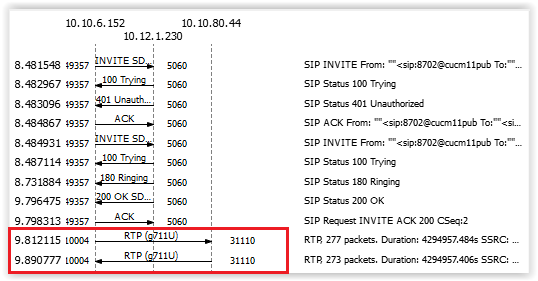
5.Open the network trace It confirms the used ports on the turret:
|