WBA API Management


WBA API Management |
|
| Compliance > Assure |
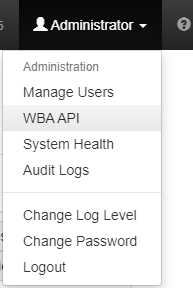
The WBA API Management page is accessed from the WBA API link on the Administrator menu on the top navigation bar. By selecting “WBA API” option in the below mentioned page will be opened and their “Admin” user can create/delete the API users for WBA client authentication.
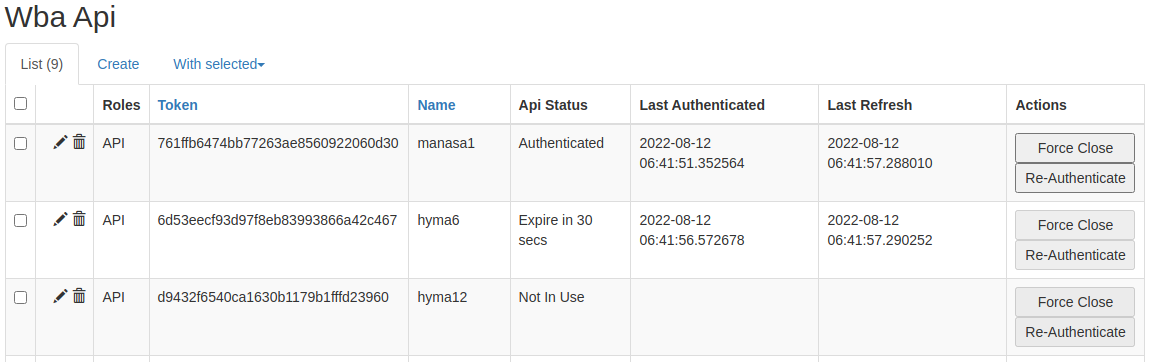
A table shows the current WBA API users within the system. Below is the page that displays all information like Token, Name, API status, Client Last Authenticated time, Last Refresh time and Actions column consists of a buttons (Force Close, Re-Authenticate) and Last Refresh time is updated every 10 secs after the client is authenticated until the client is disconnected.
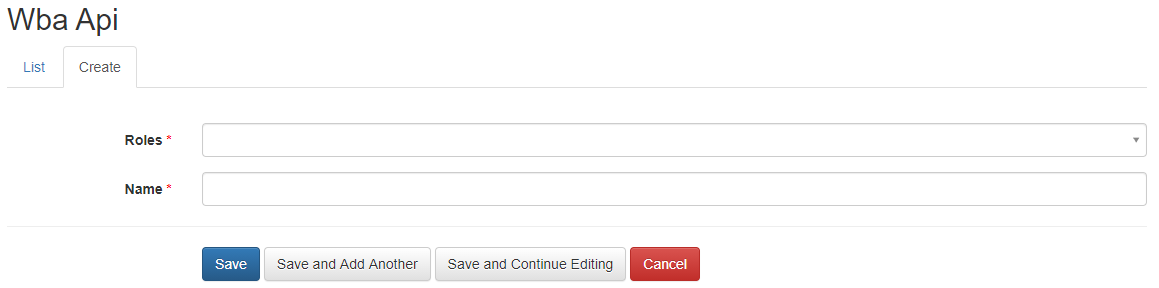
UsersCreating UsersNew API users are created by clicking on the Create tab heading on the WBA API table. A form is provided for you to enter the details of the new user.
Removing UsersAPI user can be deleted by clicking on the trash icon on the table row of the user. You will then be asked to confirm. Multiple users can be deleted by selecting them via the check-box on their row in the table, then clicking on the With selected tab and choosing Delete from the drop-down menu. You will be asked to confirm if you wish to delete the selected users. Editing a UserUsers details can be edited by clicking on the edit icon on the table row of the user. RolesAssigning a roleWhen adding a API User, clicking within the Roles entry box will produce a list of available roles. Clicking on the role will add it to the user. Clicking on the Save buttons will save the change and add the role, whereas clicking the Cancel button will cancel the change.
ActionsForce CloseForce Close causes server to send Admin close to client followed by web socket close and tokens to be released. Re-AuthenticateRe-Authenticate is only valid on sessions that are authenticated and will issue the re-authentication challenge as it would on timeout. It causes server to send Admin Re-Authenticate to client where the client should re-authenticate within the grace time else the client’s session will be expired and will be disconnected.
|