Gateway and Lines configuration


Gateway and Lines configuration |
|
| Trading and C&C > Turret Proxy To Open communication (TPO) > SIP Private Wire > Configure |
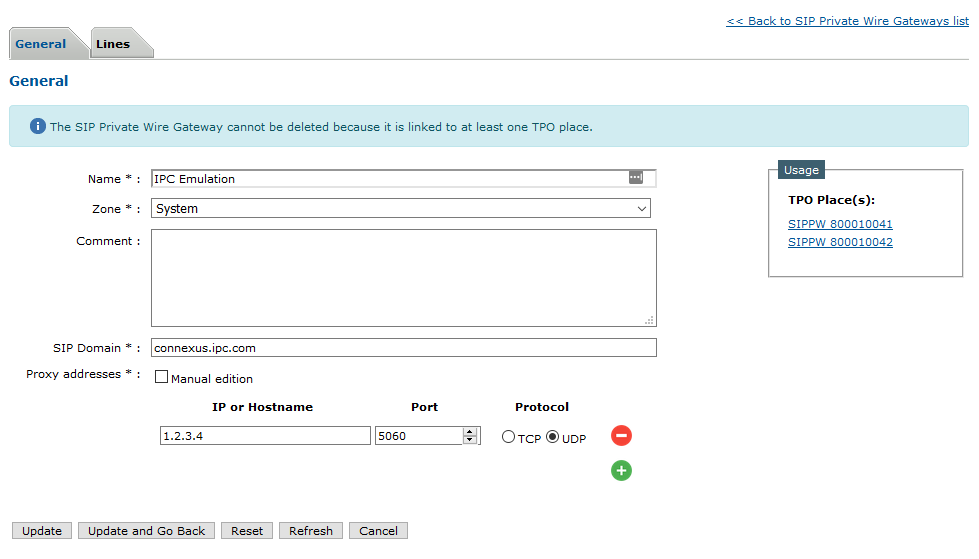
Gateway configurationThe first step is to configure a gateway. (Device Management > SIP Private Wire Gateways) You may also provision this. (System > Provisioning > SIP Private Wire Gateways)
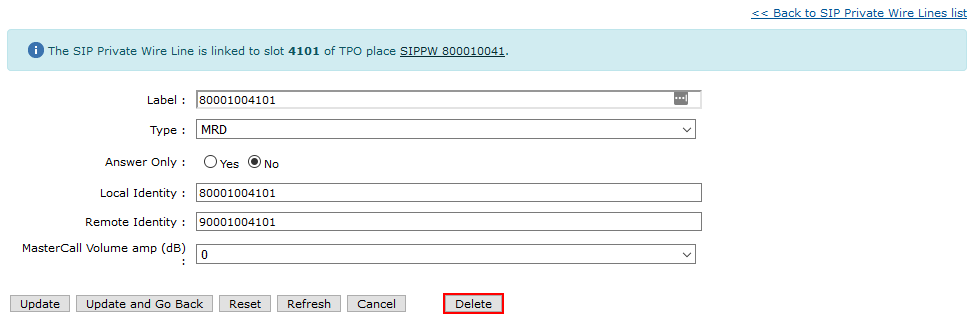
•Name: The name of the gateway. This is just a name to be recognizable in the gateway list. •Zone: The zone here is only used to give administrators access to the configuration of this gateway. •Comment: A comment to describe the gateway. •SIP Domain: The domain that will be used in the SIP URIs, see the next section for more info. •Proxy addresses: The address(es) of the gateway device(s), the TPO will use this as a proxy for all the calls. SIP URIsThe SIP Domain is used to create the SIP URIs used for the calls, so the TPO will use for a particular slot LocalIdentity@SipDomain for the local contact and RemoteIdentity@SipDomain for the remote contact. These are required in order for the system to work with IPC Connexus and you should make sure the resulting contacts match the ones you received. Lines configurationThe next step is to configure the lines, this can be done under in the "Lines" tab in the gateway edition panel. You may also provision these. (System > Provisioning > SIP Private Wire Lines)
•Label: The name of the line in the lines list. It will also be used to identify the line when linking it to a slot. •Type: The type of the line, this should be given with the lines information. (See Usage) •Answer Only: On permanent slots, whether or not the remote party should initiate the call. •Local Identity: The extension to use in the local contact. •Remote Identity: The extension to use in the remote contact. •Master Call Volume: The volume of the call.
MRD SIP InfoIf MRD Private wires are handled by the SBC, the following setting must be activated on the TPO cluster settings:
|
||||||||||