Configure


Configure |
|
| Trading and C&C > Netrix > Alarms |
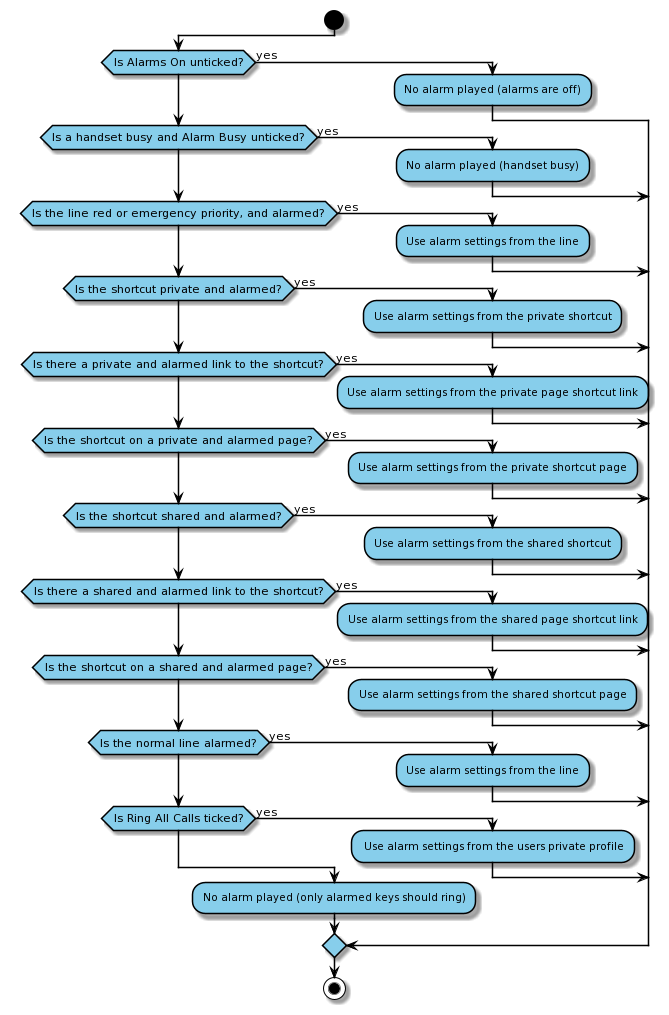
Netrix uses the same Ringtone configuration as a T4, albeit with some limitations. RingtonesWhen provisioning a TSS for use with Netrix you should following the recommendations in Configuring Ringtones Creating a Ringtone SetOnce the Netrix Ringtones have been configured, Ringtone Sets can be created, albeit with the following constraints; •Only the Incoming Event is used by Netrix. •If the periodicity is configured to repeat more than 5 times Netrix will play the Ringtone 5 times then stop. •If the tone is set to oone of the Ringtones added in Configuring Ringtones then Netrix will play the expected tone osomething else Netrix will play the "Ring Ring" tone as an alternative to the unknown Ringtone Assigning a Ringtone SetAt the TSS console a Ringtone set can be assigned to; •A Line •A Shortcut •A Shortcut Page Link •A Shortcut Page •The Users Private Profile When an incoming call arrives at the turret, Netrix using the following logic to determine which Ringtone is played and at what volume;
Editing and assigning Alarm Profiles at the turretAt the turret when •an alarm assignment is performed at the turret (either on a key or page) Netrix updates the Ringtone Set assigned to the Shortcut(s) •the default alarm profile is changed, the Ringtone Set for the Users Private Profile is updated. •an alarm profile-specific setting which is not supported by Ringtone Sets changes, the configuration is stored as a user setting; o"Ring when busy" for an alarm profile is stored as netrix.settings.ringtoneset.<ringtone-set-id>.ringwhenbusy oOn Netrix we allow a volume to be set on a Ringtone Set, this is stored as netrix.settings.ringtoneset.<ringtone-set-id>.volume oWhen a user changes the Ringtone played for a Ringtone Set their change does not affect anyone else, instead, their preference is stored as netrix.settings.ringtoneset.<ringtone-set-id>.ringtone |