Boot Settings (Turrets)


Boot Settings (Turrets) |
|
| Solution Installation > Turret/Console Installation > Device standard Installation > Device Installation |
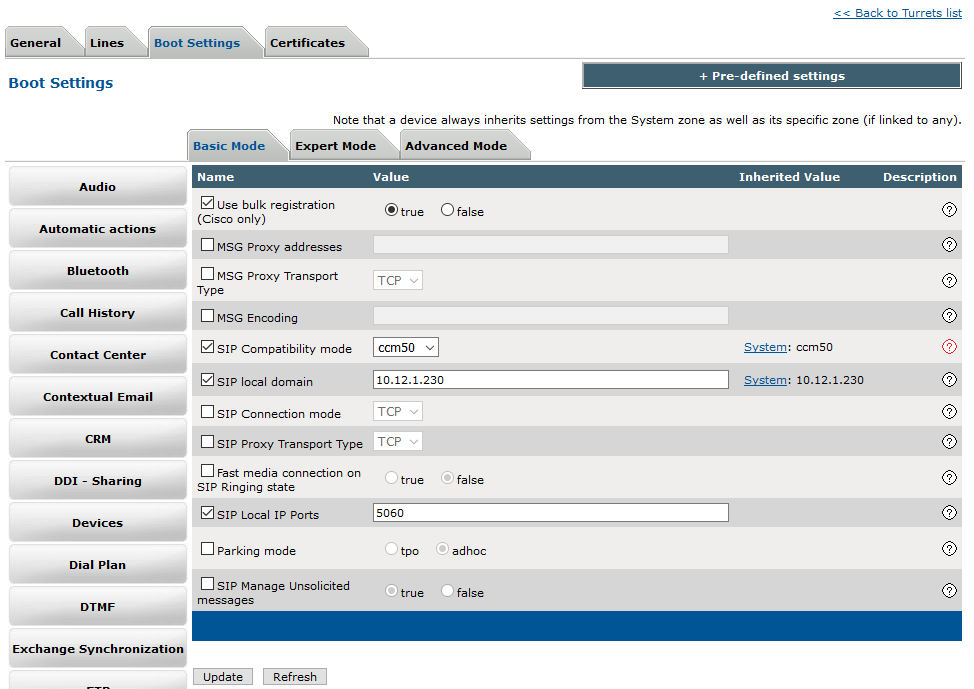
Open one of following section to set settings: •Device Management / Turrets / Edit Turret / Turret Boot Settings / Basic Mode / SIP •Device Management / Zones / Edit Zone / Turret Boot Settings / Basic Mode / SIP •System / Models / Edit Model / Settings / Basic Mode / SIP
Fulfill the following values: •Use bulk registration : true (only with cisco CUCM) •SIP compatibility mode : Cisco CUCM, Avaya Aura and Avaya IP Office = ccm50, Alcatel=omn70, Skype For Business=sfb •SIP local domain : the SIP domain defined in the PBX or the IP address of the PBX if no SIP domain has been defined
SIP server name and SIP Proxy addresses have to be defined in a PBX Cluster. Each IP Address has to be followed by :5060:ltsr in order to ensure proper behavior in case of fail-over and fallback.
Click Update button to commit changes.
You may now reboot the turret. |