Assigning a firmware to a specific zone


Assigning a firmware to a specific zone |
|
| Solution Installation > Turret/Console Installation > Device standard Installation > Device Installation |
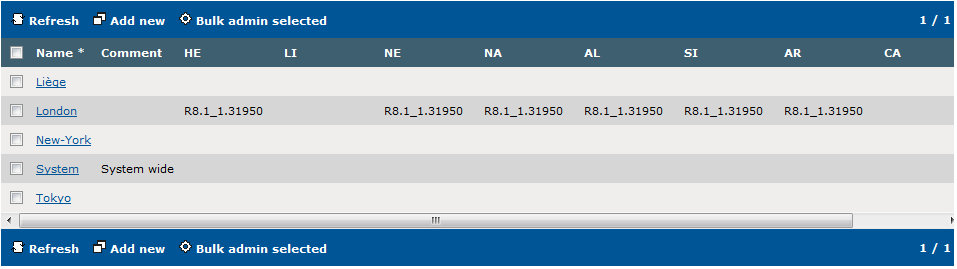
Open the zones list by clicking the Device Management > Zones menu.
The list shows, for each zone, which firmware version is assigned to each turret device type. Here, for example, the London zone uses the R8.1_1.31950 version for each turret type, except LI and CA that has been left blank. A blank version indicates that the turret type will use the default version defined globally (see Assigning a firmware to all devices).
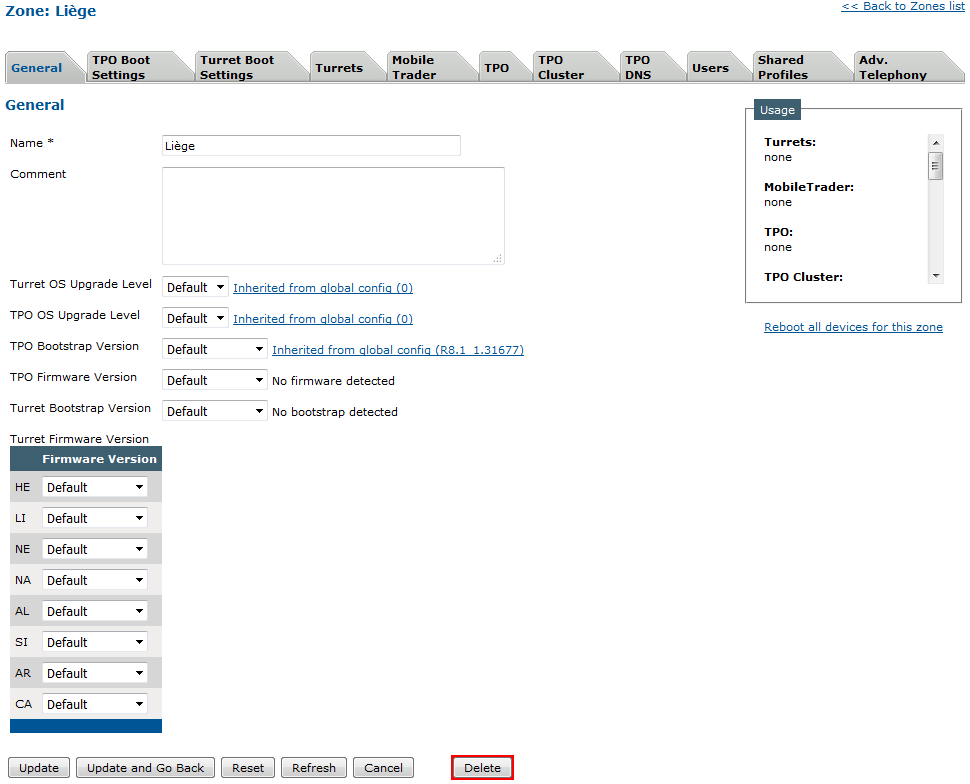
To assign the newly uploaded version to a specific zone, edit the zone by clicking its name in the list.
Here, the Liège zone does not currently specify any firmware version (Default is selected), so the version is inherited from the global default selection (see Assigning a firmware to all devices).
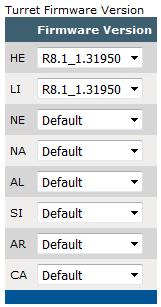
Select the R8.0_0.29649 version in the HE and LI types drop-down menus. Note that we could assign the version to one type only.
Press the Update and Go Back button.
Back to the zones list, the zone now shows the new version for the two device types.
From now on, any HE or LI turret device that is linked to that zone (and has no specific version specified in its device itself) will install and use this new firmware version.
Different firmware versions can be assigned per zone to each turret type, as long as the firmware type is available in the version.
|