Logging engine configuration


Logging engine configuration |
|
| Solution Installation > TSS Installation > Using the TSS Virtual Appliance > Optional Configuration > Optional setup using component manager |
IntroductionThis section describes how to configure the TSS integrated Logging engine. This engine is automatically installed with the TSS firmware and is dedicated to listening and storing the log messages coming either through Syslog or through Syslog over WebSocket.
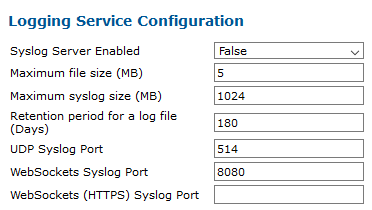
•Syslog Retrieval (Troubleshooting Guide) Logging engine configuration on the TSSOn a VA TSS, this configuration is eased by a dedicated section in the Component Manager, under Logging Service.
You can get the status of the logging engine service and change its configuration:
Once you have updated the configuration, press the Save Configuration button. The service will restart automatically.
Syslog source identificationBy default, turrets and TPO devices use their own device ID to identify their Syslog trace files. This behavior can be altered with the following two settings:
|
||||||||||||||||||||||||||||||||