Assign a firmware to a specific zone


Assign a firmware to a specific zone |
|
| Solution Installation > TPO Installation > TPO Upgrades |
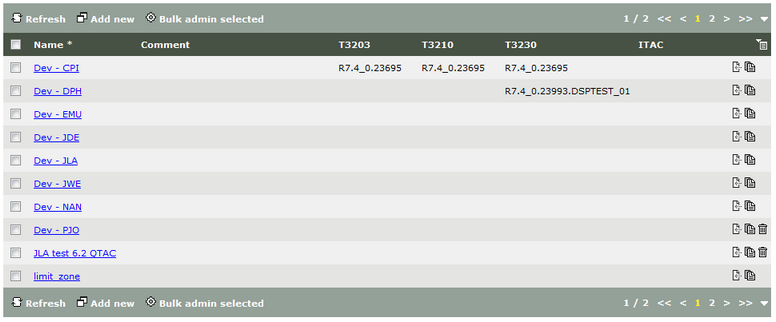
Open the zones list by clicking the Security > Zones menu.
To assign the newly uploaded version to a specific zone, edit the zone by clicking its name in the list.
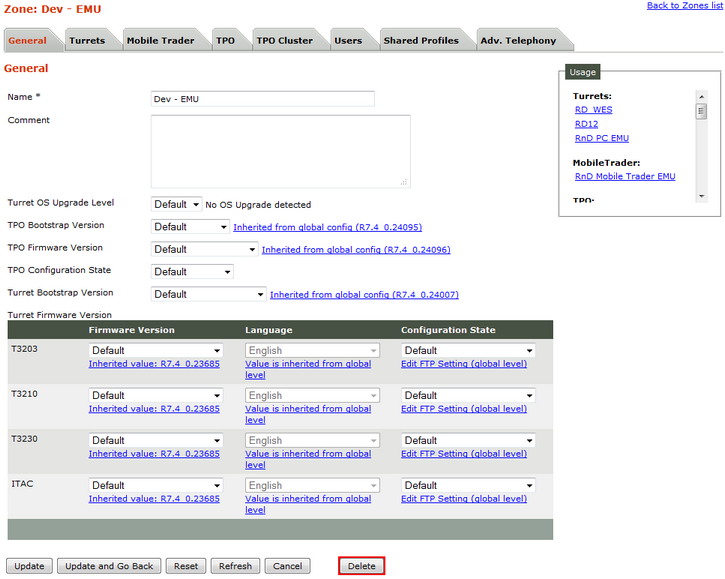
Here, the Dev - EMU zone does not currently specify any TPO Bootstrap and TPO firmware version (Default is selected), so versions are inherited from the global default selection (see Assigning a firmware to all devices).
Select the R7.4_0.24039 version in the TPO Bootstrap version drop-down menus and the R7.4_0.24040 version in the TPO Firmware version drop-down menus. Note that we could assign the version to TPO Firmware only or TPO Bootstrap only.
Press the Update and Go Back button.
From now on, any TPO device that is linked to that zone (and has no specific version specified in its device itself) will install and use those new versions.
Restart TPO is necessary to apply upgrade on TPO. |