Assign a firmware to a specific device


Assign a firmware to a specific device |
|
| Solution Installation > TPO Installation > TPO Upgrades |
Open the turret devices list by clicking the Device Management > TPOs menu.
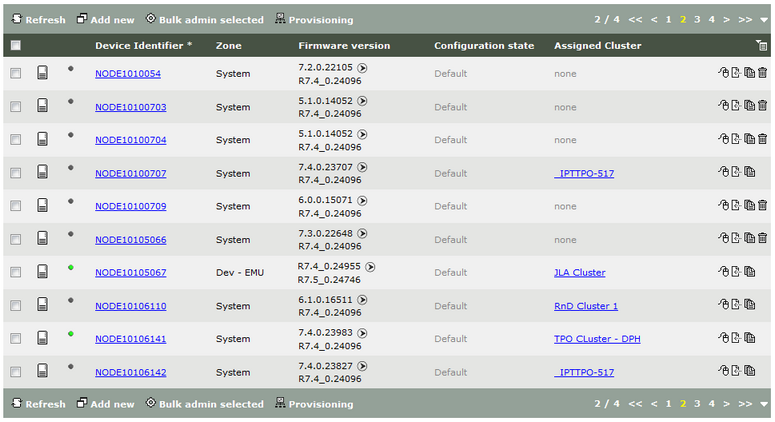
The list shows which firmware version is assigned to each TPO device. Here, for example, the NODE10105067 turret uses the R7.4_0.24096 version.
When only one version is shown, it indicates that the device is currently running this version and will keep it.
When two versions are shown, separated by an arrow, it indicates that the device currently uses the left version, but has been assigned the right version. It will install it at it next reboot. This value always takes into account the firmware versions assignment rules priority.
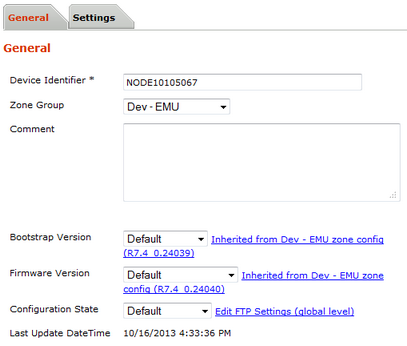
To assign the newly uploaded version to a specific device, edit the device by clicking its identifier in the list.
Here, the NODE10105067 does not currently specify any firmware version (Default specified), so the version is inherited from the zone selection (see Assigning a firmware to a specific zone).
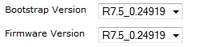
Select the R7.4_0.23983 version in the Firmware Version drop-down menu and the R7.4_0.24020 version in the Bootstrap Version drop-down menu.
Press the Update and Go Back button.
Back to the turret devices list, the TPO now shows the new version as the new target.
The device will install and start using those new versions at its next reboot. |