The Alerting module handles the configuration and management of platform alarms, as well as any Incidents which have been raised. The sidebar allows you to navigate to its different sections.
Alerting Mechanism
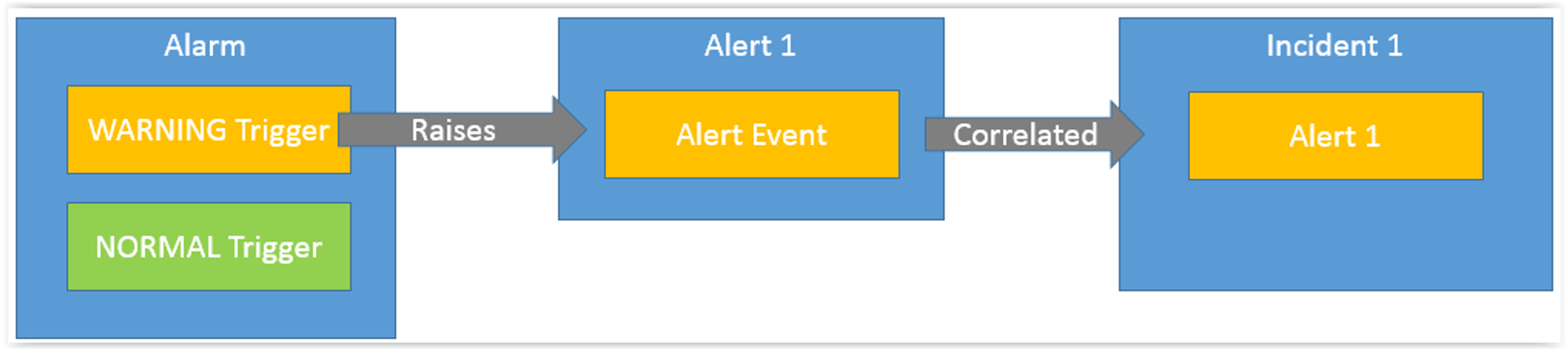
•A Trigger is configured to monitor for certain conditions. If those conditions are met then an Alert Event is created (raised). •Alert Events must have an Alert to contain them and so a new Alert is either created or an existing Alert is matched, based on the Tags of the Alert Event. •The Alert is correlated into either an existing Incident or a new Incident based on the Correlation Rules that look at the Tags of the Alert. •If Zendesk integration is configured then a Zendesk ticket is created when an Incident is raised.
1. Alarm: The details configured in the alerting section. Each alarm has 3 different sections like Attributes, Triggers, and actions.
1.1. Attributes: Enabled - Whether the alarm is enabled on the assure platform. An admin user has the provision to disable or enable the alarm based on their requirement.
Notes - It explains about the alarm.
Primary Property - The property used to identify the element that generates the alarm.
Secondary Property - The property used to identify the element that generates the alarm.
Maximum Check Attempts - The number of attempts an alert event would wait before considering it as an alert.
Correlation Delay (seconds) - Delay induced before correlating the alert into an incident.
1.2. Trigger: The triggers are nothing but generating an alert event based on the conditions set in the Alarm.
Types of Triggers: The alarm section in Tradesense Assure is categorized into 3 trigger types. All this alarm information is available in the Alerting>alarms section of the assure Dashboard.
SNMP Trap Trigger: These triggers are triggered based on a trap sent from the network elements. These network elements are mainly based on the third party elements other than BT trade components like TPO,TURRET, and TSS. Assure receives the traps and shows them on the SNMP trap tab in the alerting module. However an incident is generated based on the alarm configured.
Status Trigger: These triggers are triggered based on SNMP details assure gets from the respective network element. These network elements are mainly based on the BT trade components like TPO,TURRET, and TSS.
Sensor Trigger: These triggers are triggered based on a logical condition set in assure.
1.3. Actions: Last Log - The syslogs of the network element.
Service logs - gecko logs
TSS report - collects the TSS report.
When an alert is raised, we should check the possible condition of meeting Normal event for the respective alert to be cleared from the Dashboard. The check attempts described in the below document can be varied with the one present on the system. The document is prepared by keeping in mind the default values of the check attempts, It is always suggested to check the value on the system before drawing a conclusion. Before understanding the alerting events one should be aware of the following terms.
Alert Events: An event is created as and when the conditions are met as per the details configured in the alarm. The check attempts will be valuated here. Each event means each check attempt.
Alert: After the alert events exhaust the check attempts configured then an alert would be created.
Incident: To create a new incident or update an existing incident the correlation delay in place is valuated after the alert is created and the correlation rules are applied in the necessary cases after which an incident is created or updated.
Alert Tags: All the attributes in the alarm section are assigned actual values of the existing alarm by distinguishing property names for the generated alert.
|


