Call Activity Overview


Call Activity Overview |
|
| Attendant Features > Call Waiting Queue > Usage |
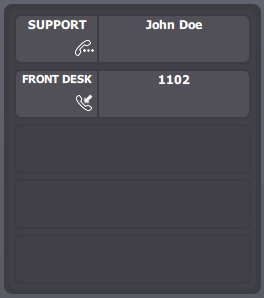
Attendants can have in a single look an overview of all calls to be answered and can prioritize them based on which queue they belong to, on the identity of the calling party, the time the call has spent in the system... Each pending call is shown on one of the slots associated with the queue and the following information is provided: calling party DDI, calling party name (when registered in the AC contact database), time in system, diversion information...
Each call-queue size is no longer bounded by configuration; instead, the call queues linked to an applet share the applet's available number of slots. The number of call-waiting queue applets and the distribution of queues among them must be carefully chosen by IT administrator depending on the specific needs and the expected call volume i.e. maximum number of in-bound calls in waiting state in each queue. The example above shows a call-queue applet handling three queues: SUPPORT, SALES and FRONT-DESK.
The system automatically displays queued calls in the queue's corresponding applets, and can be configured to also display pre-queued calls. An icon in each slot entry allows distinguishing the two states.
The queue display name is displayed on the left part of each slot, and the calling party ID is displayed on the right. In this example, three queues have been regrouped into one single applet. The attendant could prefer having one applet per queue. See Link queue to queue applet section. By default, a call that is removed from the queue by the attendant never returns to the queue when it is put back on hold manually. This behaviour can be modified. See Additional options, after. Pre-queued calls trigger a ring tone to be played out according to the ring tones set which has been selected for the queue. The system also allows enabling ringtones for queued calls (see Additional options section). |