Configure turret


Configure turret |
|
| Solution Integration > Text messaging |
IntroductionThis section describes how to configure the turret. User messaging linesIn order to subscribe to the text messaging lines must be configured in the user profile as well (either directly or in one of its attached shared profiles). Those lines can then be basically handled like telephony lines (subscribe or not).
A PBX Cluster with the type "Messaging" must be configured. IP addresses of the SMS gateway must be set in the "Node addresses" field of the PBX Cluster.
1.Open the TSS Console and edit the user profile; 2.Select the Lines tab; 3.Press Add new; 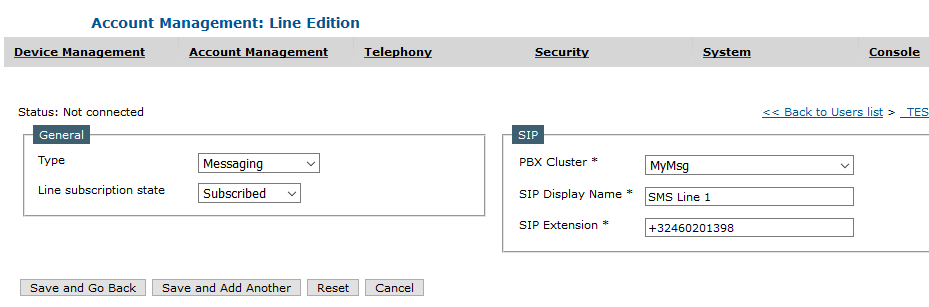
4.Select Messaging under Type; 5.Select your messaging PBX Cluster 6.Enter a display name and the line extension; 7.Press Save and Go Back.
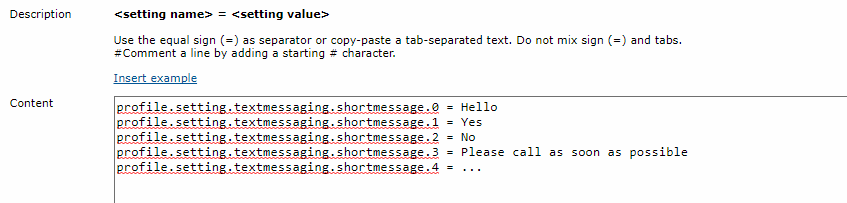
Short MessagesShort messages are pre-defined messages that are configured in either turret or user's profile. Those messages are configured using settings, but they must be configured manually in settings tab, advanced mode. The setting keys format is : profile.setting.textmessaging.shortmessage.{id} where {id} is the index of the message (integer number) counting from 0.
The most convenient way to configure this is using provisioning which is available from the advanced mode of settings (or boot settings) tab of users, shared profiles, turrets and zones.
Once in the provisioning page, write all the short messages. Then press the "populate" button.
User settingsThe settings listed below must be configured in the user profile (either directly or in one of its attached shared profiles). Mandatory settings
Optional settings
Set MSG Encoding to UTF8.
|
||||||||||||||||||||||||||||||||||||||||||||||||||||||||||||||||||||||||||||||||||||||||||||||||||||