TPO place configuration


TPO place configuration |
|
| Trading and C&C > Turret Proxy To Open communication (TPO) > Group Intercom > Configure |
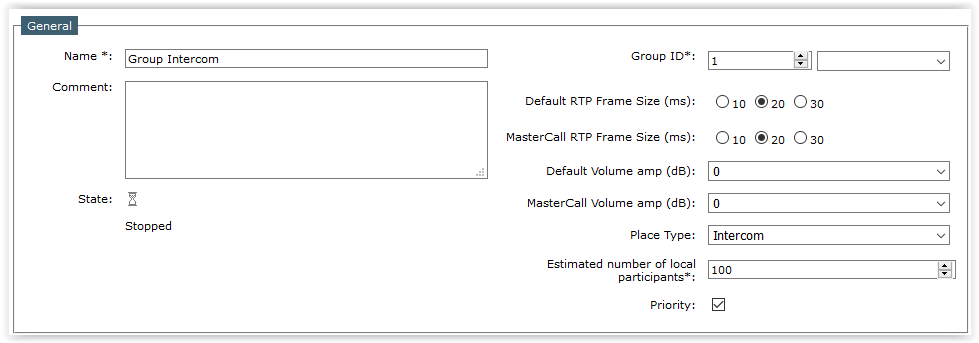
Place configuration Create an intercom place 1)Open your preferred Internet navigator, connect to the TSS administration console URL and log onto the system with administrator privileges ; 2)From the main menu, select Device Management | TPO Clusters ;
3)From the TPO cluster list, edit the cluster where you created your line earlier. e.g. TPOCluster-5; Select the tab panel TPO Places and press Add new button; the TPO place edition form is displayed; Create the TPO place with the TPO line populated in the previous section.
4)Fill in the TPO place edition form as per the table below
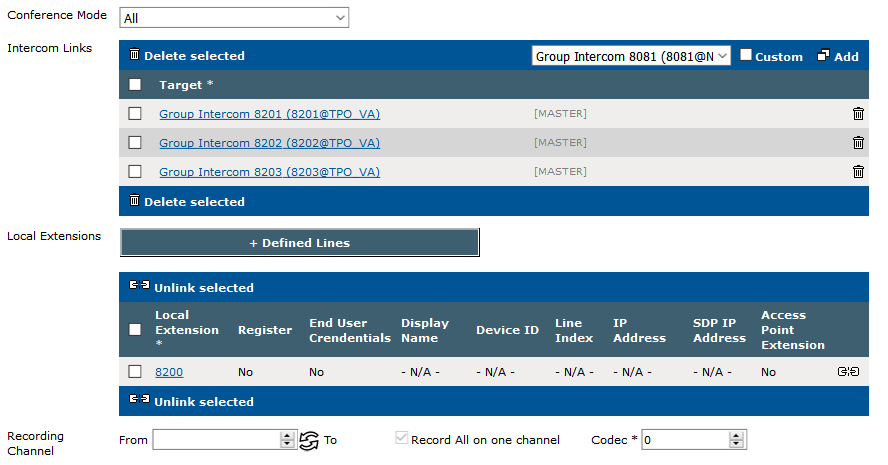
Example of Intercom links:
Multisite Intercom : the traders in these sites would like communicate with intercom each other. Here this configuration on TPO: * Inter-NY; extension 8200; Intercom links 8201, 8202 and 8203
* Inter-London; extension 8201 * Inter-Paris; extension 8202 * Inter-Toronto: extension 8203
Note: to avoid to have a loop when linking TPO intercom places, the administrator must only configure the Intercom links field on one TPO places (see above).
5)Start the place by pressing the start icon ; press the Refresh button until the place is reported as Started (this might take a few seconds) ;
|