Secure Calling (TLS)


Secure Calling (TLS) |
|
| Solution Integration > PBXs > BT Call Server > Example Configurations |
This guide provides step-by-step instructions for configuring secure calling on BT Call Server (Asterisk PBX) using TLS encryption.
BT Call Server ConfigurationTransport ConfigurationIn addition to the default TCP and UDP transports under "Web UI > Configuration > Transport", you must add an additional transport configured for secure (TLS) calling.
In this example, an additional transport [transport-tls] is configured to use the TLS (v1.2) protocol on port 5061, with the appropriate certificate and key files defined for secure communication.
[transport-tcp] type=transport ; Must be of type 'transport'. protocol=tcp ; Protocol to use for SIP traffic bind=0.0.0.0:5060 ; IP and port to bind to for this transport ;tos=cs3 ; Sets TOS for SIP Signalling ;cos=3 ; Sets COS for SIP Signalling
[transport-udp] type=transport ; Must be of type 'transport'. protocol=udp ; Protocol to use for SIP traffic bind=0.0.0.0:5060 ; IP and port to bind to for this transport ;tos=cs3 ; Sets TOS for SIP Signalling ;cos=3 ; Sets COS for SIP Signalling
[transport-tls] type=transport ; Must be of type 'transport'. protocol=tls ; Protocol to use for SIP traffic bind=0.0.0.0:5061 ; IP and port to bind to for this transport method=tlsv1_2 ; Specifies the TLS protocol version to use. ca_list_file=/opt/bt/tls/active/ca.crt ; Path to the CA certificate cert_file=/opt/bt/tls/active/server.crt ; Path to the server's TLS certificate. priv_key_file=/opt/bt/tls/active/private.key ; Path to the server's private key that matches the certificate above.
Extension Configuration
To enable extensions to use the new [transport-tls] (definded above), define an additional default template that references the TLS transport.
Place this new template immediately below the existing [extension-defaults](!) section in "Web UI > Configuration > Extensions".
[extension-defaults-tls](!) type = wizard accepts_auth = yes accepts_registrations = yes transport = transport-tls endpoint/allow = !all,alaw,ulaw endpoint/context = outbound endpoint/dtmf_mode = auto endpoint/direct_media = yes endpoint/media_encryption = sdes ;endpoint/tos_audio = ef ;endpoint/cos_audio = 5 aor/qualify_frequency = 30 aor/max_contacts = 1 aor/remove_existing = yes
In the example above, we defined the configuration used by the template [extension-defaults-tls](!).
As shown, this template makes use of the TLS transport we created earlier using "transport = transport-tls".
You can now define your TLS-enabled extensions using this template. Example TLS extension configuration:
[1500](extension-defaults-tls) inbound_auth/username = 1500 inbound_auth/password = 123456 endpoint/callerid = Asterisk_TLS <1500> endpoint/rewrite_contact = yes
In this example, we’re defining an extension 1500 that inherits from the [extension-defaults-tls] template, allowing it to use the secure TLS transport for encrypted signaling and media.
TSS Configuration
Zone
Turret Boot Settings:
TPO Cluster:
TPO Certificates:
Secure the TPO with the appropriate certificates so that turrets can register and communicate over TLS.
Refer to TPO Server Certificate for details.
User Profile:
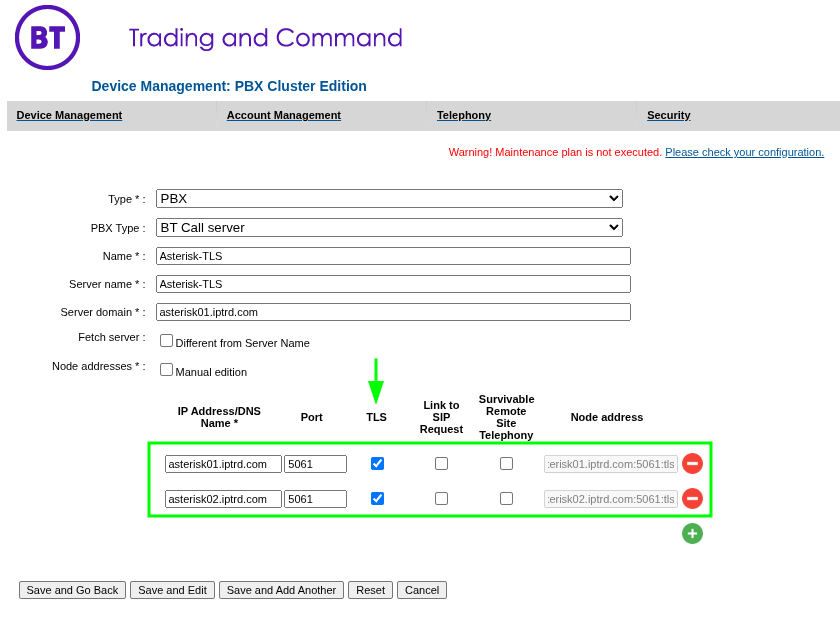
PBX Cluster:
Add the PBX cluster nodes, and ensure that TLS is enabled for each node by selecting the TLS option. This allows the cluster to communicate using the TLS protocol.
|
||||||||||||||||||||||||||||||||||||||||||||||||||||||||||||||||||||||||||||||||||||||||||||||||||||||||||||||||||||