Remote Support automatic disable


Remote Support automatic disable |
|
| Standard > Troubleshooting Data: References > Turret > Remote Control |
It is sometimes needed, for security reason to disable Remote Support on log out or log in, this section described how to do that
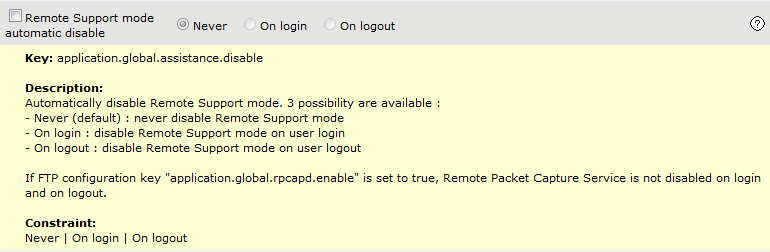
1)Connect to the TSS administration console using an administrator account 2)Navigate to System - Settings - FTP Settings (Turrets) list and select the version and file to configure 3)In the Expert Mode settings pane, select an option for the following key application.global.assistance.disable (by default, set to Never) :
4)Navigate to System - Sessions - Device Sessions list and reboot impacted devices 5)User1 logs on turret, gets in Option panel, clicks System Information tab and press Remote support button
Remote Support automatic disable key set to Never
•User1 logs out : Logout procedure doesn’t impact Remote Support mode state (Teamviewer and Remote Packet Capture service are still active) •User2 logs in on the same turret: Remote Support mode is still active
Remote Support automatic disable key set to On login
•User1 logs out : Logout procedure doesn’t impact Remote Support mode state (Teamviewer and Remote Packet Capture service are still active) •User2 logs in on the same turret: Remote Support mode is automatically turned off during login procedure (Teamviewer and Remote Packet Capture service are stopped) oNote there is no warranty that Remote Support mode: ▪is turned off before beginning of login procedure ▪remain active until end of login procedure
Remote Support automatic disable key set to On logout
•User1 logs out : Remote Support mode is automatically turned off during logout procedure (Teamviewer and Remote Packet Capture service are stopped) oNote there is no warranty that Remote Support mode: ▪is turned off before beginning of login procedure ▪remain active until end of login procedure •User2 logs in on the same turret : Remote Support mode is not active anymore
Limitations
•"Disable on login" mode ensures Remote Support mode is turned off during login procedure, but it doesn’t guaranty that Remote Support mode: ois turned off before beginning of login procedure oor remain active until end of login procedure •"Disable on logout" mode ensures Remote Support mode is turned off during logout procedure, but it doesn’t guaranty that Remote Support mode: ois turned off before beginning of logout procedure oor remain active until end of logout procedure •When Enable Remote Packet Capture Service (application.global.rpcapd.enable) setting is activated (true), Remote Support mode doesn’t enable or disable Remote Packet Cature service capabilities. In this case, automatically disabling Remote Support mode doesn’t stop Remote Packet Cature service. |