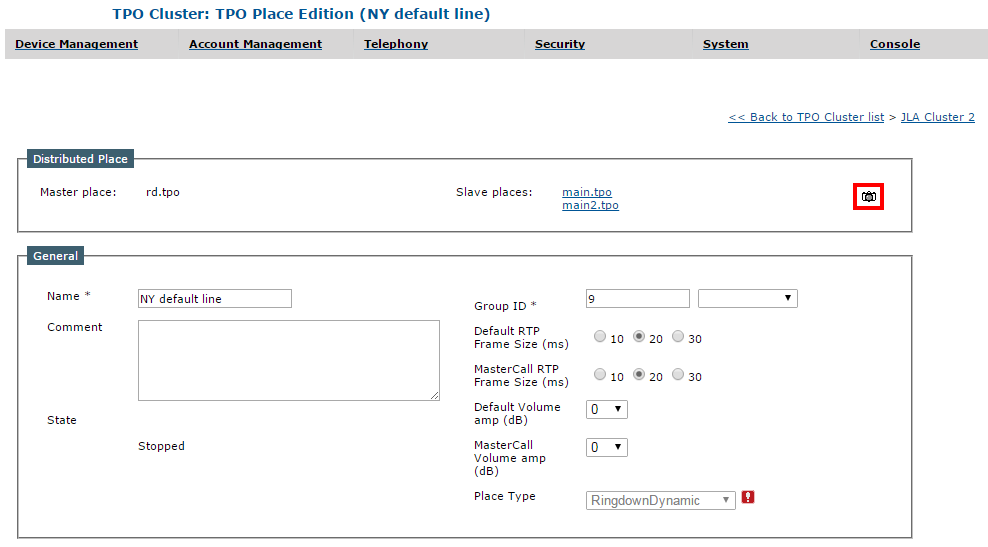
On a distributed place


On a distributed place |
|
| Basic > Troubleshooting Data: How to retrieve them > TPO > Debug Information |
When dealing with distributed places that are used by multiple TPO devices (master and slaves) across the system, having a clear picture of the whole distributed place state requires taking debug information dumps on each involved TPO.
The TSS allows easing this process by requesting the dump with a single click in the place edition form.
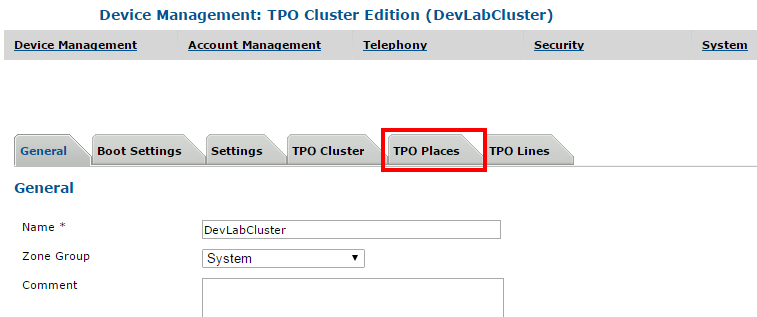
1.Open the TSS Administration Console 2.Go to Device Management > TPO Clusters and edit one of the clusters that are part of the distributed place 3.Select the TPO Places tab and click the place in the list
The distributed place is displayed, and all the involved TPO groups are listed on top of the page.
4.Click the Camera button (
All TPOs involved are notified after a few seconds and start generating their dumps.
5.Retrieve the dumps here: Browse and download the dumps
|
 )
)