SNMP over WebSocket


SNMP over WebSocket |
|
| Basic > Troubleshooting Data: How to retrieve them > TradeSense |
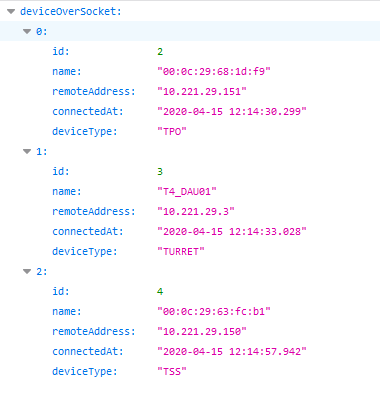
Check connected devicesTo check which device is connected through SNMP over WebSocket on Assure, you can browse https://<tradesense>/gecko/api/provisioning/v1/snmp-devices
Check SNMP on connected devicesOnce your devices are connected to the WebSocket, it can be usefull to check that SNMP queries are well managed. To check this, it is possible to trigger a SNMP get or a SNMP walk on devices using a request sender program (such as Postman). This will be authorized only if your request sender program is holding the .pem TradeSense CA certificate
Trigger a SNMP getSend a GET request to https://<tradesense>/gecko/api/provisioning/v1/snmp-get with the following body :
{ "remoteAddress": "<Device IP>", "oid" : "<Requested OID>" },
For example, this request will request the OID representing the used memory on the turret "T4_DAU01" in KB :
{ "remoteAddress": "10.221.29.3", "oid" : "1.3.6.1.4.1.30191.1.1.2" }, Trigger a SNMP walkSend a GET request to https://<tradesense>/gecko/api/provisioning/v1/snmp-walk with the following body :
{ "remoteAddress": "<Device IP>", "oid" : "<Requested OID>" },
For example, this request will request each OID representing the System Information of turret "T4_DAU01" :
{ "remoteAddress": "10.221.29.3", "oid" : "1.3.6.1.4.1.30191.1.1" }, Check SNMP responsesAfter sending SNMP requests, response will be available on "SNMP traps" tab of https://<tradesense>/gecko/events page
|