Configure


Configure |
|
| Audio Processing > Volumes > Volume Control over TPO |
IT & voice administrators must proceed as follows:
1.Connect to the TSS administration console from your preferred Internet navigator and log onto the system with administration privileges;
2.From the main menu, click on Device Management and select your TPO cluster;
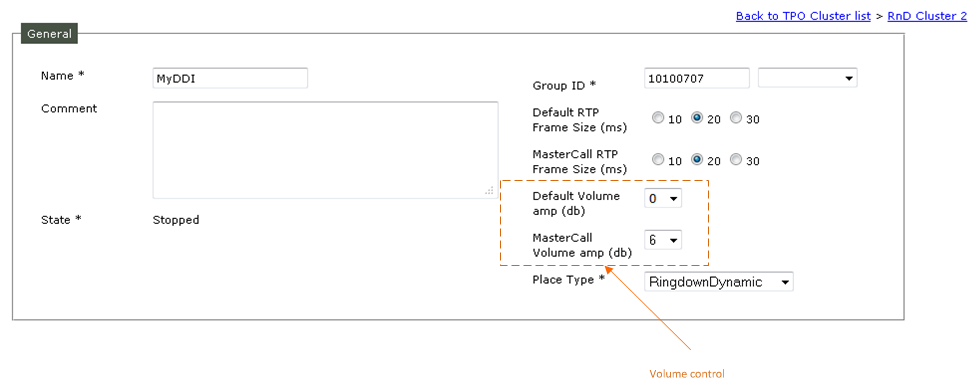
3.Open the TPO Places panel, then create/open a place; The general configuration parameters of the place contains a section dedicated to the volume control.
The volume amplification/attenuation is expressed in db. The possible values are -9,-6,-3,0,3,6 and 9 db.
Default value is O; It means there is not amplification/reduction of the volume.
•Default Volume amp (db) is applied to the call between TPO and a turret
•MasterCall Volume amp (db) is applied to the call between TPO and a remote party;
Important Notes: Within Ringdown Dynamic place context (DDI sharing) this parameter will apply only to master calls of standard DDI slots. For specific slots properties MrdPermanent, Ringdown and StaticIP , the volume is handle through these slot properties screen.
Example:
TPO (X) is configured with a DDI place (line X); MasterCall Volume amp is set to 6; Default Volume amp is set to 3; Turret (T) is configured with a DDI line X The Remote party is R
1.Turret calls the Remote party by using the line X.
2.The call is established.
Result: The remote party hears the turret's user with 3 db of amplification; the turret's user hears the remote party with 6 db of amplification
Important Notes: From the TPO point of view, the amplification/attenuation mechanism is applied to input streams only, nothing is done on output streams.
|