Allow detection and usage of your Stream Deck device by the firmware
Location: Terminal Boot Settings
Devices
Enable Stream Deck devices usage
truefalse
Key: application.global.streamdeck.start
Description: Allows the detection and usage of Stream Deck devices by the turret firmware.
Enabling this setting will take ownership of any supported Stream Deck models. This means that the official Stream Deck manager daemon cannot be used and cannot run on the end user's computer.
Supported models: - Stream Deck Original (15 keys), version 1 (VID=0x0fd9, PID=0x0060) - Stream Deck Original (15 keys), version 2 (VID=0x0fd9, PID=0x006d) - Stream Deck v2 (15 Keys), version 1 (VID=0x0fd9, PID=0x0080) application.global.streamdeck.mk2 must be true - Stream Deck XL (32 keys), version 1 (VID=0x0fd9, PID=0x006c) application.global.streamdeck.XL must be true
Constraint: true|false
Related settings: Defines action for stream deck key (x,y) (profile.streamdeck.key.x.y.action) Handle Streamdeck V2 (application.global.streamdeck.mk2) Handle Streamdeck XL (application.global.streamdeck.XL)
Stream Deck MK2 and XL Support
Location: Terminal Boot Settings
Devices
Handle Streamdeck V2
truefalse
Key: application.global.streamdeck.mk2
Description: Defines if the turret detects the Streamdeck V device (with PID 0x0080) as well as the original one.
Constraint: true|false
Related settings: Enable Stream Deck devices usage (application.global.streamdeck.start)
Location: Terminal Boot Settings
Devices
Handle Streamdeck XL
truefalse
Key: application.global.streamdeck.XL
Description: Buttons can be assigned the same way it is done on regular Stream Deck but with more assignments possible: profile.streamdeck.key.x(0-3).x(0-7).action
Constraint: true|false
Related settings: Enable Stream Deck devices usage (application.global.streamdeck.start)
Stream Deck key location configuration
Each key is addressable, given its (row, column) coordinate.
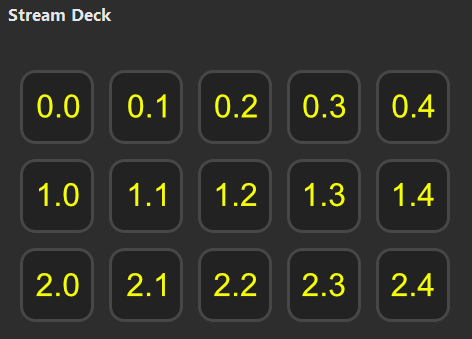
•Stream Deck (15 Key): The top-left key is the origin (0.0), while the bottom-right is (2.4).
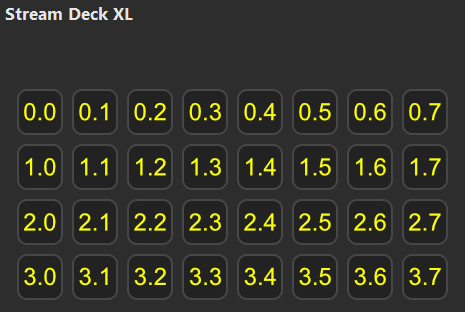
•Stream Deck XL (32 Key): The top-left key is the origin (0.0), while the bottom-right is (3.7).
Stream Deck Action keys
Each key can be configured a single action:
•dnd: reflect the Do Not Disturb access button and allows to toggle it.
•dnd_intercom: reflect the Do Not Disturb Intercom access button and allows to toggle it.
•focus: allow to bring the Flex window on front of the screen.
•volume+: increase the volume of the selected monitor slot key by a unit.
•volume-: decrease the volume of the selected monitor slot key by a unit.
•monitorcontrol: allow to toggle the current mode between normal and monitor control. The monitor mode is a mode in which the user can see and adapt the volume on each configured monitor entry, like the one available in the turret by pressing the "Control" access button.
•mic.a.b: reflect the monitor slot key (a, b) where a refers the applet column and b refers the entry index
•speeddial_xxxxxxx: Allow to add a speed dial key on the Stream Deck, where 'xxxxxxx' is the speed dial number.
Description: This setting allows to associate an action to a Stream Deck key of coordinate (x, y), where x and y are variable.
We define the Stream Deck key coordinate system with: - an origin (0, 0) defining the topleft key of a Stream Deck keys grid. - the x axis refers to the Stream Deck physical row. - the y axis refers to the Stream Deck physical column.
Example: for a Stream Deck original of 3 rows and 5 columns (15 keys), the topleft coordinate is (0, 0) and the bottom right coordinate is (2, 4) Example: for a Stream Deck XL of 4 rows and 8 columns (32 keys), the topleft coordinate is (0, 0) and the bottom right coordinate is (3, 7)
The value of this setting defines the action assciated to the (x, y) key.
Possible values: dnd: allows to toggle the Do Not Disturb (DND) user status dnd_intercom: allows to toggle the Do Not Disturb (DND) user status focus: allows to raise the FlexPro window on the foreground to make it visible and focus it. volume+: allows to increase the volume on the current selected monitor slot on the stream deck. This key is only visible in "control" mode. volume-:allows to decrease the volume on the current selected monitor slot on the stream deck. This key is only visible in "control" mode. monitorcontrol: allow to toggle the current mode between normal and monitor control. The monitor mode is a mode in which the user can see and adapt the volume on each configured monitor entry, like the one available in the turret by pressing the "Control" access button. mic.a.b: reflects a monitor entry microphone status. The "a" variable defines the entry column, which belongs to the set: {1, 2, 3} where: - 1 is the left applet column - 2 is the center applet column - 3 is the right applet column The "b" variable defines the entry index in the monitor entries column, which varies in the interval [1; 12] For example: - if you have a small monitor applet at the top left column, its entry coordinates are: (1, 1), (1, 2), (1, 3), (1, 4), (1, 5) - if you have a small monitor applet at the bottom center column, its entry coordinates are: (2, 6), (2, 7), (2, 8), (2, 9), (2, 10) - if you have a big monitor applet in the right column, its entry coordinates are: (3, 1), (3, 2), ..., (3, 12) Pressing a mic.a.b key in normal mode allows to open/close the microphone on this monitor slot. In monitor mode, pressing this key allows to toggle the selection, and increase/decrease volume on it by pressing to a volume+ or volume- key.
General key example: profile.streamdeck.key.0.0.action = dnd will configure the top most left Stream Deck to act as a DND access button
To support speed dial: Add to the user profile in the format StreamDeck Key(x,y) = speeddial_xxxxxxx where 'x' and 'y' are the position of the key on the StreamDeck device and 'xxxxxxx' is the speed dial number.