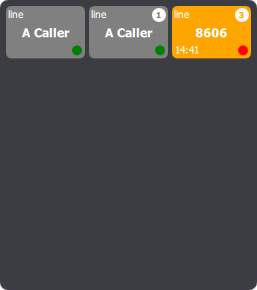
 It shows an entry per caller or per pair of line and caller, the most recent first, and can be scrollable (it isn't by default). Once an entry reaches the end of the applet, it is hidden and will never show up again until a new call is made related to that entry. It shows an entry per caller or per pair of line and caller, the most recent first, and can be scrollable (it isn't by default). Once an entry reaches the end of the applet, it is hidden and will never show up again until a new call is made related to that entry.
An entry contains the caller's extension or display name, the local line's display name or extension, the elapsed time until the oldest unanswered missed call, the occurrences counter and the state bullet.
The occurrences counter shows the number of missed calls until the last established one (third entry). The state bullet is either red if the last call was missed or green otherwise (first entry). A remotely established call, to the voicemail or picked up by someone else (i.e. green-light missed call), resets the counter to 1 and switches the state bullet green (second entry). So those two indications allow to know whether user have to call back or not.
The elapsed time counter, combined with the occurrences counter, allows to determine a priority for a call (e.g. 8606 called 3 times in the last 15 minutes). Additionally, some thresholds may be defined to change the background color of entries according to how long they have been waiting.
When pressing an entry, the same popup as the one in call history applet shows up displaying more information about the call and allowing to redial or add a shortcut.
|


