From a workstation


From a workstation |
|
| Solution Integration > LDAP > Usage > Single sign-on |
With the Turret PC application automating the login process on the turret
The Turret PC application allows a user to sign-in (and sign-off) on his Windows PC and on his turret in a single operation.
The application usage is quite straight forward: the user sign-on on his PC automatically triggers the corresponding turret account sign-on on his IPTrade device.
Of course, the sign-off is also automatic as soon as the user logs off from Windows.
Control the Turret PC application
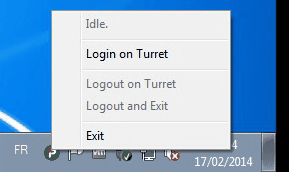
The application can also be controlled using its tray icon located in the Notification Area. It gives access to the manual sign-in and sign-off operations:
•The first item gives the current status of the application (here, Idle, meaning that the application is ready to perform a sign-in); •Login on Turret: performs the current user login on the turret associated to the PC; •Logout on Turret: performs the current user logout on the turret associated to the PC; •Logout and Exit: performs the logout operation and then exit the application; •Exit: simply exit the application, leaving the current user status unchanged on the turret.
|