Configure


Configure |
|
| Audio Processing > Audio Devices > Dynamic Allocation of Speaker Channels |
Configuring Dynamic Allocation of Speaker Channels is done through the TSS Administration Console, in the Screen Layout tab of a user profile.
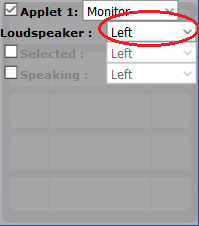
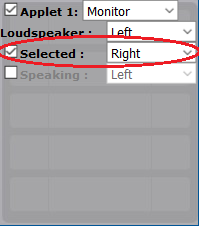
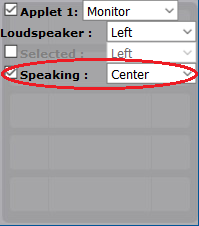
Monitor applets now have their own loudspeaker configuration divided in three parts :
Logical device allocation
The new dynamical allocation of speaker channels changes the way logical loudspeaker devices are allocated internally. This means that there is an impact on the devices that have to be configured in the individual shortcuts.
As long as there is no "custom" device configuration, i.e. no specific device has been defined for any Selected or Speaking entry in an applet, the devices will be allocated as usual. For example, having one applet on the Left Loudspeaker and one on the Right will produce the following list of devices:
First applet: 1.LD1.1 / HF1.1 2.LD1.2 / HF1.2 3.LD1.3 / HF1.3 4.LD1.4 / HF1.4 5.LD1.5 / HF1.5
Second applet: 6.LD2.1 / HF2.1 7.LD2.2 / HF2.2 8.LD2.3 / HF2.3 9.LD2.4 / HF2.4 10.LD2.5 / HF2.5
But as soon as at least an applet is configured with a different loudspeaker for its Selected or Speaking state, the devices are reserved the following way:
For an applet with idle set to left, selected set to right, speaking set to right, and an second applet on right (idle, selected and speaking), the devices are:
First applet: 1.LD1.1 / LD2.1 / HF2.1 2.LD1.2 / LD2.2 / HF2.2 3.LD1.3 / LD2.3 / HF2.3 4.LD1.4 / LD2.4 / HF2.4 5.LD1.5 / LD2.5 / HF2.5
Second applet: 6.LD2.6 / HF2.6 7.LD2.7 / HF2.7 8.LD2.8 / HF2.8 9.LD2.9 / HF2.9 10.LD2.a / HF2.a
|