Voice Loops


Voice Loops |
|
| Trading and C&C > Turret Proxy To Open communication (TPO) |
PurposeThis feature aims at offering turret users the ability to handle dynamic conference places called voice loops, connecting and mixing the voice of turret users and far parties. Introduction
When having to deal with incidents, some command and control (C&C) users want to be able to assign a specific “conference slot” to that incident, conferencing multiple parties together and including other users and far parties, with the ability to: •Add new remote parties from his device •Allow other remote parties to join the conference
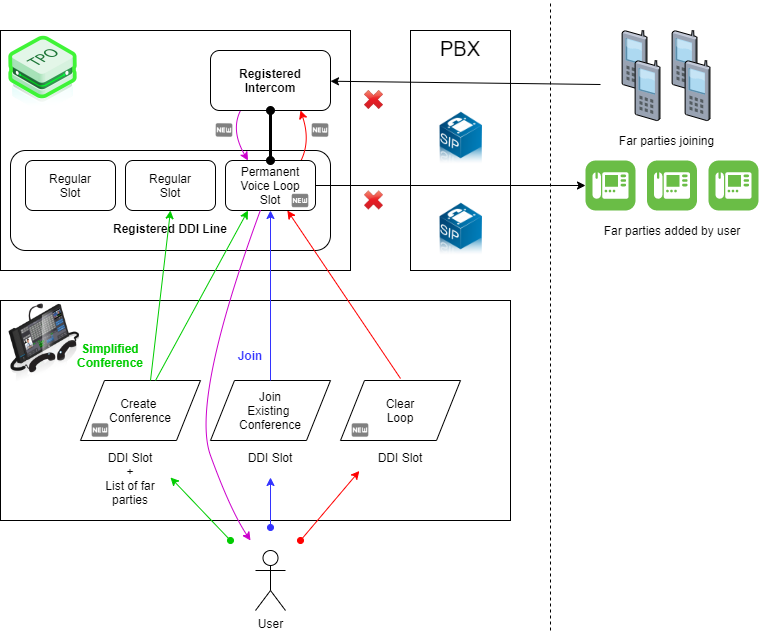
Once the incident is resolved, the users want the ability to clear the conference, terminating the calls to the different parties. ArchitectureA voice loop is made of: •A TPO registered intercom place that allows far parties to join the voice loop •A TPO Registered DDI Line having: oA permanent slot targeting intercom place with new Voice loop ARD property oRegular slots allowing to call other far parties
Voice Loop Link setupWhen operator starts a TPO DDI Line that has a Permanent Voice Loop slot from the TSS console interface, the TPO initiates a call to the target registered intercom. This is the Voice Loop Link call, it remains permanently connected. Initial connection of participants (Green Lines)C&C users can initiate a voice loop conference in one single press, mixing one or several far parties together. Users adding far partiesC&C users can add new far parties to the voice loop by conferencing (or merging) a new (or existing) call to the Voice Loop Slot. Remote parties joiningFar parties can join the voice loop conference by dialing the registered intercom place line number. Adding user participants (Blue Lines)C&C users can to join an existing voice loop by joining the corresponding Voice Loop Slot. View the far parties of a voice loop (Purple Lines)C&C users can view the far parties of a voice loop, including far parties added in the conference by the user and far parties who have joined the intercom place line number. Clearing a voice loop (Red Lines)C&C users who are connected on the Voice Loop Slot can clear the voice loop by pressing a dedicated button on the interface. Optional behaviorsClearing a voice loopThe clearing operation may keep or close turret user calls depending on a TPO setting Voice loop without turret userWhen a last turret user leaves a voice group TPO may clear the voice loop or not, depending on a setting value.
|