This section describes how to setup a Manual RingDown (MRD); the corresponding TPO place is a RingdownDynamic place.
1.Open your preferred Internet navigator, connect to the TSS administration console URL and log onto the system with administrator privileges;
2.From the main menu, select Device Management | TPO Cluster ;
3.From the list of TPO cluster, select the TPO cluster to modify
4.Select the tab panel TPO Places and press Add new button ; the TPO place edition form is displayed
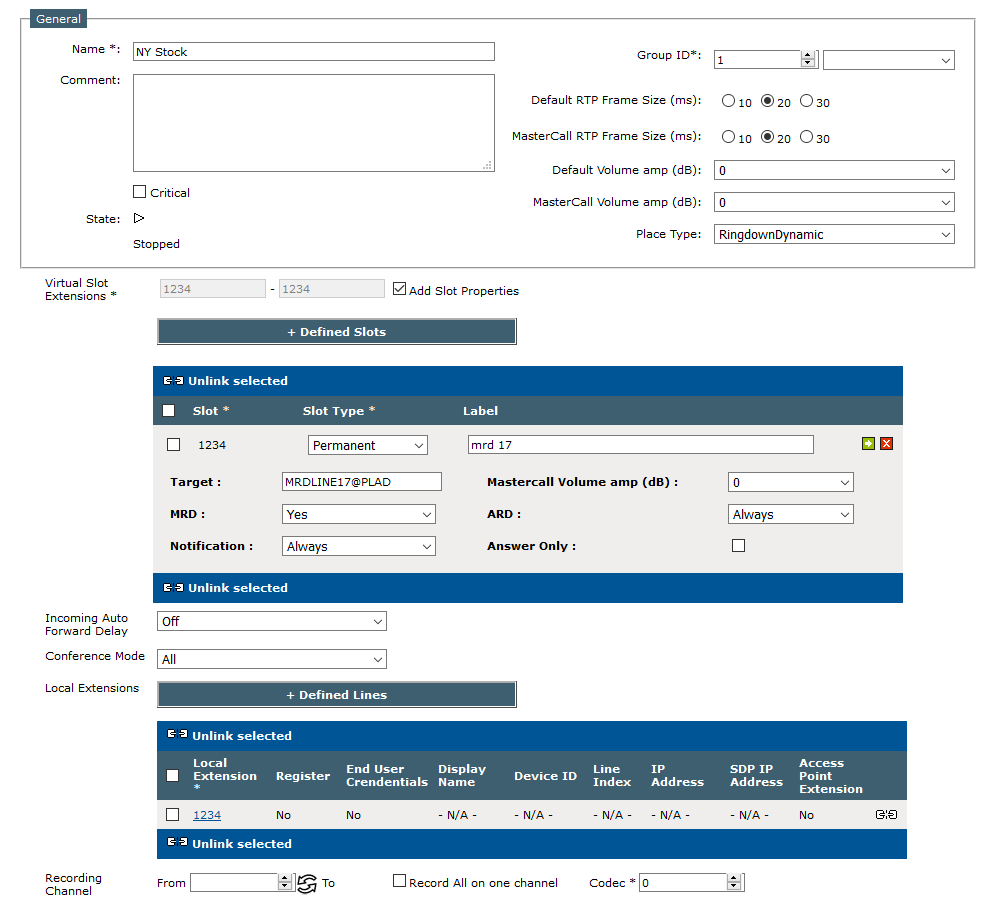
5.Fill in the TPO place edition form as per the table below
General place parameters
Field
|
Description
|
Example
|
Name
|
The name used to identify the place
|
NY Stock
|
Comment
|
A comment
|
|
Group Id
|
The configuration identifier. This number is considered only when redundant TPO services are installed. A random value can be used for this scenario.
|
1
|
Place Type
|
The place type must be set to RingdownDynamic
|
|
Target
|
The extension which represents the line of the PLAD Group.
It must be in the form “remoterUser@PLADGroup”, where remote user is the name given to the line in the PLAD configuration file.
|
MRDLINE17@PLAD
|
Local extensions
|
Select the extension which needs to be bound to the place and press the button Add>>. Usually the local extensions for this place is a no registered line
|
1234
|
Specific MRD parameters
Field
|
Description
|
Example
|
Automatic ringdown
|
•Always: a ring down event is automatically generated each time a trader connects to the line •First User: a ring down event is automatically generated when a trader connects to the line while no other traders are connected to the same line. •Never: ring down event is never automatically generated |
|
Manual ringdown
|
MRD (Manual Ring down) allows the trader to send manually a TDM hook flash (ring down event) to the Private Wire line by clicking on the slot shortcut.
Note: “Ring Down” on shortcut must be set to true on the turret settings.
|
|
Ringdown notification to user
|
•Always: incoming ring down notifications are always sent to trader •No Call: incoming ring down notifications are sent to trader only if not any trader is connected to the place •Never: incoming ring down notifications are never sent to trader |
|
Synchronization
|
This parameter enables/disables the Redundancy for private wires.
If is it enabled, the IT & Voice Administrator must also fill the "Sync IP" field
|
|
The following parameters are not relevant and are reserved for future use.
•Signal type •Number hook flash •Duration
6. Press Update to commit changes; the newly created place is listed in the TPO places tab panel and reported as Stopped ;
7.Start the place by pressing the start icon ; press the Refresh button until the place is reported as Started (this might take a few seconds) ;
|


