TPO Line pool population


TPO Line pool population |
|
| Trading and C&C > Turret Proxy To Open communication (TPO) > DDI Sharing > PBX Phone Access > Configure |
Shared DDI lines and its access point must be added to the TPO lines pool as per the procedure below
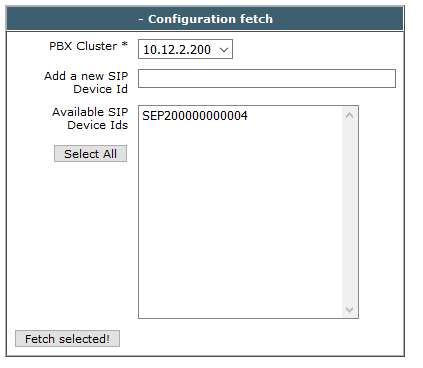
1)Open your preferred Internet browser, connect to the TSS administration console URL and log onto the system with administrator privileges 2)From the main menu, select Device Management | TPO Clusters 3)From the TPO clusters list, edit the profile linked to the TPO e.g. ID-TPO-10.10.0.2-shared 4)From the TPO cluster edition form, select the tab panel TPO Lines 5)Fetch the device/line configuration out of the CUCM database as follows a)In the Configuration fetch box, enter the CUCM IP address and the name of IPTrade Profile EK device(s) provisioned for the shared DDI line(s)
b)Press the Fetch selected! button
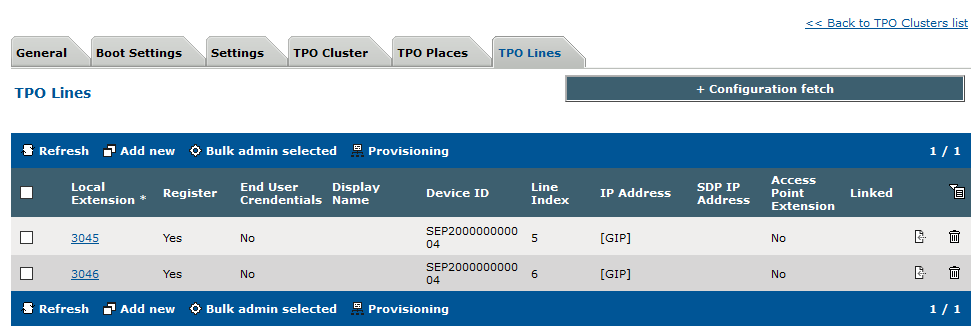
6)Devices/lines configuration is imported in the TPO configuration and listed in the TPO lines panel as shown below.
In this case, at least two lines must be added, one for DDI sharing line and one for its access point.
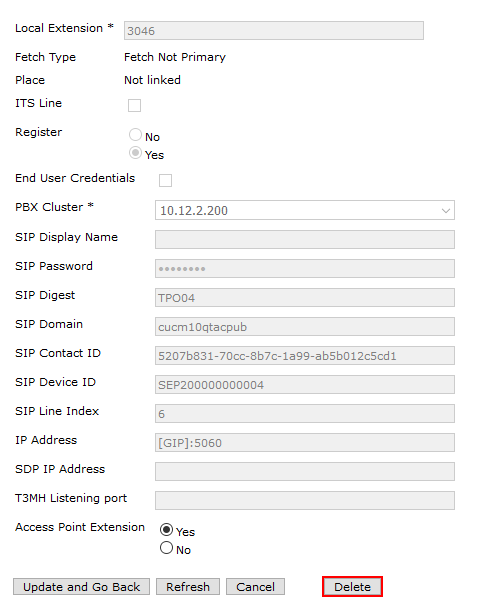
7)On the TSS administration console, under Device management | TPO Cluster click on the specific cluster to edit. Then select the TPO lines tab and click on the TPO line you want to become the access point. Set Access Point Extension to Yes.
|