Configure


Configure |
|
| Trading and C&C > Netrix > Call Lists |
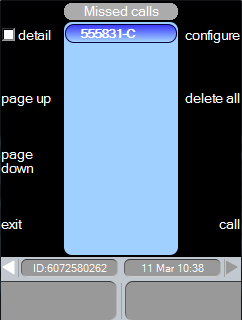
Configure callsThe configure calls menu is where you configure DDIs to be monitored for missed and answered calls. This menu is accessed by pressing the configure key in any of the call list’s secondary menu.
If DDIs are selected for monitoring at this Netrix, records are added to call lists when the following events occur: Event Added to: call not answered Missed Calls list call answered here Answered Here Calls list call answered elsewhere By Other Users list
When you access the Configure Calls menu all keys that are currently being monitored are displayed in the list and their corresponding red indicator on the line bank, lights up. Note: this menu times out after 30 seconds if no keys are pressed. Opening the configure calls menuThe configure calls menu can be opened via any of the call list secondary menus, although the quickest way to access it is via missed calls. press missed …in the main menu press …to show the missed calls secondary menu press configure …the configure calls menu is displayed
With the monitor calls on menu displayed: press DDI keys …to be monitored indicator red-on …the DDI label appears in the centre of the configure calls menu.
If you want to know when calls are answered by other users on a DDI: press …to highlight the DDI to be monitored elsewhere press by other users icon …appended to DDIs label NOTE: Repeat the above step for all the slots for this DDI. If even one slot is missed out, then the call will not be registered in the “other users” list. press ok …to return to the call list Removing DDIs from monitored listA DDI key, or all monitored DDIs can be removed from monitored list. The configure calls menu can be opened via any of the call list secondary menus, although the quickest way to access it is via missed calls. press missed …in the main menu press …to display the secondary menu press configure The DDIs being monitored are displayed. press …to highlight the DDI to remove press delete …the selected DDI is removed Or press delete all …all DDIs being monitored are removed indicator off press ok …to return to the call list
Maximum Call list records The number of call lists records available on the turret is determined by the setting profile.setting.calllogentries.max |

 or
or 
