Usage


Usage |
|
| Trading and C&C > Netrix > Conferencing |
Conferencing provides you with the ability to connect several lines, so you can have a conference call with multiple clients who are external to your organisation. As the initiator of a conference call you can: •add new parties to the conference at any time. •withdraw yourself from the conference at any given point by putting the call on hold. •make the conference private so that no uninvited parties can join. •move between conference calls if multiple conferences are in progress. Creating a conferenceTo initiate a conference, your handset must be on a call made or answered on your default DDI.
press conf …on the Netrix. This will put the current call on hold, and the handset is free to make a new call or to join another call, maybe on your colleague’s line. You can make a new call by: •Dialling a number, which selects your default DDI. •Press a speed-dial key. •Use directory to dial a contact. press conf … will join the originally held call and the new call into a conference call. Note: the CLI displayed on your DDI will be the CLI of the oldest call.
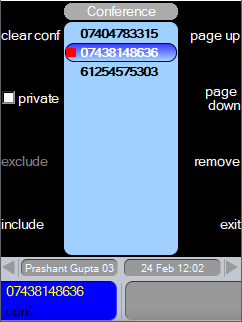
You can repeat the above sequence to add further calls to this conference. Remove a participantpress …to highlight the participant to remove press remove …the highlighted participant will be removed Exclude a participantWhen you exclude a participant, they are still in the conference, but they will not be able to hear any other participants, and they will not be heard by others.
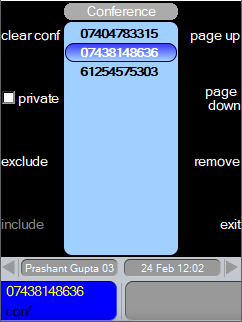
press …to highlight the participant to exclude press exclude …the highlighted participant will show a “red mark” indicating participant excluded. Include a participantTo bring back the excluded participant into the conference, where they can hear and be heard. press …to highlight the excluded participant press include …the highlighted participant will have the “red mark” removed and can hear and be heard. End a conferencepress clear or press clear conf … will end the conference.
Hold a conferencepress hold … will put the conference on hold.
Private conferenceTo make a conference private so that no other turret user can join and listen:
press private … will make the conference private.
|
 or
or