TPO


TPO |
|
| Trading and C&C > Turret Proxy To Open communication (TPO) > Conference Modes > Configure |
The first thing to configure on TPO-side is to set the desired places in Geographic Group Conference Mode:
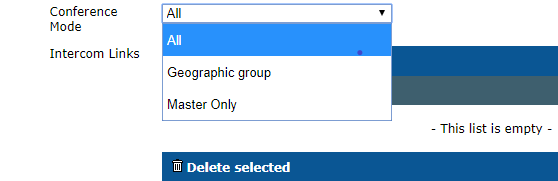
Three options are available for the Conference Mode: • All: The traders have dual audio way communication between each other and the remote party regardless of the configuration of the geographic groups. • Geographic group: The traders inside the mute zone of the same geographic group cannot hear each other, but they have the dual audio way communication with the remote party. • Master only: The traders only hear the remote party regardless of the geographic groups.
The administrator can change the Conference Mode proximity limit ( the default value is 3 ): go to the TPO Cluster settings or TPO device settings and click to Global panel. |